Możliwości
Integracje







Zastosowania
Możliwości
Integracje
Zastosowania

An affiliate marketing dashboard gives you an instant view of program performance. Happy dashboard = healthy program 🤝
Or that’s the idea, at least.
Trouble is, in practice, most dashboards focus on the headline financials – gross revenue and commission paid – while the stuff that actually informs decision-making is buried two clicks deep.
Don’t worry, it doesn’t have to be like that. Read on and I’ll explain how you can build an affiliate marketing dashboard that only requires a quick glance to tell you everything you need to know…
Much like the Sprouse twins, affiliate marketing dashboards and reports have a lot of similarities, but they’re not exactly the same:
🤓 Further reading: If it’s reporting your after, head on over to Affiliate Reporting: What to Track and How to Report on Your Program.
An affiliate marketing dashboard should show more than money moves (AKA commission and gross revenue). But, at the same time, there are a loooooot of different affiliate marketing metrics, and there’s no good reason to cram them all into one dashboard.
Instead, only include a metric if it actually changes a decision.
Here’s the stuff that (most) affiliate program dashboards should be tracking:
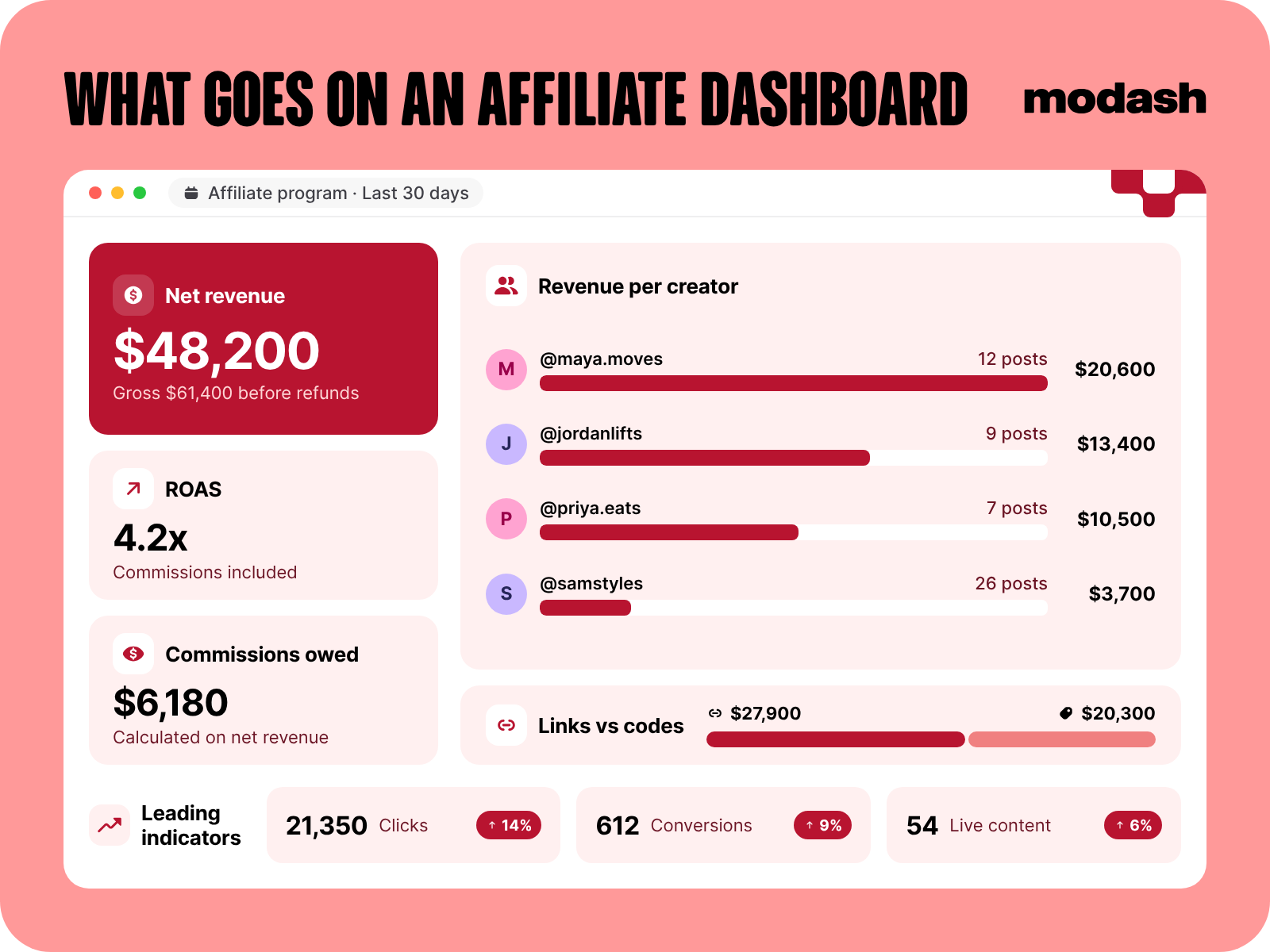
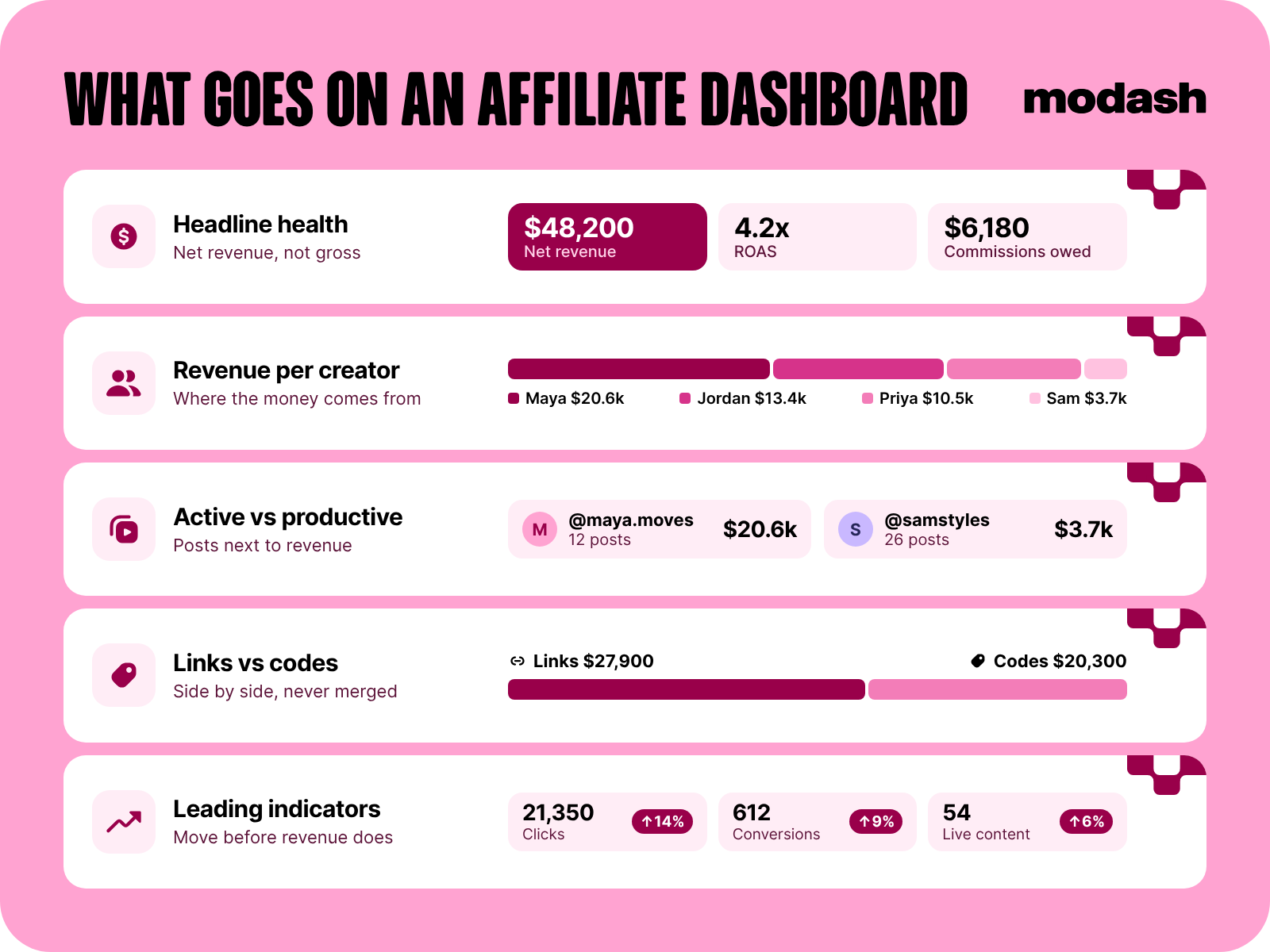
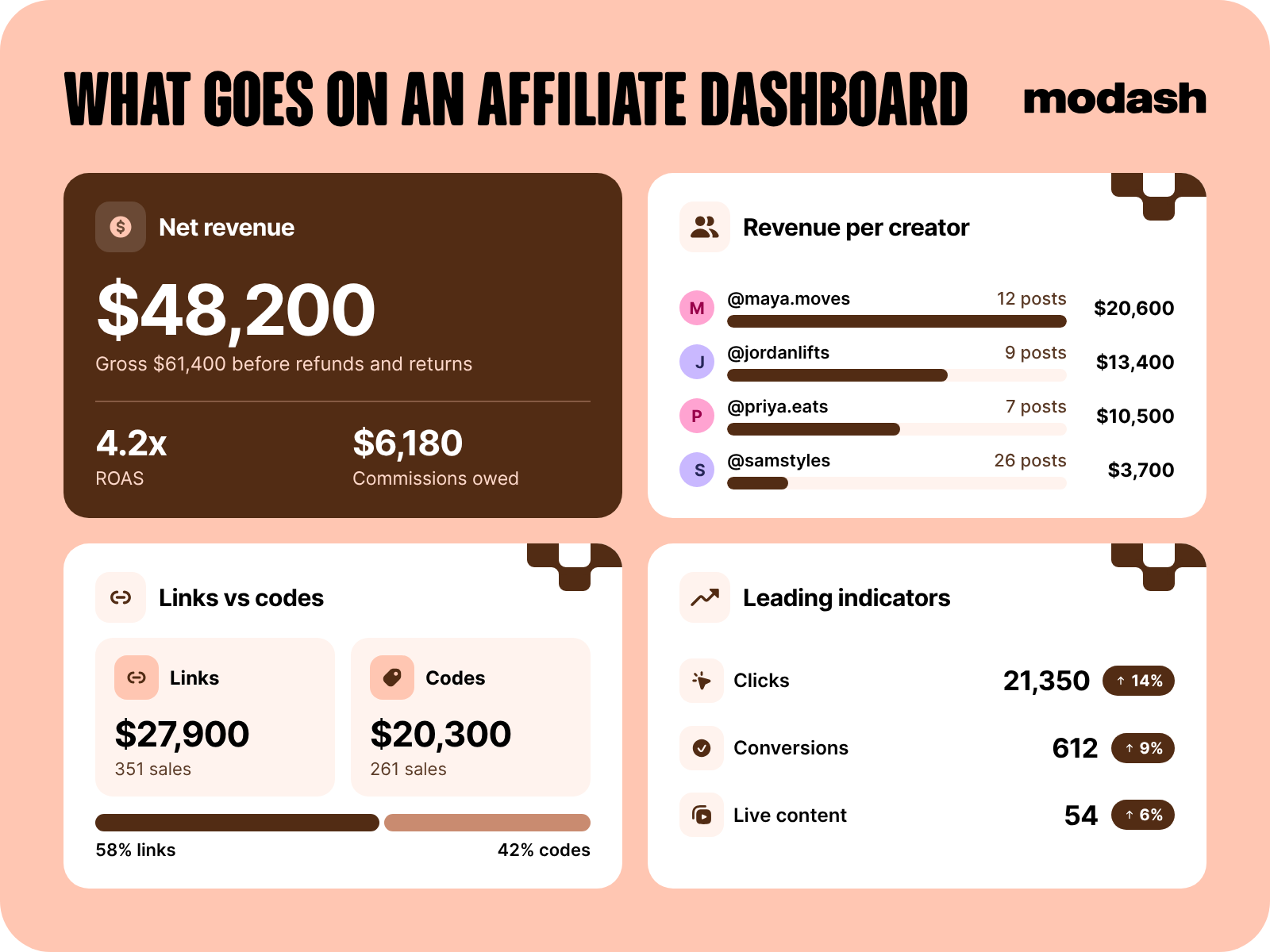
⚠️ I’m not gonna share a detailed definition of each metric here; if that’s more your speed, check out 10 Affiliate Marketing Metrics That Actually Matter (Ranked).
While your dashboard shouldn’t be all about money, there’s no getting away from the fact that for the vast majority of brands, revenue is ultimately the name of the game.
Specifically, I’m talking net revenue, not gross.
Why? Well, there are two reasons.
Firstly, net revenue takes into account your gross margin and softer costs. So when you’re reporting ROAS – which should be in your dashboard too, BTW – the number will be based on an honest calculation you can defend to your board.
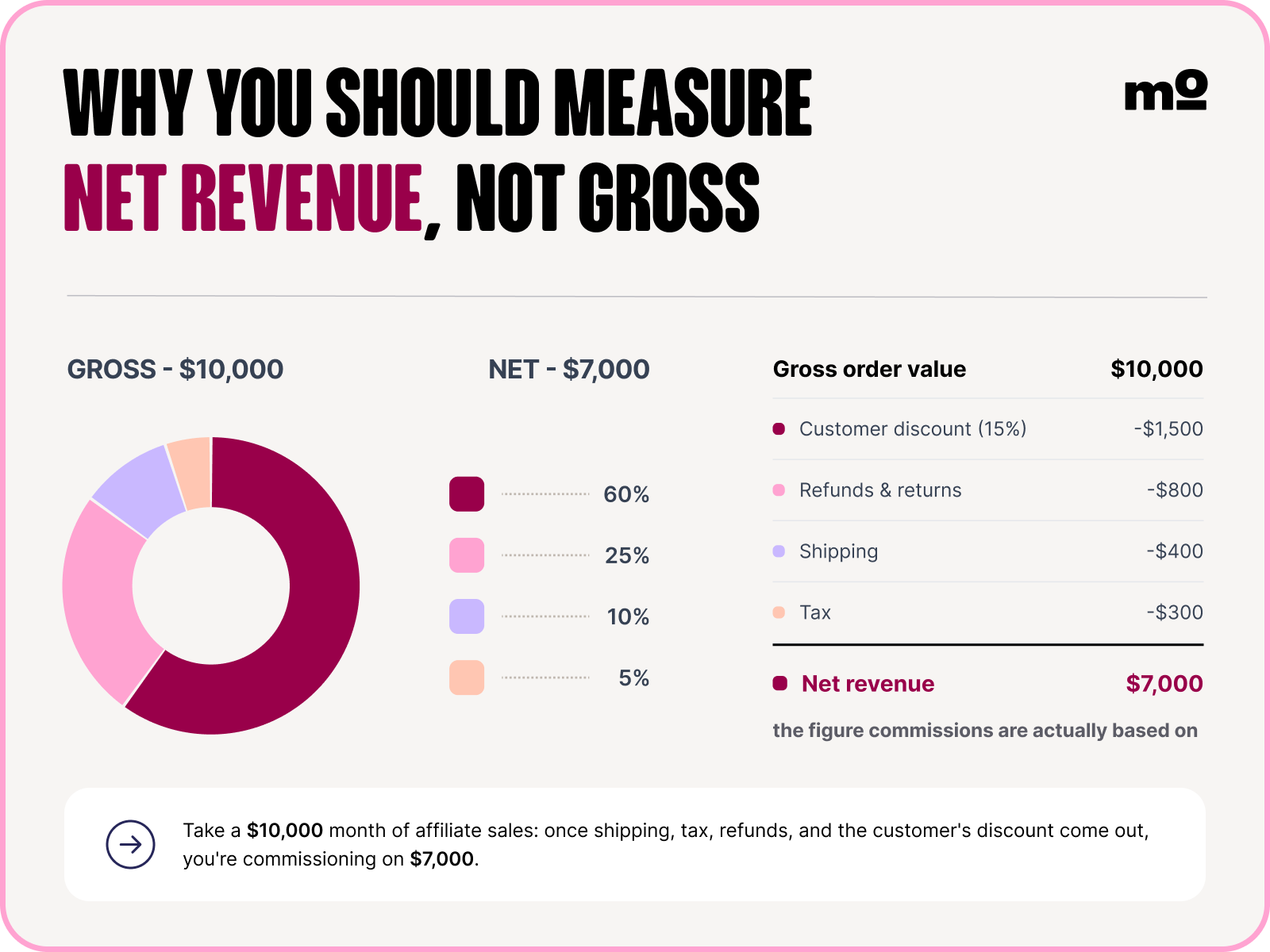
And secondly, consider the impact of revenue on commissions owed (another dashboard must-have).
Commissions should be calculated on net revenue, post-refunds and cancellations. Otherwise you’re gonna overpay creators for sales that didn’t stick, which will hit your ROAS.
🤓 Pro tip: rather than working all this stuff out manually, automate it with Modash, which calculates net revenue after shipping, taxes, discounts, refunds, and returns. Modash folds affiliate commissions into ROAS automatically so the headline number is margin-honest.
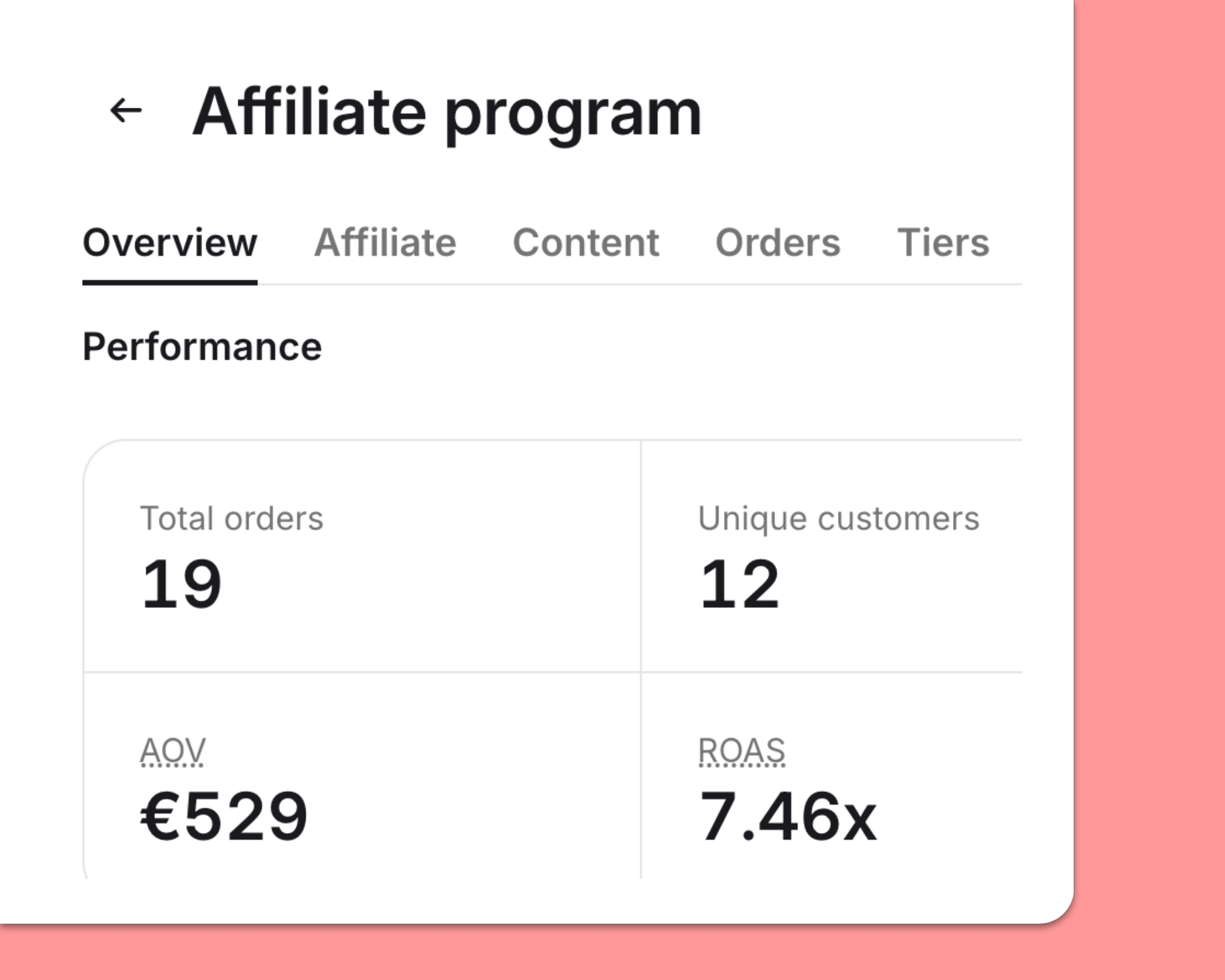
👉 Try Modash’s tracking tools for yourself when you start your 14-day free trial!
Net revenue only shows you so much.
For example, it doesn’t show you where all the $$$ actually came from. Is it split evenly between a bunch of creators, or are just 1 – 2 bringing in the overwhelming majority?
(I’ll talk about why over-relying on a handful of affiliates is a problem later in the article 👇👇👇)
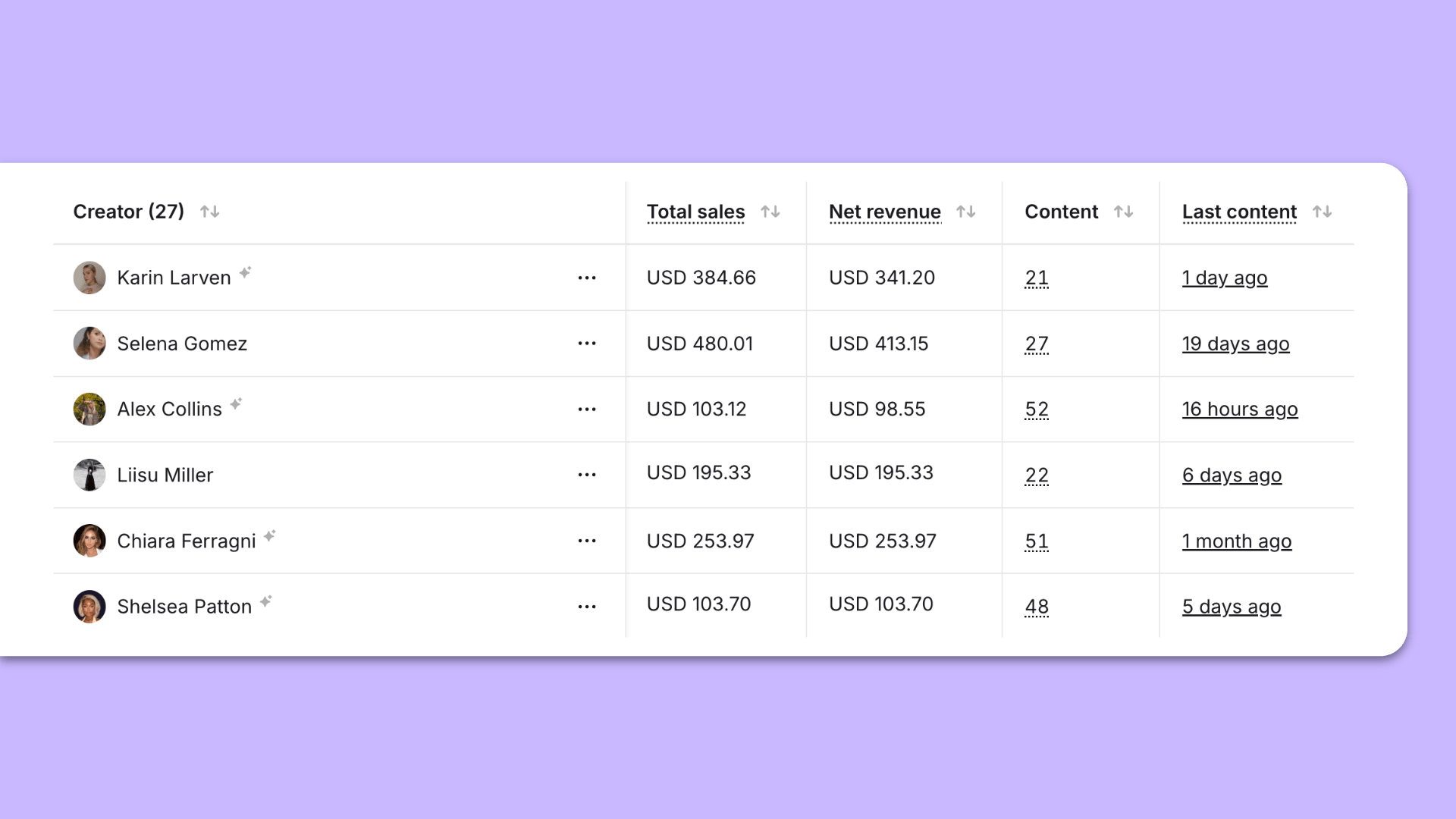
That’s why your dashboard should break down revenue per creator. Modash does this automatically for both gross and net revenue, so you can instantly see who’s performing (and who isn’t).
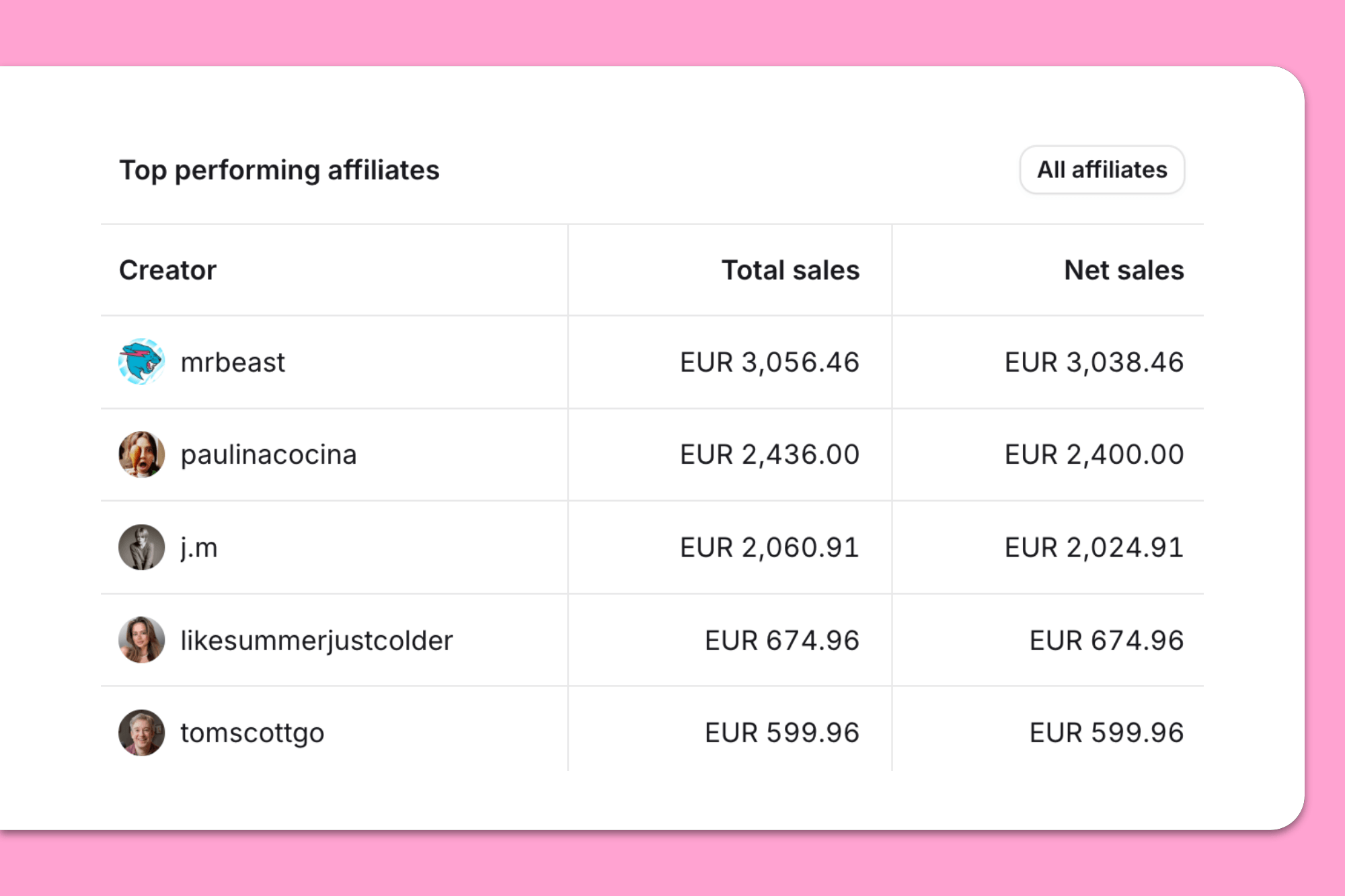
Taking things a step further, you don’t just want to know how much revenue each affiliate is generating – you also want to know how often they’re posting. So stick these numbers side by side in your dashboard; that way, you can easily see which creators are active (AKA sharing lots of content) vs which are actually productive.
As you can imagine, tracking these numbers manually is a serious headache, so you’ll be relieved to hear that Modash automatically gives you a per-creator view of total content posted and most recent post.
⚠️ Disclaimer: the last 2 paragraphs assume that the primary goal of your affiliate program is to sell, sell, sell. But if you’ve actually hired an affiliate for something else (like website views or email signups or brand awareness), it doesn’t make sense to correlate sales + content volume.
The two most common methods of attributing affiliate sales are promo codes and tracking links. Pretty much every program relies on at least one of them.
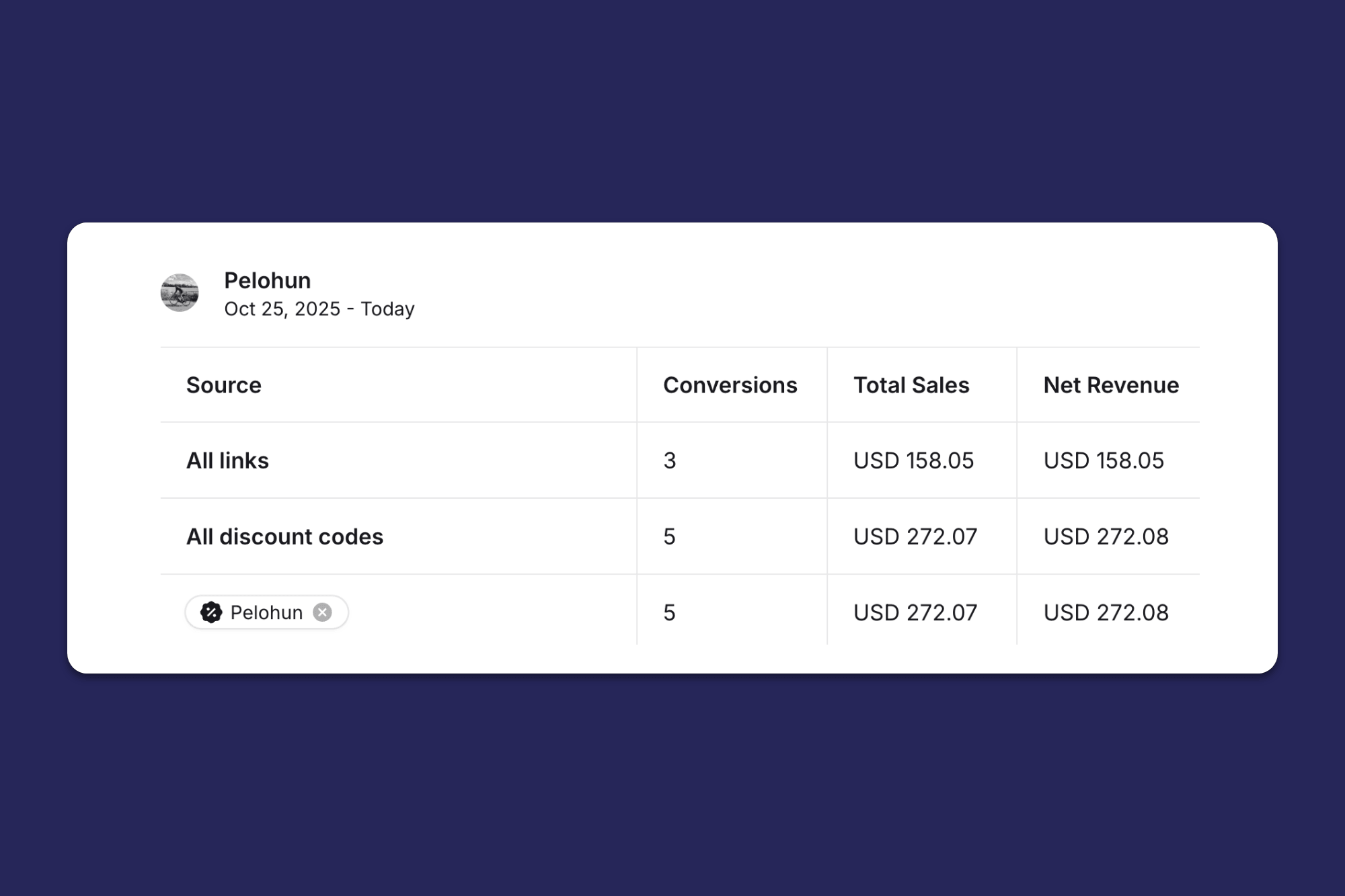
If you track through links + codes, make sure your dashboard shows each side by side, rather than only merging as a single revenue figure. That way, you can be sure you’re not double-counting or under-counting sales.
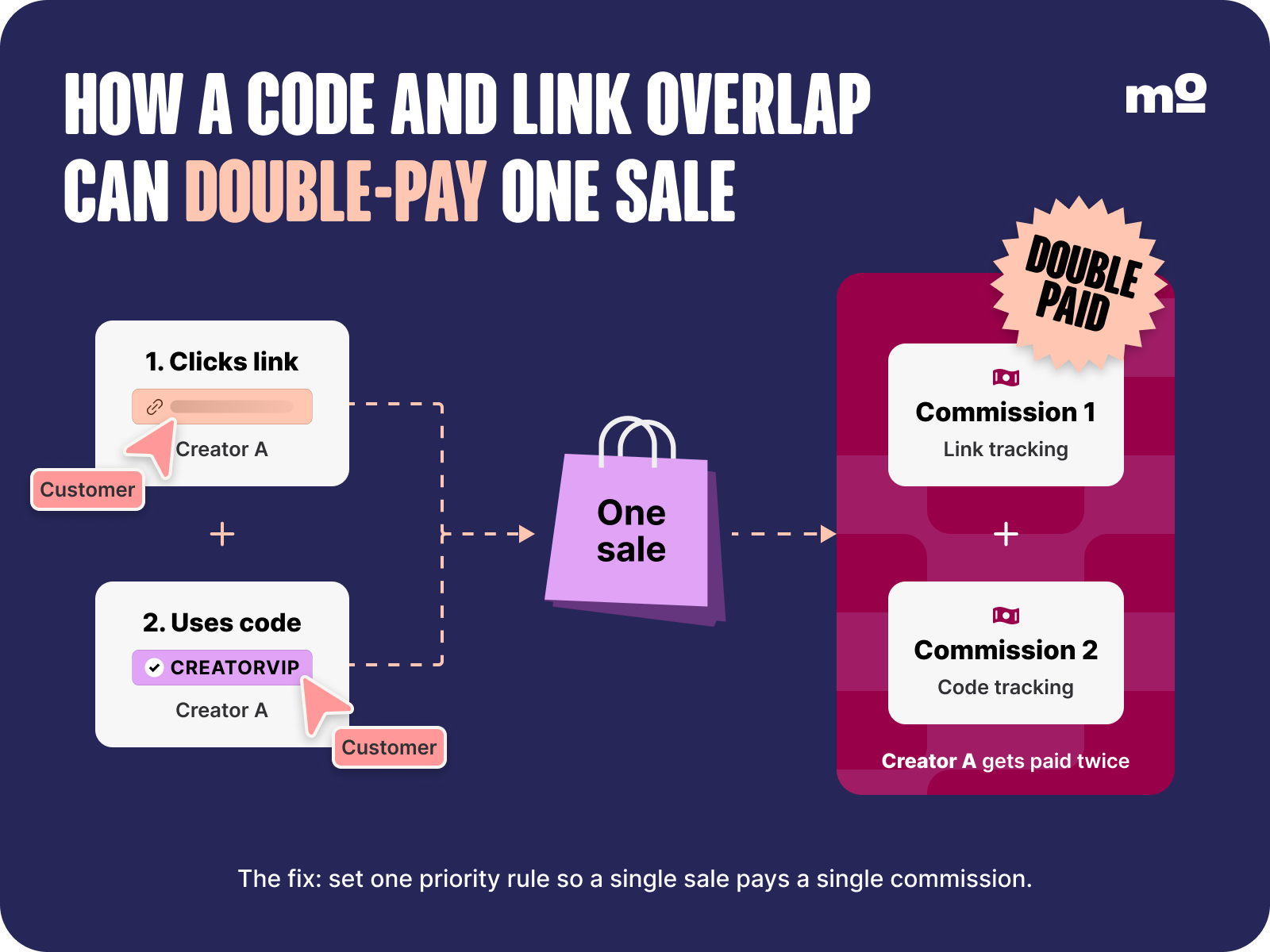
BTW – the smart move is to use both links and codes to track sales. That way, if 1 method doesn’t work (say, a customer Googles you rather than clicking a link, or forgets to enter your creator’s code at checkout), you’ve got the other as fallback.
However, make sure you set rules around each so you don’t overpay.
🤓 Pro tip: Modash does the hard work for you here. When both a link click and a code redemption are present in a transaction, Modash automatically gives credit to the code. Modash also automatically splits conversions, sales, and net revenue across links and codes.
If the first sign a campaign isn’t working is when you miss your sales target, you’re doing something wrong.
Specifically, you’re not tracking leading indicators that move before revenue does. So make sure to add these indicators to your dashboard:
Leading indicator
What it tells you
Why it matters
Clicks 🖱️
How much traffic affiliates are driving to your store
Shows whether affiliate activity is generating interest in your products, even before that traffic converts into sales
Conversions 💰
How many sales your affiliates are generating
Shows whether affiliate traffic is turning into paying customers, helping you identify which affiliates are driving results
Live content 🤳
How many units of content your affiliates have shared
Shows how actively affiliates are promoting your products, giving you an early indication of potential future traffic and sales
I’ve explained all the stuff that should be in your affiliate marketing dashboard, so now let’s get into how to build it.
There are three main options:
Here’s an at-a-glance comparison…
Approach
Setup effort
What it shows well
Where it breaks
Build it in a spreadsheet
Lower initially, but requires ongoing manual updates
Custom reporting across clicks, sales, commissions, costs, and ROI
Manual reconciliation gets painful past ~10 active affiliates
Build it in GA4 or Looker Studio
Higher – requires tracking setup and, for Looker Studio, connecting data sources
Clicks + traffic
Weak on tying sales to individual creators + showing net-of-refund revenue
Use a Shopify-native tool
Medium – install the app, connect your store, and configure tracking
Per-affiliate code + link sales, net revenue after refunds
Less customizable than a spreadsheet
…and now let’s take a deeper look at each:
First things first, let me be clear:
It’s totally possible to build and maintain a functional dashboard in Excel or Google Sheets. In fact, it’s probably the best option if you’re:
So if some or all of the above apply to you, look no further than a trusty spreadsheet – super customizable, cheap, easy to set up; what’s not to like?? We can even help you get started with the free affiliate tracking template in our article 5 Spreadsheets for Influencer Marketers. You’re welcome!
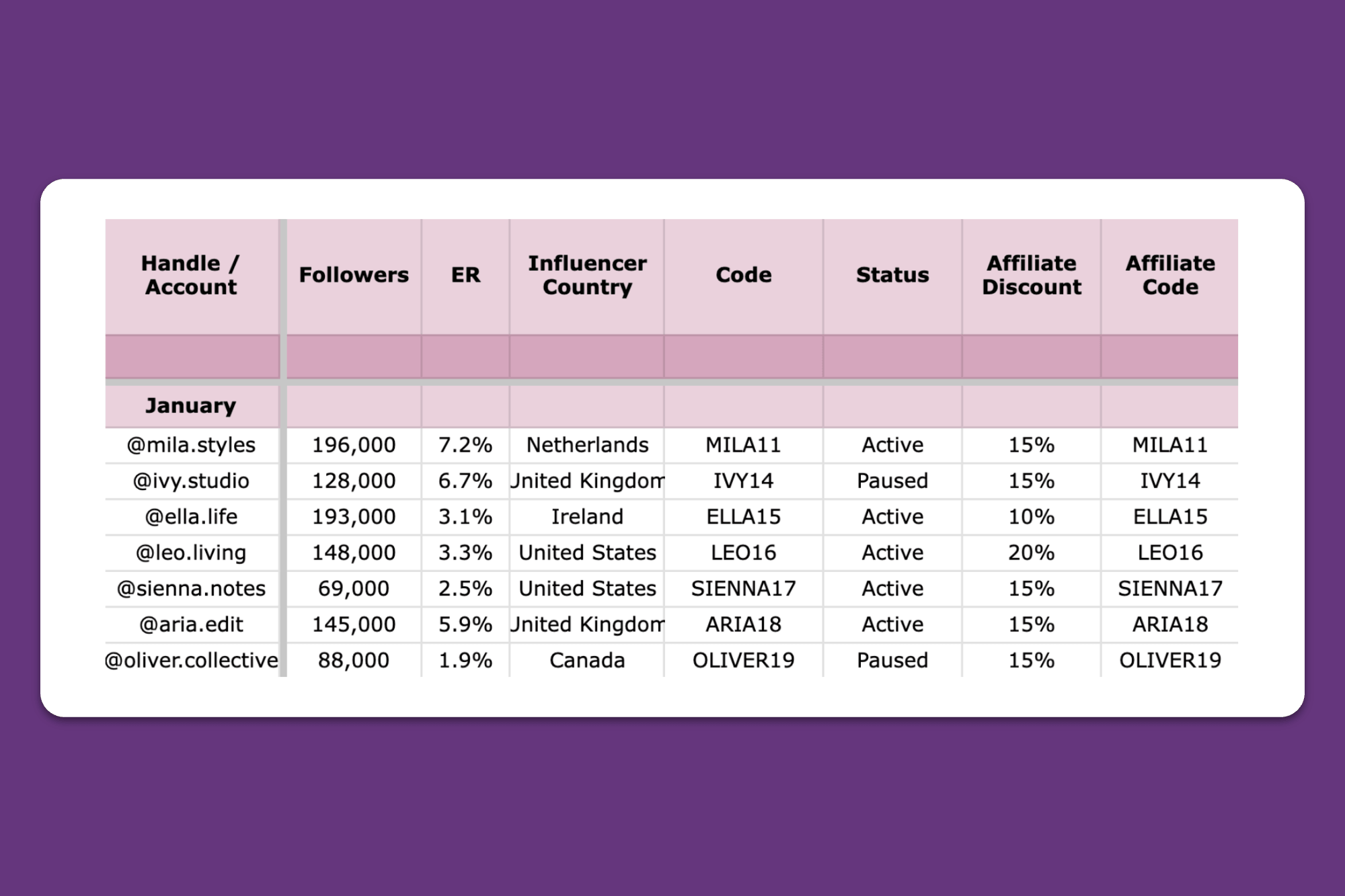
However, don’t over-rely on spreadsheets.
All that manual reconciliation gets seriously painful once you’ve passed 10-or-so active affiliates. By that point, you could easily be spending hours a week keeping your sheet up to date, so it’s time to look for a more efficient solution.
Such as…
There are plenty of tools out there that can track and visualize your data without endless manual input, such as GA4 and Looker Studio (or Data Studio, as it’s officially now called).
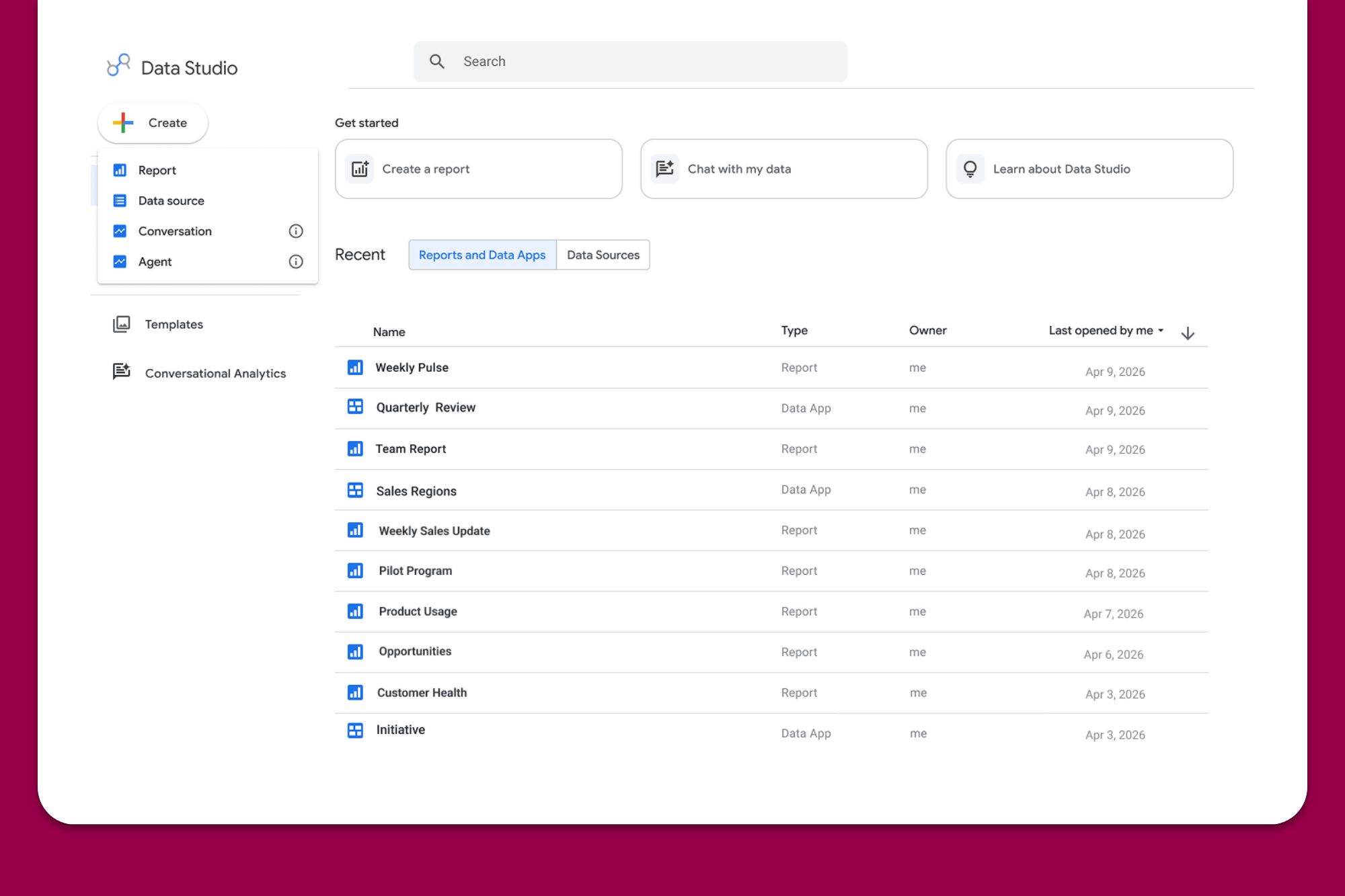
Screenshot taken 27/10/2026
Both are great for showing clicks and traffic, but they’re less effective at:
Technically, you can pull data from Shopify – or whatever ecommerce platform you’re using – into Looker for visualization. But because Looker lacks a native Shopify integration, you’ll have to rely on a 3rd-party connector to do it for you. Or you can build a workaround by exporting your Shopify data to Google Sheets then importing it to Looker Studio.
Either way, it means more manual effort and/or adding more tools to your stack.
So if you’re looking to keep it simple, your best bet is to…
When you build your dashboard in a Shopify-native platform like Modash, you can wave goodbye to manual reconciliation 👋
That’s because your tool of choice pulls sales data from Shopify’s backend automatically, so you can sit back and watch the numbers update themselves. (Or do something more productive if you prefer – I’m not your boss.)
Modash syncs sales from Shopify in mere minutes, as well as calculating revenue after refunds automatically, and tying code- and link-based conversions to individual creators.
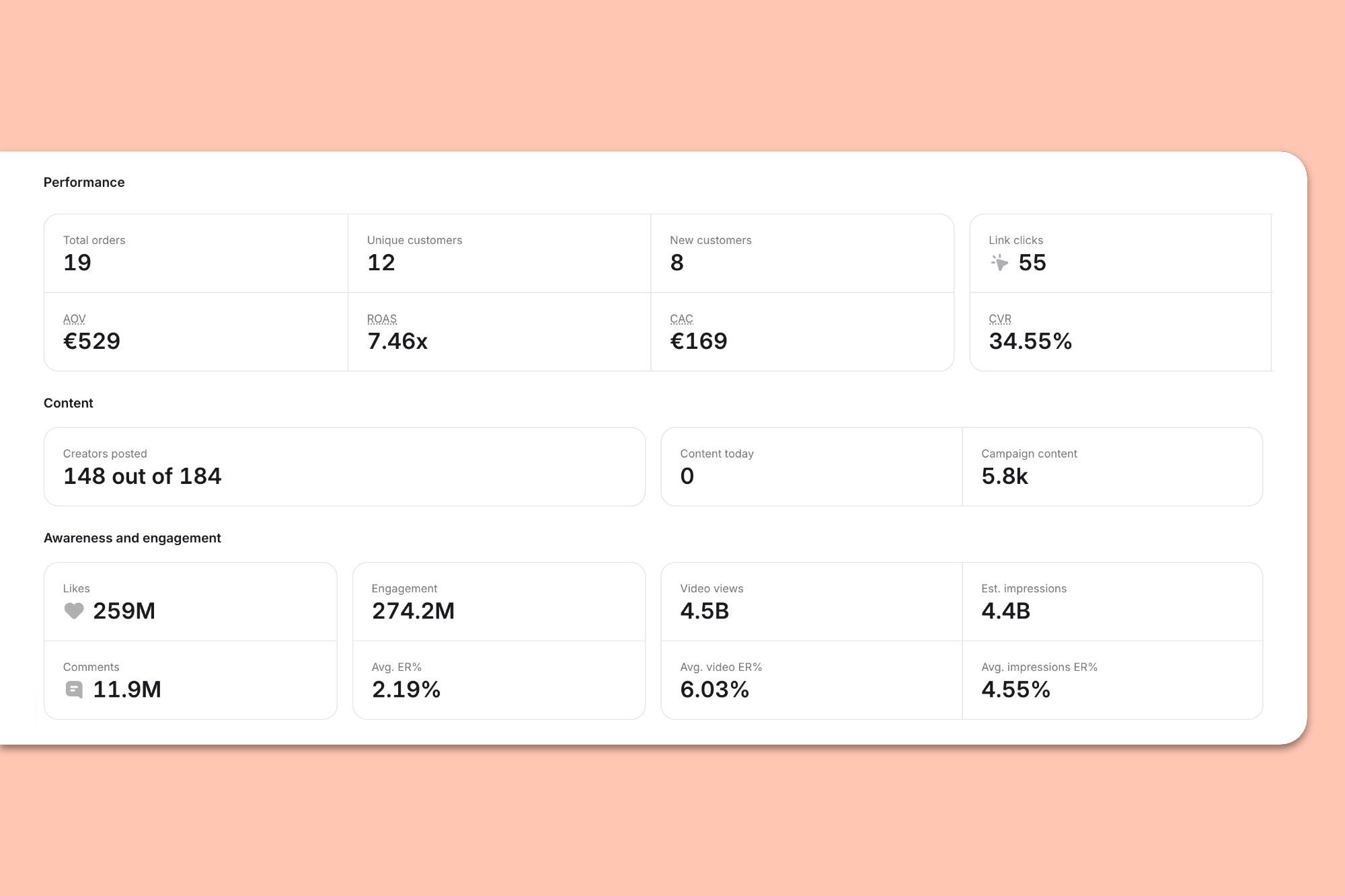
So your dashboard becomes an accurate reflection of what’s happening on your store, not a static spreadsheet or visualization.
🤓 Further reading: Check out my roundup of the 10+ Best Affiliate Apps for Shopify.
You’ve built the dashboard views, the next step is to translate all that sweet, sweet data into meaningful strategic decisions.
In this section, I’m gonna share five examples of “signals” within your affiliate data, along with what it means and what to do about it. First, here’s the quick view…
Signal
What it means
What to do next
Revenue increasing, but only a small number of affiliates are contributing
Over-reliance on a handful of top performers, putting revenue at risk if they leave or become less active
Recruit more creators + re-engage inactive affiliates
Affiliates generating lots of content but minimal sales
Affiliates driving awareness and engagement, but activity isn't translating into attributable sales
Shift effort toward affiliates who convert; hire high-content, low-sales affiliates for awareness campaigns
Gross revenue climbing but margins being squeezed
Refunds and discounts mean margins + profit are down
Review discount + commission rates; identify affiliates with high return rates
Lots of code sales but few link clicks
Code leakage on forums, coupon sites, etc
Use a unique code per creator + retire leaked codes
Lots of link clicks but few code sales
Creators aren’t pushing codes and/or customers just aren’t using them
Embed codes in tracking links so they apply at checkout automatically
…and now let’s explore in more depth:
It’s not unusual for a high proportion of revenue to come from a relatively small number of creators. In fact, there’s a phrase for it: the Pareto principle, AKA the 80/20 rule.
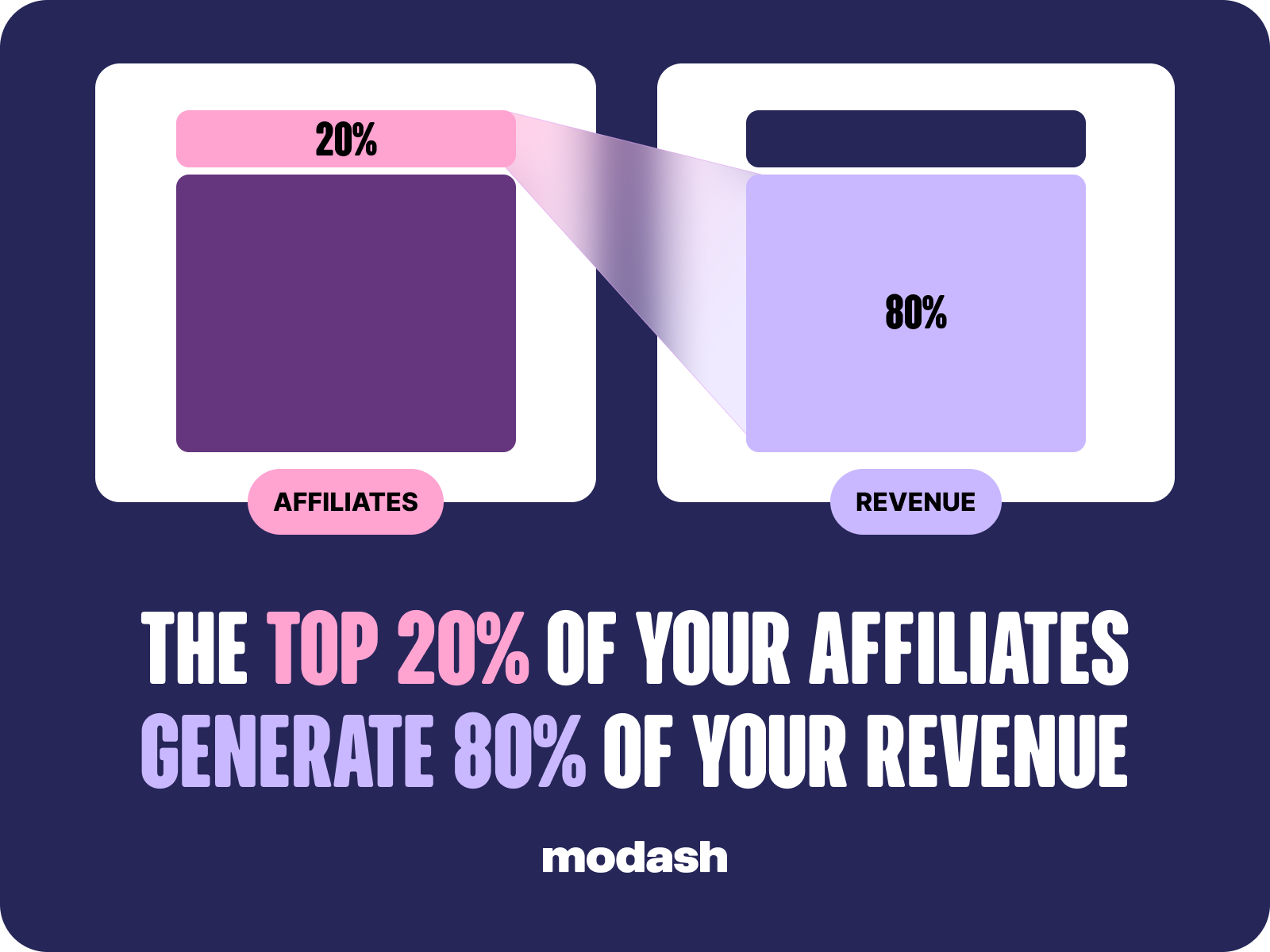
So some concentration is only natural.
But if you dig a little deeper and realize all your sales are coming from 1 – 2 affiliates, you need to do something about it. Because if they stop posting for some reason, you’re in trouble. Plus you're likely dividing your efforts more or less equally across all your affiliates, which means your top affiliates aren't getting the love they deserve.
The solution is simple in theory: build a deeper bench of brand-fit creators so your results don’t fall off a cliff if your top performer ghosts you 📉
Of course, if it was really so easy to find active, engaged, high-performing affiliates, you’d have done it in the first place.
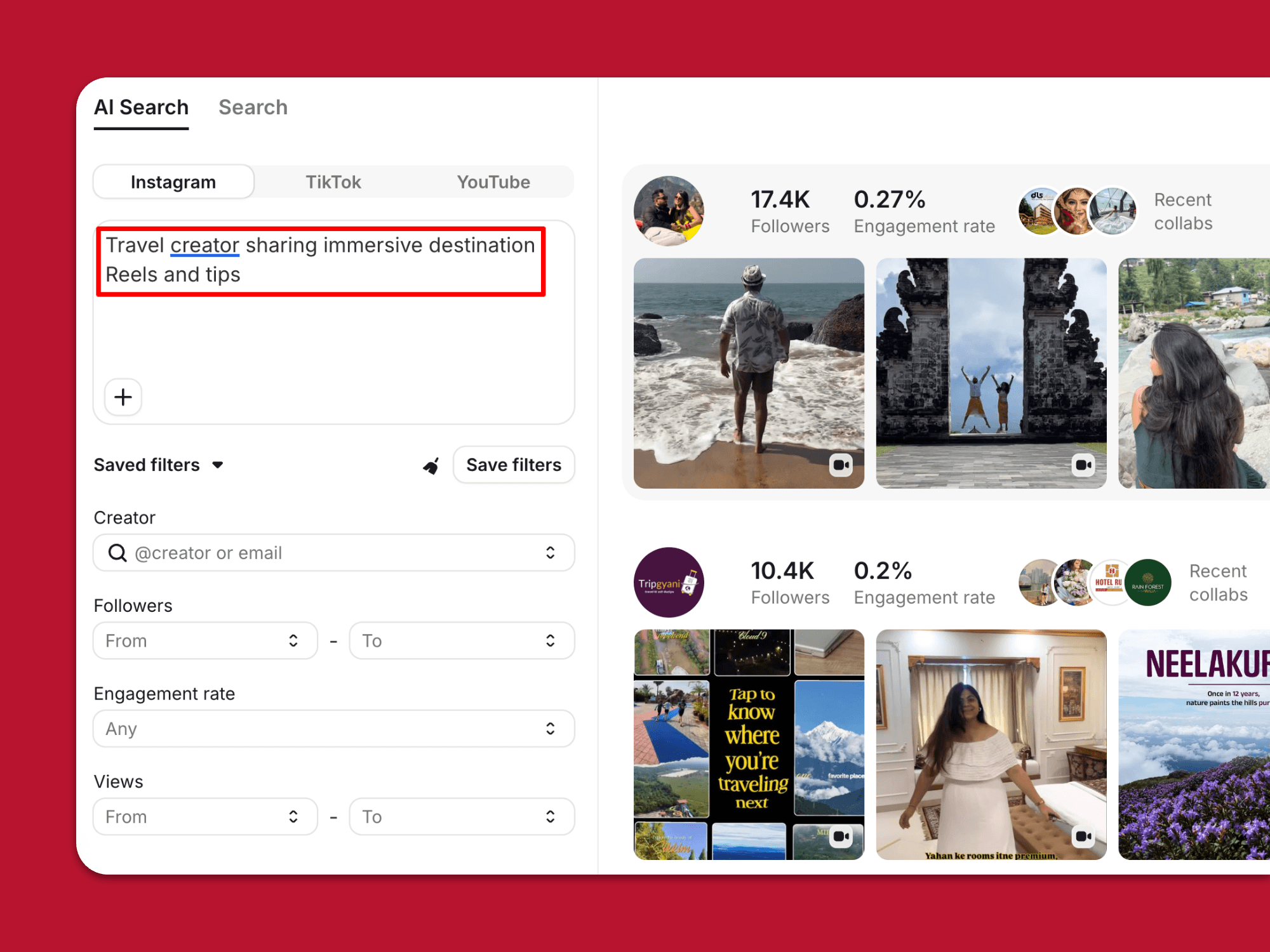
🤓 Pro tip: Modash can help you with our affiliate search tools. Run filter-based searches to find relevant results from 380M+ public accounts. Or use AI search to simply describe the types of creators you want to work with – Modash matches you to creators based not just on the words in their captions, but also what’s in their images and videos.
Your affiliates get full marks for trying, because they’re sharing plenty of content. Trouble is, all that activity isn’t translating into sales and revenue.
The smart move here is to shift your effort toward affiliates who are converting. Keep them engaged by sharing things like:
At the same time, motivate them to keep driving sales by introducing tiered commissions.
Modash data shows that the average commission tiers range from 10% at the low end to 19% for top performers. When setting your own rates, start with your net margin and work back – if your net margin is 25%, for example, you can likely afford to pay a top-tier commission of 10% – 15%.
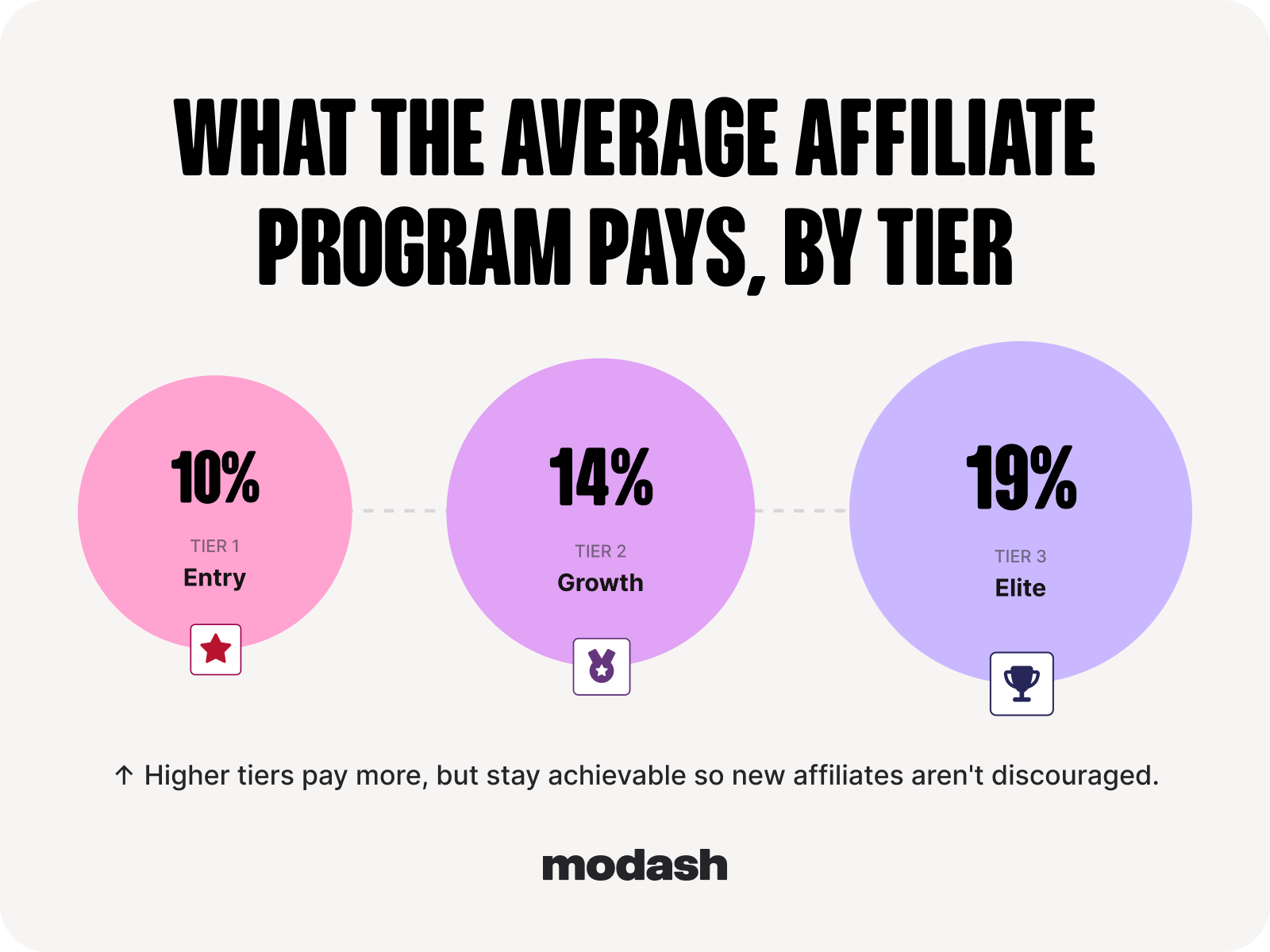
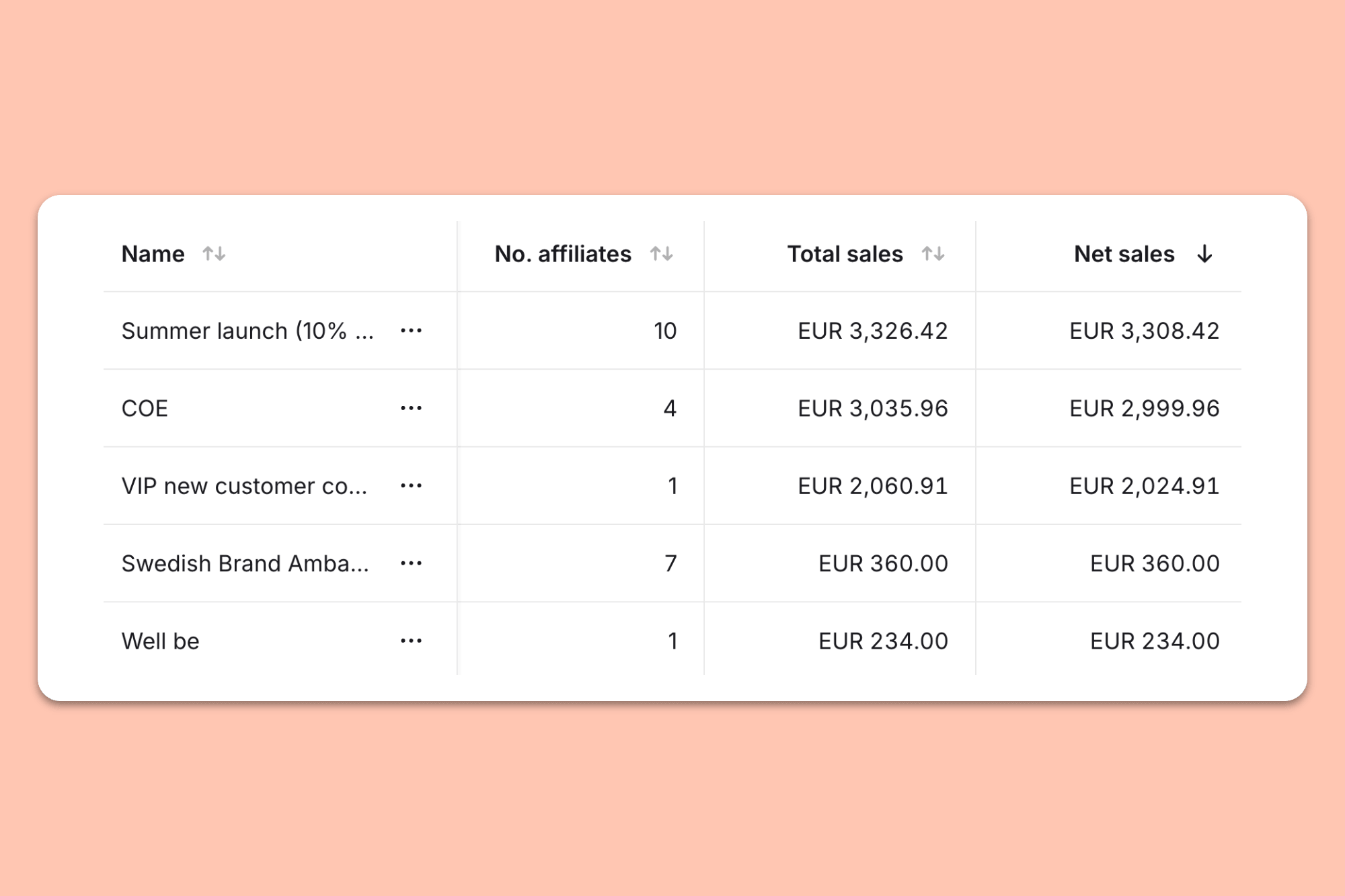
🤓 Pro tip: With Modash, you can create custom commission tiers, then simply add all the relevant affiliates so they automatically earn the correct rate. Plus you can track sales and commissions per tier.
Finally, bear in mind that not every creator shines at driving sales.
This doesn’t mean you should kick those low-sales-drivers to the curb; they might be a better fit for awareness campaigns or product launches, or as a means of capturing content for your own channels.
Because changing the goal is almost always quicker, easier, and cheaper than changing the creator.
Your gross revenue is surging – hooray!
But wait, there’s a problem, because when you factor in the impact of discount codes, refunds, and cancellations, your margins are way down – boooooo!
All too often, this problem creeps up and bites brands in the… ummmm… dashboard because they calculate ROI on gross rather than net revenue. So everything looks peachy, until they dig deeper into the numbers and uncover the bitter truth 😬
If this sounds familiar, you need to figure out what’s wrong, fast.
The obvious first step is to add a hold period so you never pay commissions if an order is returned.
Next, review returns per creator. If an affiliate consistently sees high returns, there’s clearly something going on – like maybe their messaging doesn’t align with the reality of your product. Check their content for red flags and reach out if you spot any causes for concern.
🤓 Pro tip: Modash’s tracking tools speed up this process by automatically capturing live campaign content, with the ability to filter results by creator, keyword, date, engagement metrics, and content type.

Take another look at your discount percentages and commission rates, too.
Sure, they might be helping you attract lots of creators and drive lots of sales. But if you’re discounting too aggressively and/or paying unsustainably high commissions, they’ll leave your margins too thin – in which case your affiliate program will barely be breaking even.
Remember earlier, when I said your dashboard should split sales between link clicks and discount codes, rather than boiling them down into a single number? Well, here’s where that decision pays off, because you can spot disparities between links and codes, then close the gap as necessary.
First up, let’s deal with the scenario of mucho code sales but minimal link clicks.
Most likely this is down to code leakage (AKA code poaching), where a creator’s code circulates beyond their audience – typically on other social media accounts, forums, and/or coupon/discount sites.
This is a problem because it often means the people using your code were going to buy anyway and are actively shopping around for a discount code, thereby eating away at your precious margins.
🤓 Further reading: Learn more about code leakage in How to Prevent Affiliate Abuse in Your Program (Before It Gets Expensive).
If this is happening to you, don’t panic, because almost half of marketers told us that they’ve experienced code poaching too…
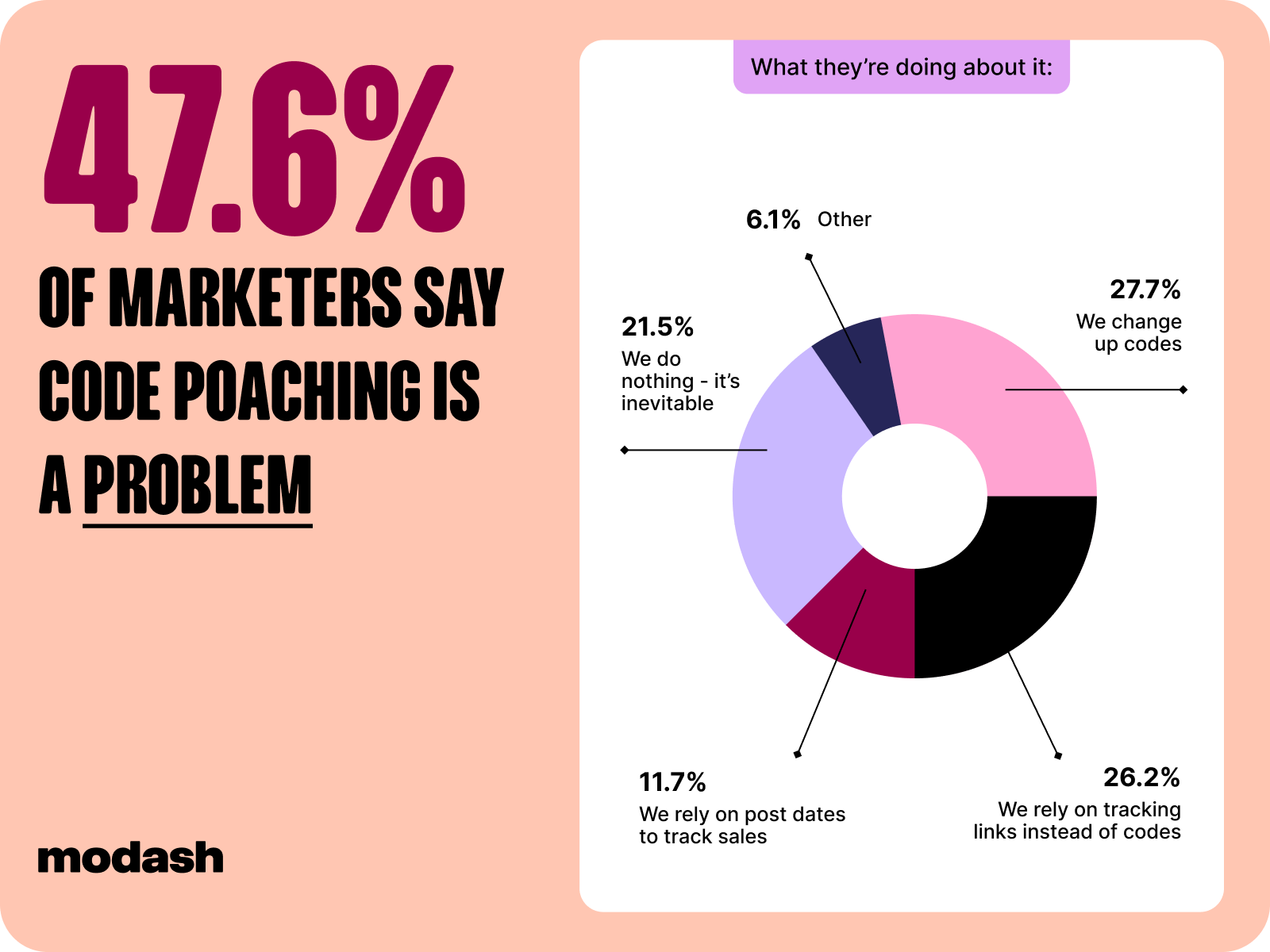
…and there are lots of ways to deal with it.
Make sure you use unique codes per creator so you can trace misuse, search coupon sites for leaked codes, and retire or replace any that have leaked.
Or, like 21.5% of marketers in our survey, simply shrug and accept that battling code leakage is like trying to hold back the tides – it’s gonna happen anyway, so why fight it?
The exact opposite of the above scenario can happen, too, whereby your dashboard shows a ton of link clicks but few or no code sales.
Clearly, customers aren’t using codes for some reason. But why? Surely everyone wants a discount, right? 🤷♀️
It’s most likely down to one of two things (or perhaps both):
To find out if it’s #1, browse your live affiliate content – remember, Modash captures it for you – and make sure creators are encouraging audiences to use their discount code. If not, just get in touch and explain why it matters to you (more accurate attribution) and them (they get credit for the sales they drive).
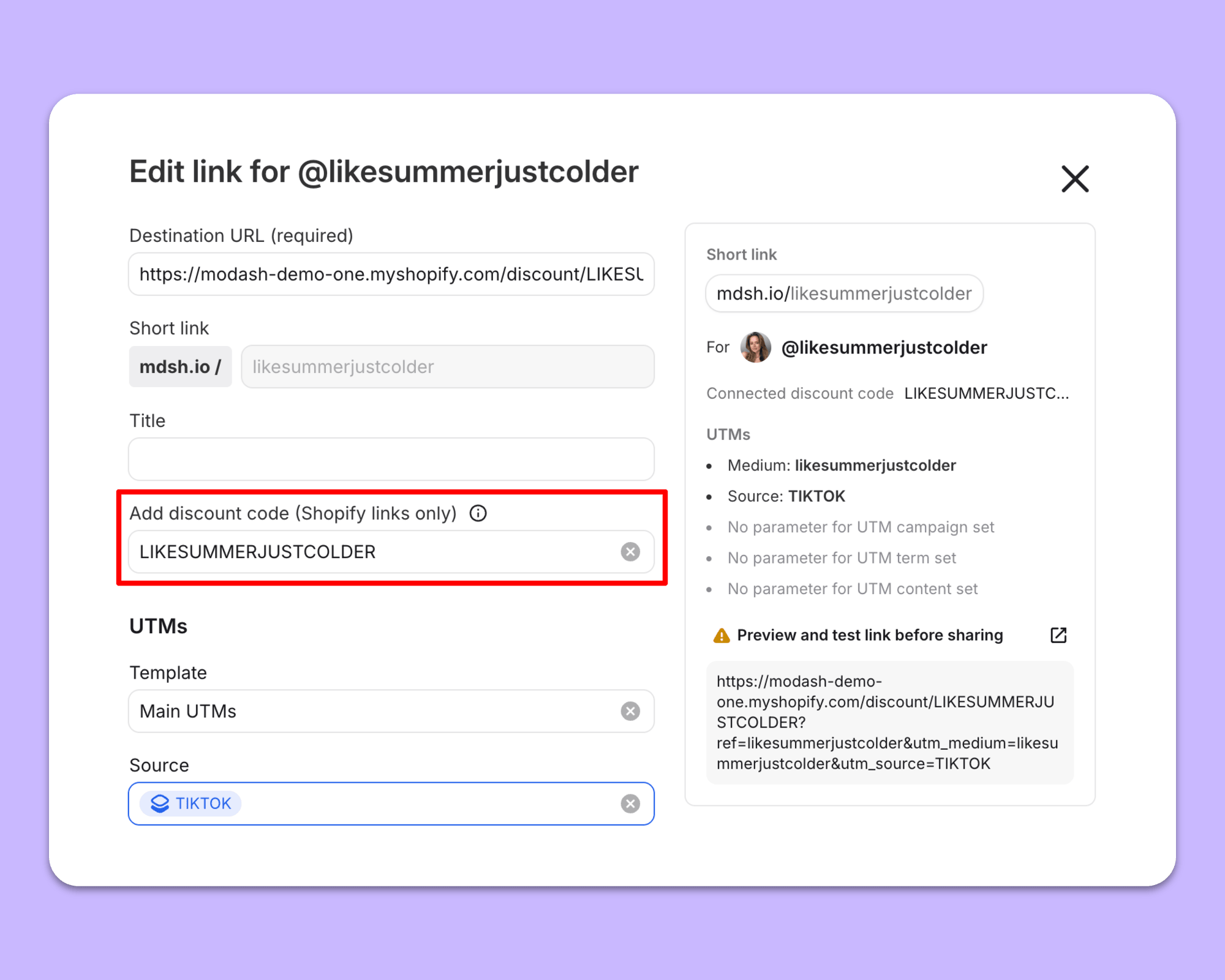
At the same time, it’s worth tackling #2 by embedding discount codes in a creator’s tracking link so it applies automatically at checkout. It’s quick and easy to do this with Modash:
A dashboard is only worthwhile when it takes no more than a quick glance to inform your next decision.
To do that, it should:
If you’re working with no more than ~10 active affiliates, you can do all that with a spreadsheet. But as you scale, you’re gonna need a tool to automate content collection and pull accurate sales data from your ecommerce platform.
For Shopify stores, Modash is the obvious fit.
Sales and commissions come straight from Shopify. Revenue is broken down per creator, and the split between links and codes is visible at a glance. And because net revenue is calculated after refunds, there's no need for any manual reconciliation 😌
👉 See for yourself when you start your 14-day free Modash trial – no credit card required.
An affiliate marketing dashboard gives you all the data you need to run your program day to day by providing an always-on view of how your campaign and creators are performing.
An affiliate marketing dashboard should include:
There are 3 main ways to build your own dashboard:
The Shopify-native approach is generally the most expensive, but also saves you the most time by automatically pulling Shopify sales data into your dashboard.
In a word: no.
Shopify can track top-level affiliate data like discount code redemptions or UTM referral sources.
But it doesn’t track live content or tie sales and revenue to individual creators, so it doesn’t provide a complete picture of program performance.
Reports summarize past performance for stakeholders like your leadership team, whereas dashboards give an up-to-date view of how your program is performing right now.
That depends on the goals of your program – a brand targeting sales will have a different definition of “healthy” to one that’s building brand awareness or another that uses affiliate marketing to generate content.
However, there are some leading indicators that speak to the general health of your program, including total link clicks, number of conversions, and units of content live.