


More tools
Use cases



A good affiliate report has two jobs:
Most affiliate reporting advice out there only does the first job, and even then, it's answering the wrong question.
That's because almost everything written about affiliate reporting is built for affiliate networks: think EPC, subIDs, traffic sources, all click-and-close. These numbers are useful if you're running a network, but less so if you're a Shopify brand running creators as your affiliates, because a lot of what your creators do can’t be measured in the traditional sense (and you can end up crediting the wrong people if you only focus on clicks and revenue).
So consider this your full rundown of which metrics are worth tracking, how to build a report that covers both sales and content, and how to fix the reporting headaches that crop up once you start to scale your program.
Not every metric needs to be in your report. The trick is picking the ones that help you decide what to do next rather than the ones that simply look good. Here's what each one actually means, what it's useful for, and a pro tip for reading it right.
If a metric wouldn’t change what you do next, it’s a vanity metric. But if it would, it’s a decision metric and, therefore, should be in your report.
It’s not always that simple, though. Even revenue (a.k.a. the number everyone thinks is safe) can be a vanity metric if you’re not cross-referencing it with cost and retention. Andreea Moise sums it up well:
Any metric can become vanity if it's not grounded in insight and connected to outcomes. Even revenue. "Oh, look, we converted $50k in revenue this month through influencers. We're doing great!" – but if you spent $100k to get that and churn is over 10% and it's a mixed audience with separate goals that you have no idea how to retarget through content, it's not a long-term win. It's actually setting an impossible standard to scale and maintain for the team.

So, before you put a metric in your report, look at the context around it:
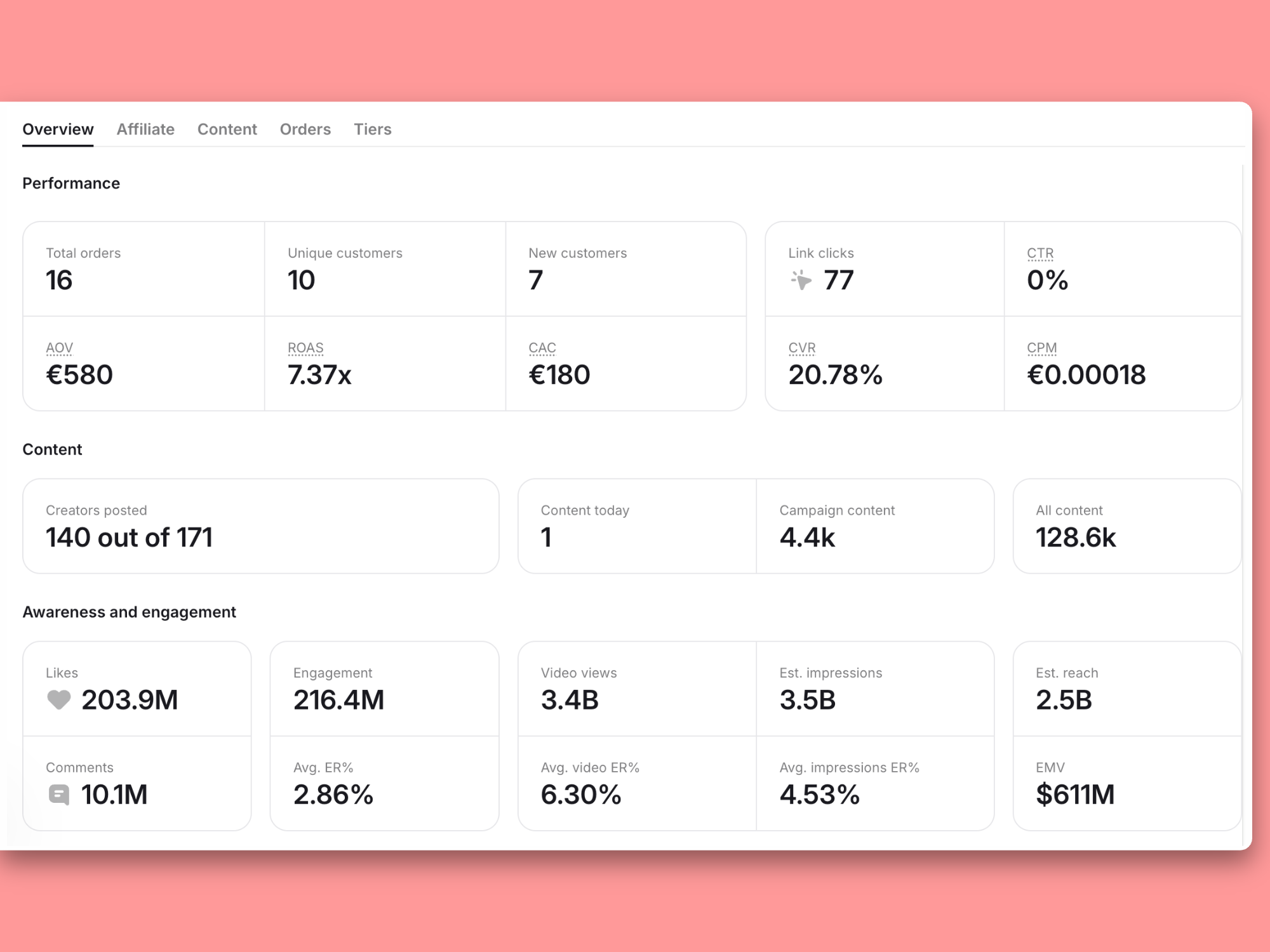
Modash automatically calculates all of this, per creator and campaign, so you’re not stitching together revenue, spend, and retention together to figure out whether last month was actually a good one.
👉 Learn more about which affiliate marketing metrics matter the most (and why).
Most affiliate reporting advice you find online was written for affiliate networks, where it’s an affiliate's job to drive clicks and sales.
But if you're a Shopify brand working with creators as affiliates, there’s more to it. A creator can do the work for you… they can post content, build trust, get someone curious about your product, all that good stuff, without a single person clicking through.
Like we said above, if you’re just reporting on clicks and revenue alone, you’re probably massively under-crediting the creators who are providing value through awareness and content rather than clicks.
That's why a creator affiliate report needs two halves:
The first tells you which creator closed the deal, and the latter tells you who created the buzz in the first place. It might be the same creator, or it might not.
It’s easy to see why content tends to be the half that “goes missing”. It’s not really anyone’s fault, it’s just harder to track and Shopify simply isn’t built to track in. As Melissa Sorby says:
Shopify affiliate tracking was limited to just clicks and conversion, and we couldn't cross-check content pieces without also using our affiliate marketing platform, so it was important to have both.

Modash closes this gap with one dashboard that shows both sales attribution and content performance, per creator and campaign.

A report is only as good as the process behind it. Here's how you can put one together, from picking the right metrics to making decisions from the numbers.
First things first, get clear on what your program is for because this will help you decide which numbers to focus on. But "grow revenue" or "get more customers" isn't specific enough to build a report around. Turn it into an actual goal: a target, a timeframe, and a guardrail metric that stops you from hitting the target the wrong way.
Now you've got a specific number to report against, and a guardrail that keeps you honest about how you get there.
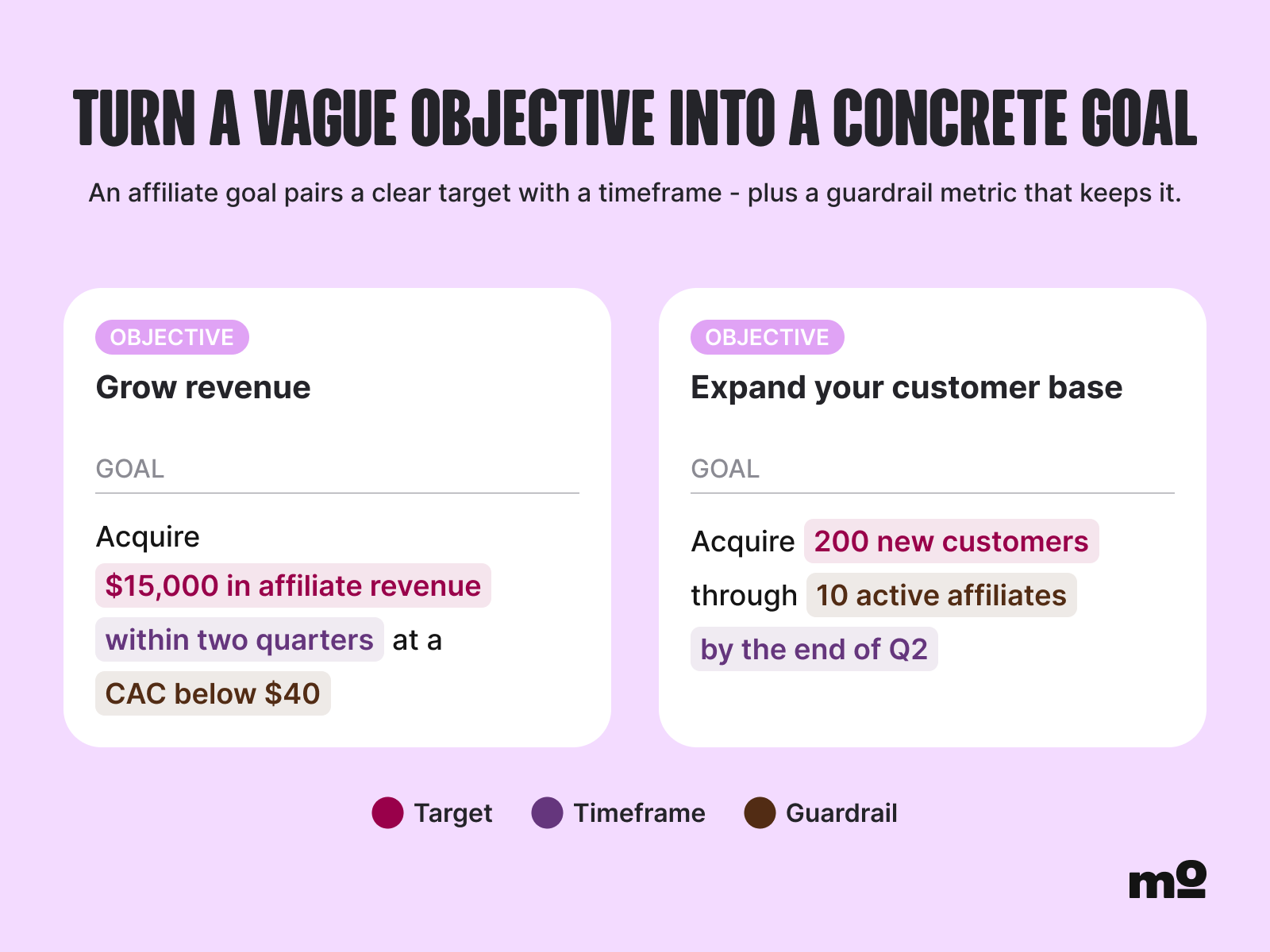
Once you've got a goal like that, mapping it to metrics is easy:
Don't try to track everything from the metrics table above. Instead, pick 4–6 that map to your goal.
Let’s say the goal for your program this quarter is new customer acquisition. That might mean you build your report around new customer count and CAC as the headline numbers, with code redemptions and AOV as supporting context.
Views and EMV might still be worth a mention, but they're bit parts in the wider play. If your goal was awareness instead, that hierarchy flips so that reach and views take the lead, and revenue becomes the supporting metric.
Who are you reporting to? Different audiences need different levels of detail. If your team just wants to catch any early problems, you can get away with a quick internal check. But if you’re reporting to leadership or finance, you might choose to do a fuller report so they can get a feel for the bigger picture.
Quarterly reporting is quite common, and Andreea gives good reason for this:
The most accurate [reporting frequency] by far for proving performance of a program is quarterly – weekly won't catch a lot of impact, especially if you have long form content in the mix, and monthly might look inconsistent based on content volumes and hitting/missing 1-2 goals, but quarterly will always tell the truth on how the program is actually doing.
But really, there’s no single “right” cadence, as proven by these brands:
👉 Learn more about how these brands practice creator reporting (with templates).
Check the numbers in your report match those in Shopify.
Melissa built this into a habit, regularly reviewing her affiliate platform's performance reports against Shopify's sales data to make sure everything lined up. That habit pays off the moment a dispute comes up:
If a creator ever had a question about a commission, we'd be able to investigate by checking the attributed order, link activity and discount code usage across both our affiliate platform and our Shopify backend.
Because Modash pulls order and commission data directly from Shopify, your affiliate numbers aren't a second version of the truth to reconcile against your store. You spend less time squaring two systems, and when a creator questions a payout, you're both looking at the same Shopify-backed number.
Nothing kills trust in a report faster than a creator who thinks their numbers are wrong. Luckily, there’s a pretty simple fix: just let them see what you see.
If a brand pays its creators through Modash, each creator gets their own portal showing orders, commissions, and payout status in near real time.
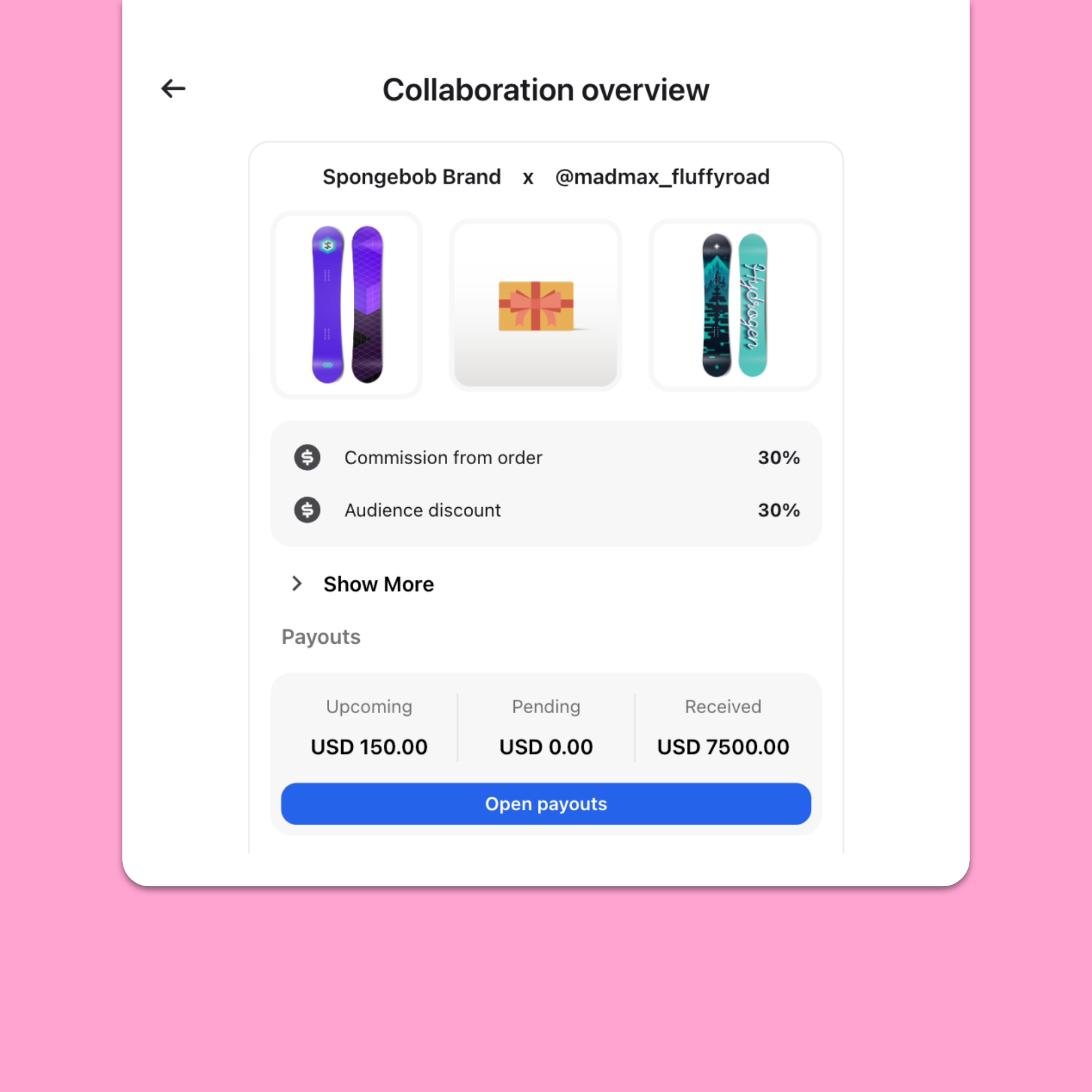
Even if you’re not using Modash for payouts yet, you can still keep things accurate through Modash's Shopify integration. This keeps your numbers correct behind the scenes, which can help reassure creators.
It’s all well and good having a stunning report, but if it just sits there doing nothing… well, it’s not doing its job. The point of it is to tell you what to do next, and that gets a lot easier once you sort your affiliates into four groups:
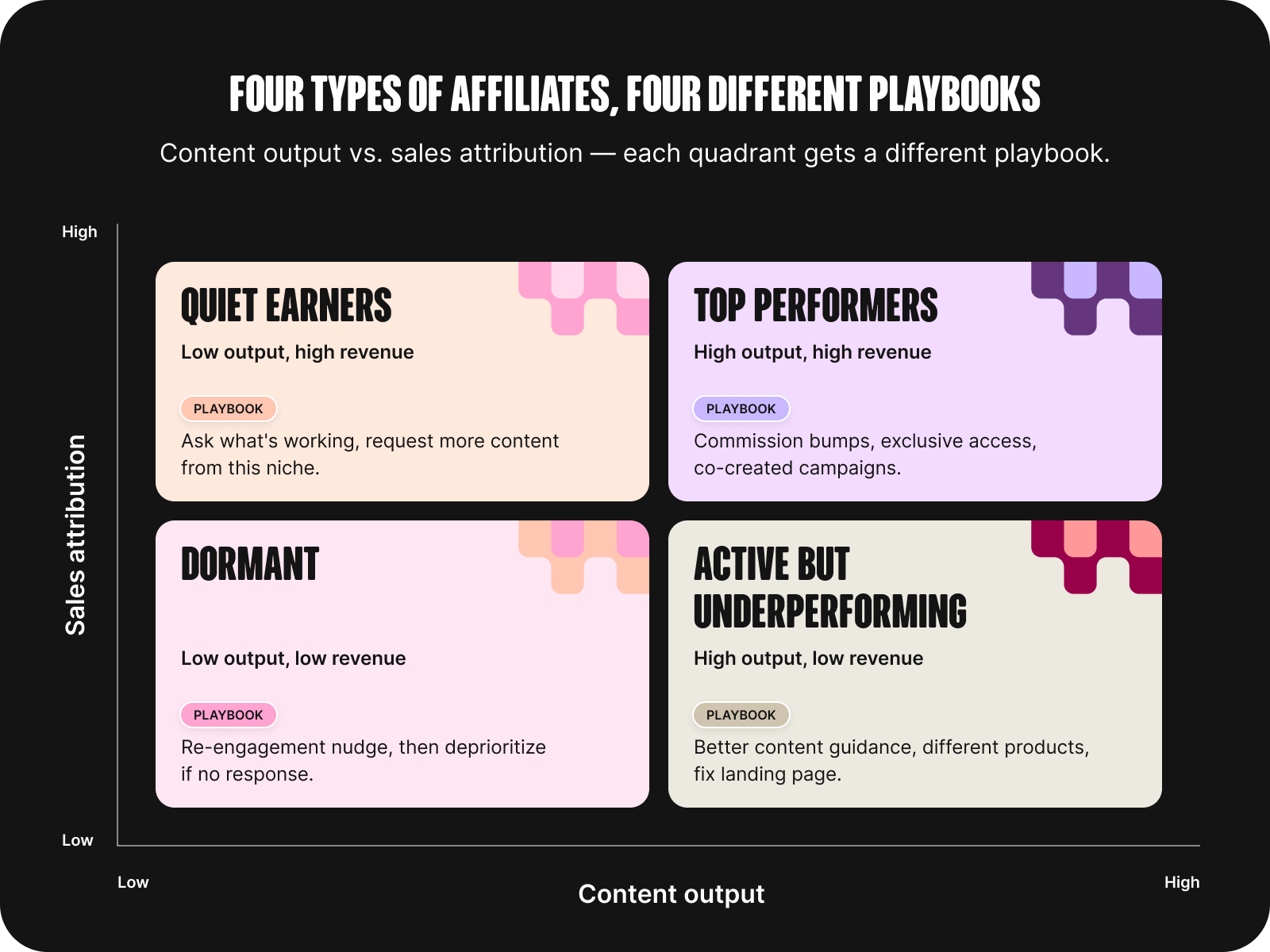
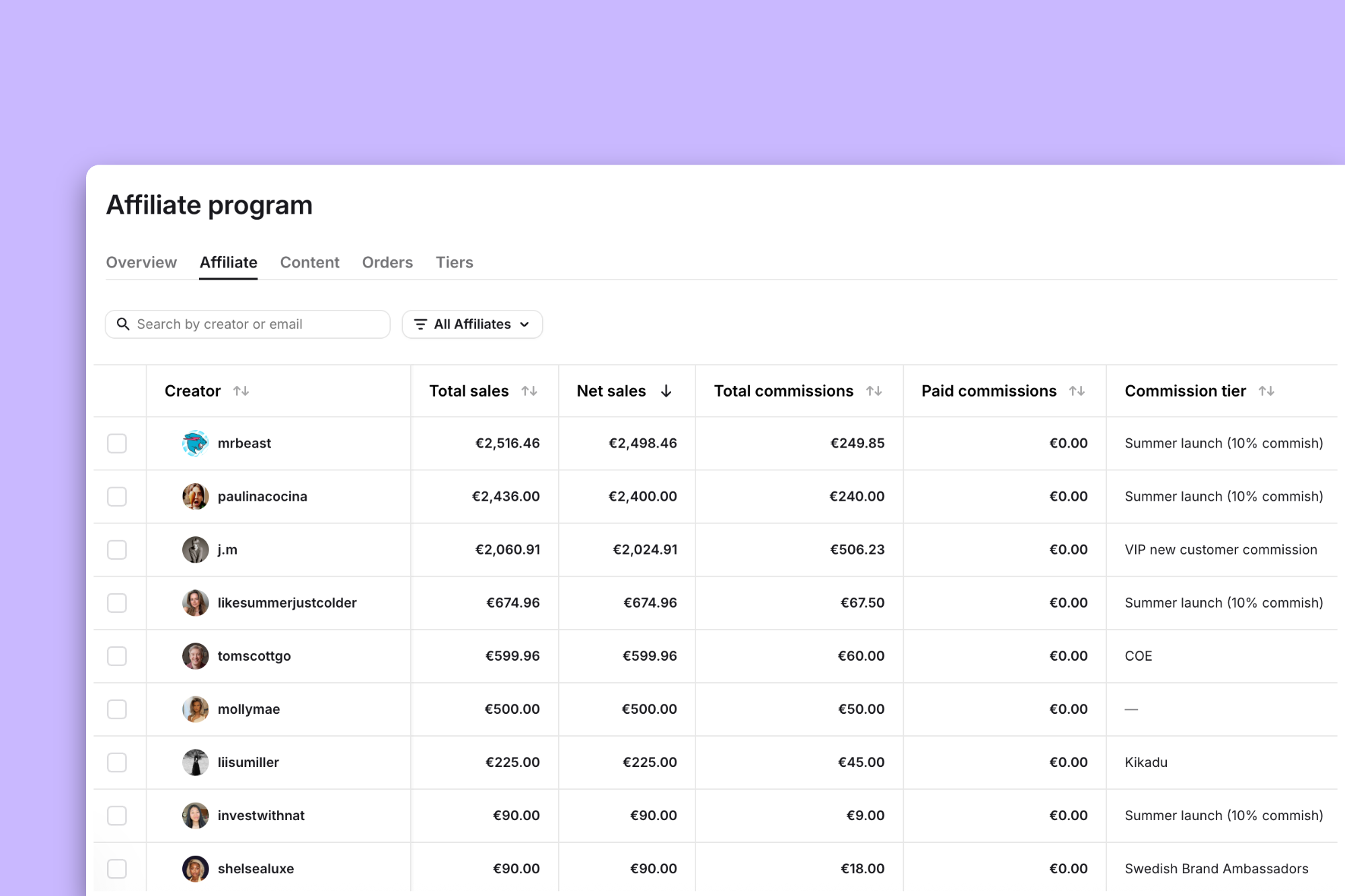
In Modash, you can filter your affiliate list by sales, revenue, clicks, or code redemptions, so finding your top performers (or spotting who's gone quiet) is easy enough to do.
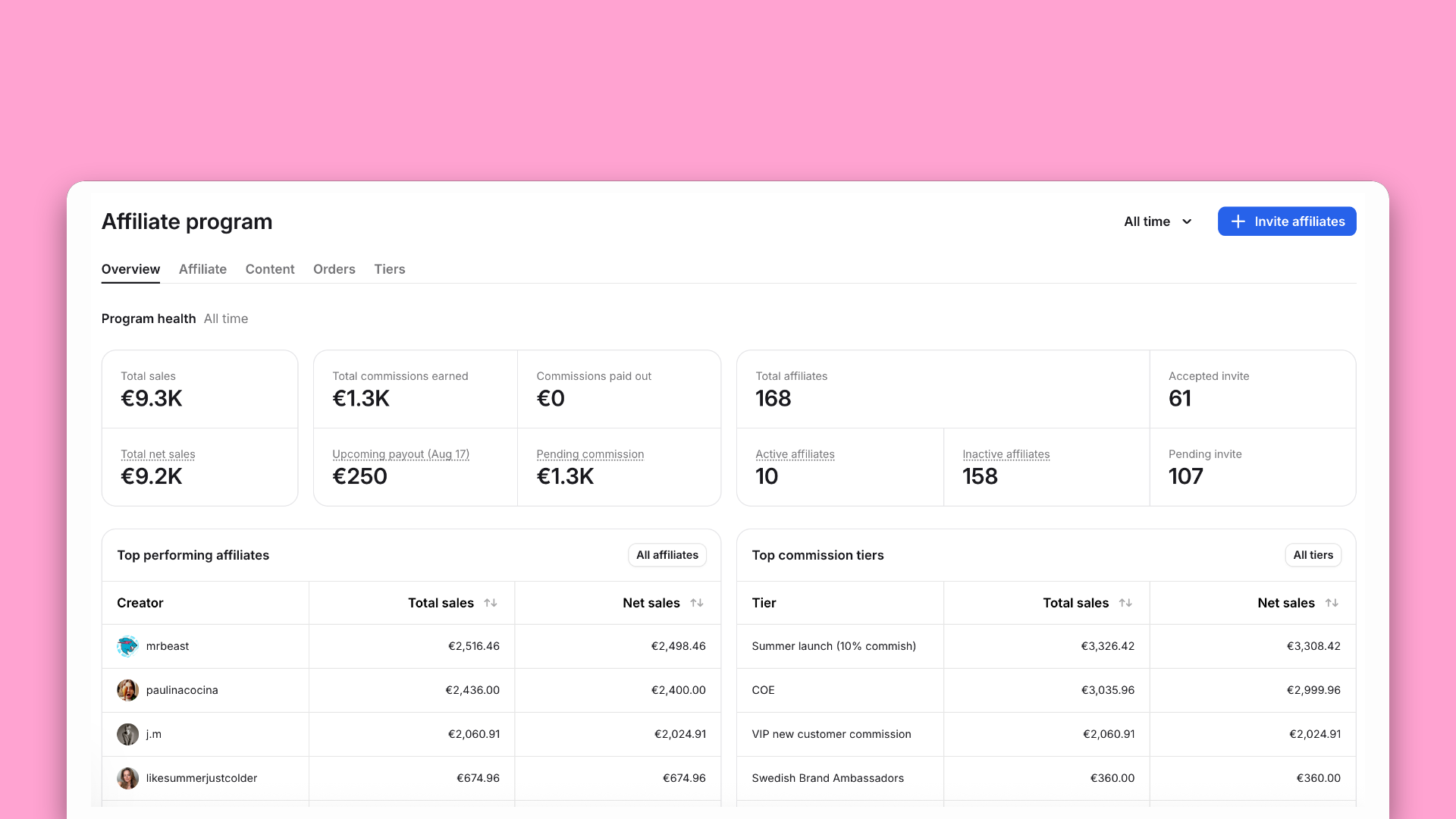
Instead of digging through filters to build your own view of who's performing, the tool surfaces your top performers to make this part of the process even easier.
Short answer: somewhere around 20 affiliates.
Below that, a spreadsheet is usually fine…don't let anyone talk you into a tool before you really need one. Past that point, though, you’ll probably spend more time manually matching code redemptions to Shopify transactions which will cost you more than most affiliate platforms would.
If you're still under that 20-affiliate mark, grab our free affiliate tracking spreadsheet template and you're good to go. But once you’re past that point, we really recommend using an affiliate reporting software where you can see everything in one place and track metrics automatically.
Even with a solid process, you’ll probably still get a few problems popping up. Here's what's going on when they do, and how to fix them.
This is a classic headache right here that usually comes down to the fact that codes and links track different parts of the affiliate journey.
So when someone clicks a creator's link but forgets the code, or skips the link entirely and just types the code in at checkout, your two tracking methods will disagree.
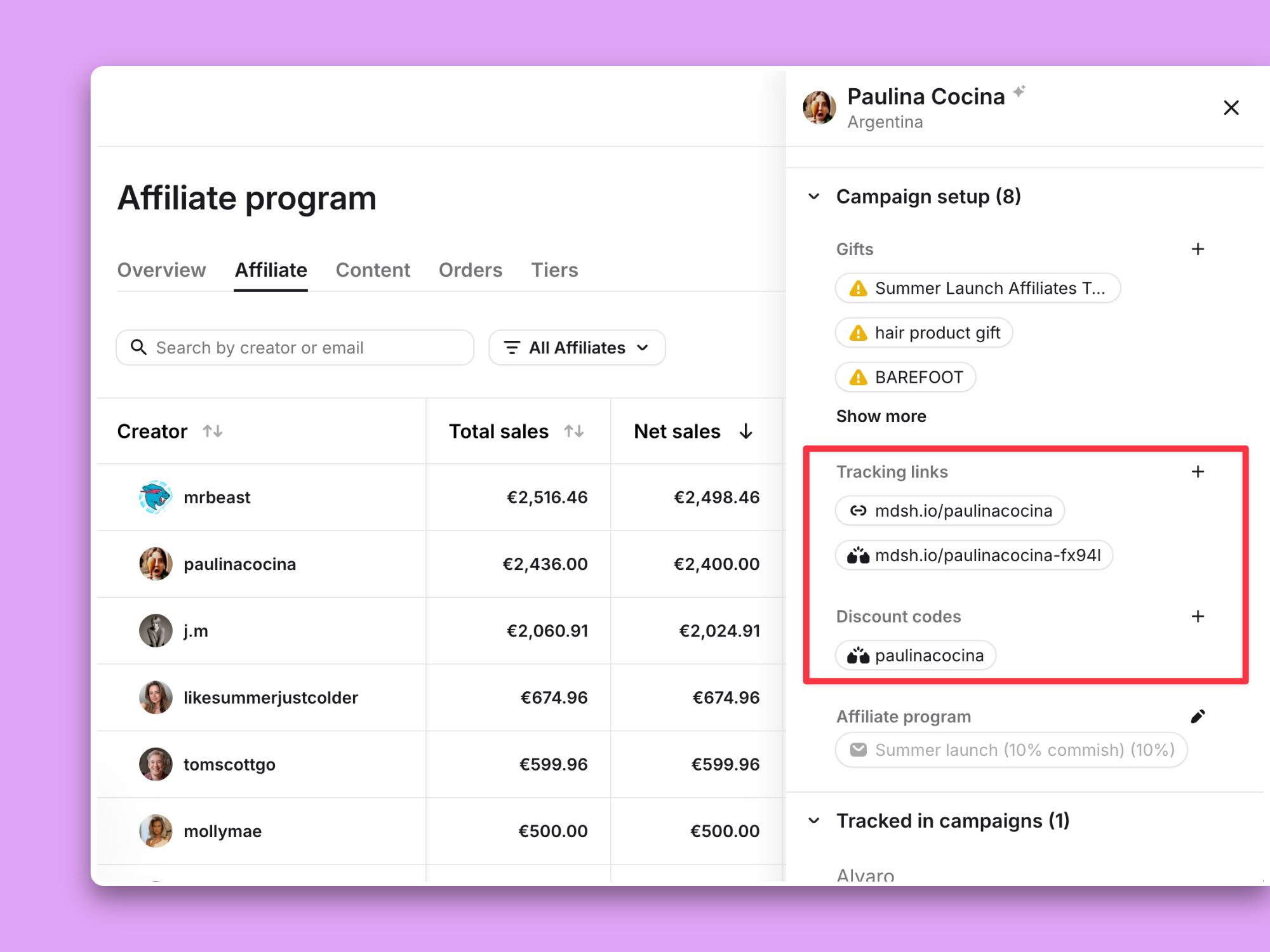
In Modash, each affiliate can have both a tracking link and a discount code, and when an order could be tied to either, Modash credits one owner rather than counting it twice, so your code and link numbers don't drift apart.
If your report only tracks sales, you're going to have some creators who look like they're underperforming, when really, they're doing exactly what you asked them to, just earlier in the funnel.
Take a creator whose whole job is the top of the funnel. Their post gets thousands of people curious about you, but only a handful click their link or check out with their code – most drift off and buy days later after seeing you somewhere else.
On a sales-only report, that creator looks like dead weight. In reality they did exactly what you hired them for. No attribution model will fully credit that kind of awareness work, which is why the fix isn't a better attribution window – it's putting content performance next to sales so you can actually see it.
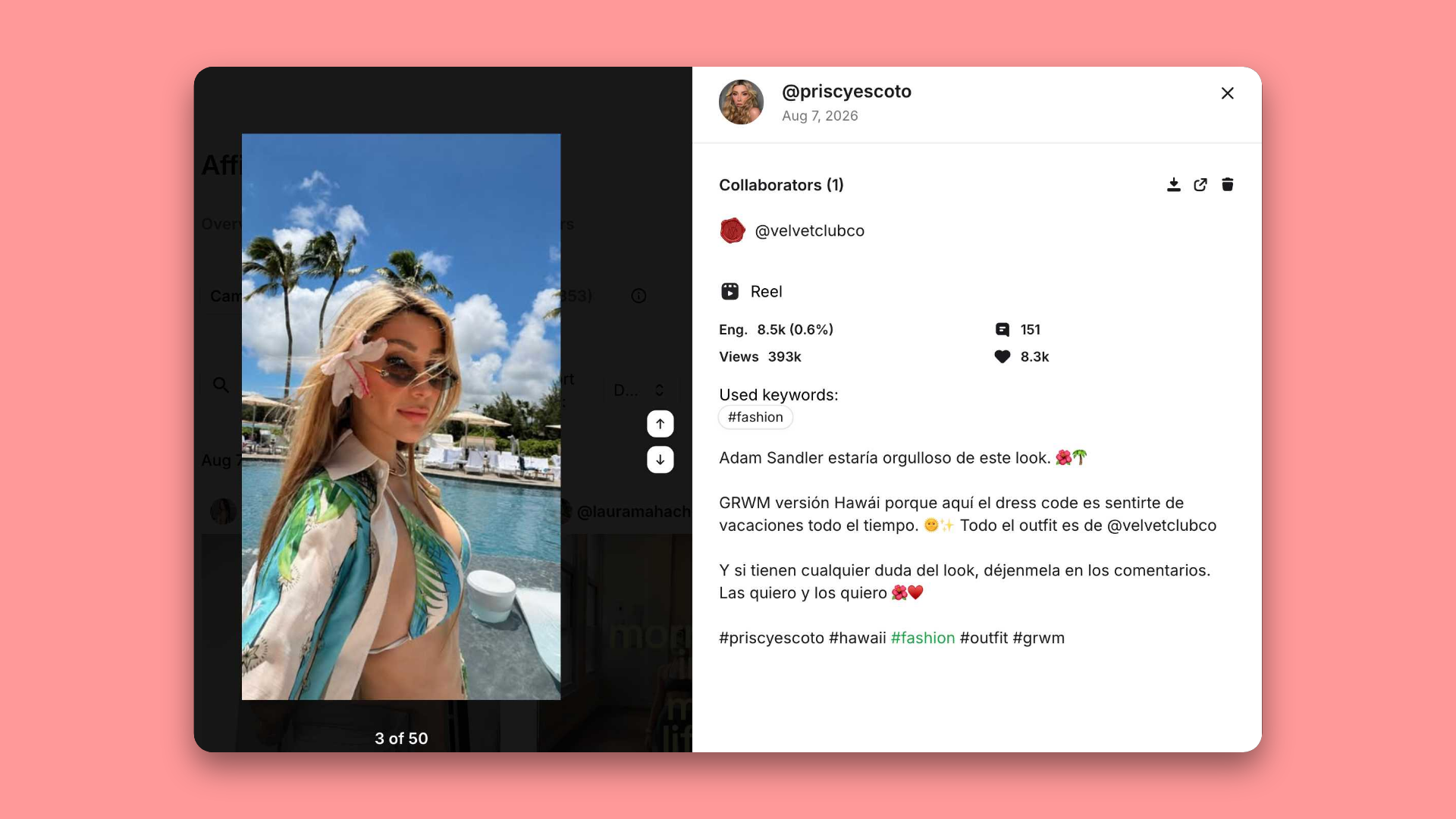
This is exactly why content data should rub shoulders with sales data in your report. Modash pulls each creator's content output and performance – so even in a period where last-click sales numbers under-credit a creator, you can still show, very clearly, that they delivered.
Code leaking (or "poaching," if you want the more dramatic term) is more common than you'd think, with 47.6% of the marketers we surveyed saying it's a problem for their program.
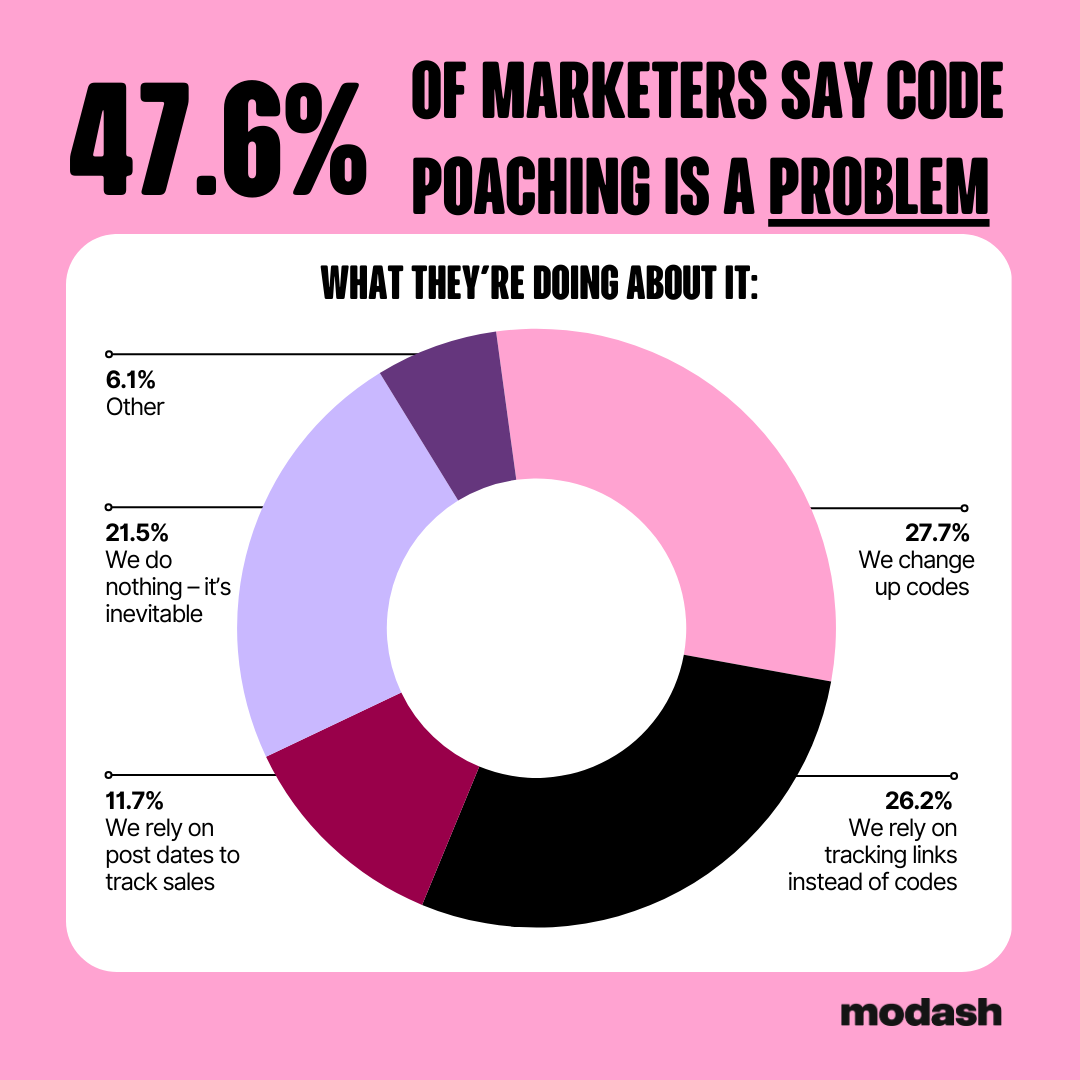
It happens when someone shares a code on a coupon site that gets used by shoppers who weren’t influenced by the creator who owns the code, which artificially inflates that creator’s numbers.
Interestingly, the same survey found 20% of marketers don't bother trying to fix it, because it's seen as a cost of doing business.
If it's genuinely distorting your numbers, the fastest way to catch it is a spike in code redemptions with no matching spike in content or clicks. This is easy to spot in Modash since it tracks both code and link activity per affiliate.
But for most programs, code poaching isn't worth the effort of chasing. Unless it's actually skewing your attribution or eating real margin, changing codes every time one leaks usually costs you more hassle than the leak itself. Sometimes the right move is to just let it go.
Related reading: How to Prevent Affiliate Abuse in Your Program (Before It Gets Expensive)
Not every number in your report is measured the same way, and reading them all as exact is where people trip up. For posts and Stories, reach and impressions are estimates, not hard counts. For Reels, TikTok, and YouTube, the view counts are actual figures pulled straight from the platform.
So if a creator's reach looks lower than they expected, or doesn't match what they see in their own app, that's usually the estimate at work, not the tool undercounting. The fix is to know which is which: lean on the exact video numbers when you're comparing performance, and treat post and Story reach as directional.
Modash shows the platform-native figures where they exist and pulls them consistently across creators, so at least you're comparing like with like.
Sales tells you who sealed the deal. Content tells you who got you in the room in the first place. If your report only tracks one, you're only seeing half your program and could be crediting the wrong creators for the wrong reasons.
Track both, and you can see who's driving revenue, who's building the awareness that leads to it, and who's just coasting on a code.
If pulling both halves together sounds like more manual work than you have time for, that's exactly what Modash is built to handle.
Sales and commissions straight from Shopify, content and engagement tracked automatically, every affiliate in one view, plus a creator dashboard that heads off the "what's my commission?" emails before they land.
With Modash, you’ll spend less time reconciling numbers and more time growing the program. You can try the whole thing free for 14 days, no credit card, and see both halves of your program in one place.
It depends on your program's goal, but the core ones are revenue and commission, orders split by code vs. link, and content performance like views and engagement. If a number wouldn't change what you do next, leave it out.
Shopify natively shows sales by discount code and referral source, but it won't tie codes and referrals together per affiliate for you. You'll either reconcile that manually or use a Shopify-native affiliate tool that does it for you (like Modash).
Because codes and links track different parts of the journey. Codes tell you who made the sale, links tell you where the click came from, and they don't always match. It usually comes down to how attribution is being credited.
Attribution decides who gets credit for a sale. Reporting is what you build on top of that rule. So if the credit is being assigned wrong, your report will be wrong too, no matter how good it looks.
Keep it simple: one headline number with 4–5 supporting metrics tied to your program's goal, and a short note on what you're doing next. Leadership wants the story, not every number you have.
A spreadsheet works fine under about 20 affiliates. Past that, the time you'll spend manually matching codes to transactions usually costs more than most affiliate tools do.