Capabilities
Integrations





Use cases
Capabilities
Integrations
Use cases

No matter how many followers an influencer might have, it won't lead to sales if the audience isn't right.
Before spending time on finding emails & reaching out, you need to confirm that the creator can reach your target market.
Asking influencers one by one to share their demographics just doesn't work at scale. It's slow & painful. It forces you to invest time in influencer outreach which might be wasted. And you're limited to only whichever data the platform gives their creators.
Here's how you can analyze influencer demographics quickly, without reaching out to them.
Four data points decide whether a creator can reach your buyers:
I’m going to show you how to get influencer audience data using Modash, a tool for finding & analyzing influencers.
It’s quick & easy. You can run checks for a single influencer if you already have a profile in mind, or you can search for new ones based on your criteria.
Here’s the TL;DR:
You search for a profile (Instagram, YouTube, or TikTok), and click once to open up a profile summary. That’s it. Here’s an example for a UK TikTok creator with 52.7k followers.

There’s more detailed data available too which I’ll get to shortly.
Keep scrolling to get more details, or grab a 14-day free trial and try it for yourself. No credit card needed.
Let’s look in more detail at these two scenarios: checking a specific influencer’s audience, or finding new influencers based on your audience criteria.
After you sign up for a Modash trial, you’ll land in the Discovery tab. It looks something like this.
The first thing you should do is select the right platform (Instagram, TikTok, or YouTube).
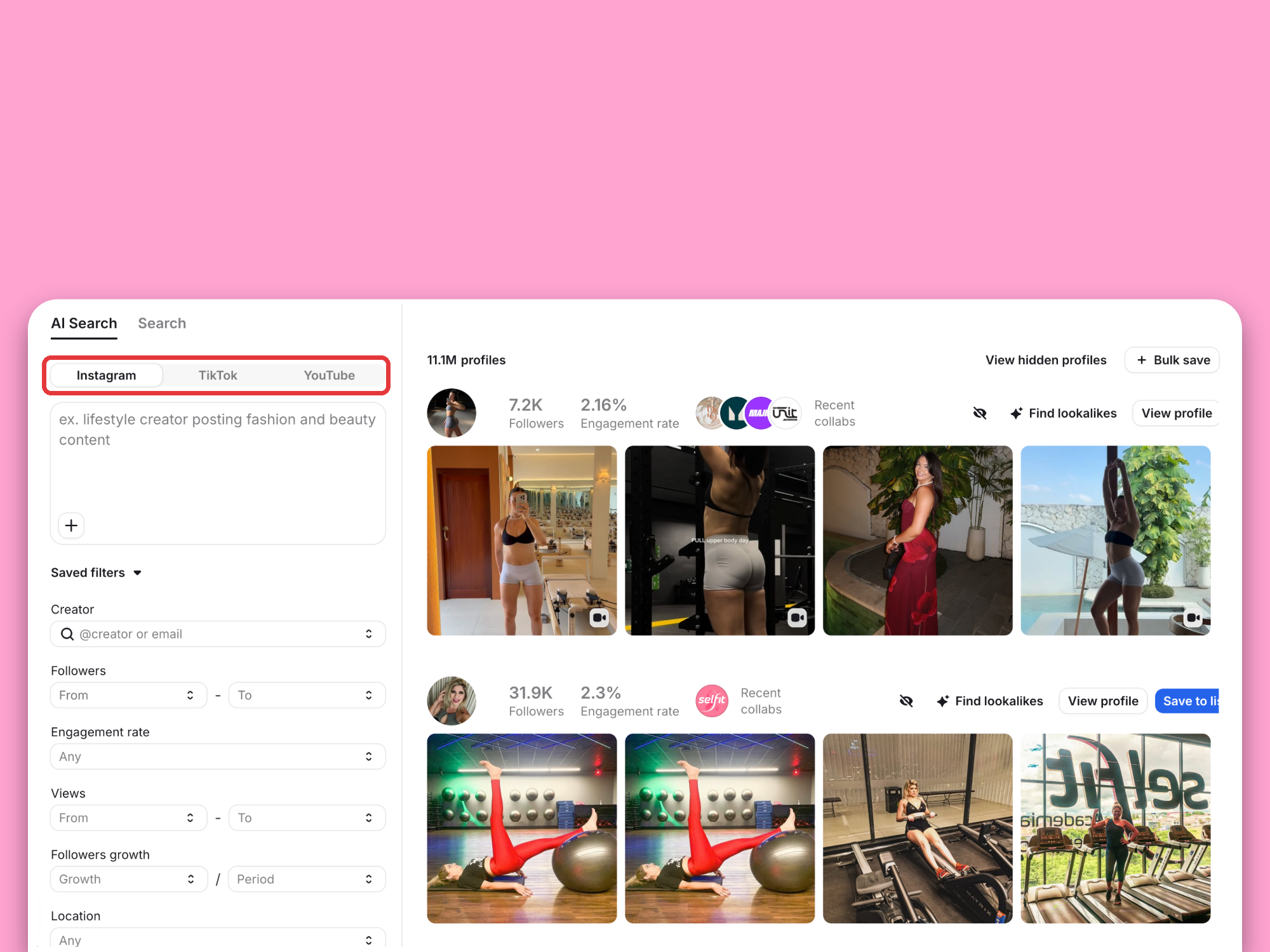
Next, type or paste a profile handle into the Creator field on the left, and run the search.

In the results, you’ll see the profile you searched for, with its follower count, engagement rate, recent brand collaborations, and latest posts. Below that, Modash’s influencer lookalike tool suggests creators with similar content or audiences.
Click View profile to open the creator’s profile in a sidebar. Right at the top, the Collaborations tab shows the brands the creator has worked with and how each sponsored post performed. It’s the quickest way to check whether they’ve recently promoted one of your competitors, or whether they’ve already worked with brands like yours.

On the left, you can add notes, assign the creator to a teammate, and set your relationship status, so everyone on your team knows where things stand.
Scroll down for the audience demographics. You can switch between followers and likes, which shows whether the people who actually engage match the wider follower base. You’ll see:

The Popular posts tab shows the creator’s best-performing content, and the Lookalikes tab suggests similar creators to add to your shortlist. Below that, you’ll find their performance data:

In 90% of cases, that’s probably already enough data to make a decision.
For Instagram creators specifically, an Instagram average views calculator can also help estimate how many people typically watch their content before you begin outreach.
If you need though, you can continue & open the full report to get every detail available. There, you’ll find extras like:
Demographics only matter if the followers behind them are real people. Before you trust the numbers, look for three warning signs:

In Modash, you can see how much of an audience is real right next to the demographics. The full report shows the creator’s fake follower share and an audience breakdown that splits followers into real people, notable followers, real mass followers (real accounts that follow thousands of profiles), suspicious mass followers, and suspicious accounts.

Read the two together. If a big share of the audience is suspicious, the age and location data partly describes accounts that will never see your campaign, let alone buy from it.
Modash’s influencer discovery tool acts like a search engine for influencers. It lists every creator on Earth with 1k+ followers across Instagram, YouTube, and TikTok.
There are filters available that you can use to narrow your search & find best-fit creators.
Here’s an example. Let’s say my target market is English-speaking women aged 25–45 in the US and UK, and I want creators with 5k–75k followers and an engagement rate of at least 5%.

I can apply audience filters for:
Each can be controlled with a percentage filter too. Very few creators are going to have 100% of followers in the US or UK, for example. So to broaden my search, I could specify that the results should have at least X% of followers in my target country.
There are additional filters available based on the influencer, rather than the audience. For example:
After that, it’s a case of iteration. Run your search, check the results. Analyze a few profiles (as above), and add them to a shortlist. Modify your search, and go again. Rinse and repeat as much as you need.
If you don’t have an influencer analysis tool to use the method above, it might still be possible to get some data for your decision-making.
Depending on the platform & the account type, influencers have access to some audience demographics data. During the outreach and negotiation process, you can request that they send this information manually.
The big downside is that you have to spend time on outreach before you confirm that the influencer reaches your target audience. Plus, you’re limited to whatever data the platform gives to creators. Nevertheless, it’s better than flying blind.
For Business and Creator accounts, Instagram Account Insights are available in the mobile app. That includes top locations and age ranges.
In TikTok Studio’s analytics, there’s a ‘Followers’ tab where creators can learn about their audience. There, you can find age groups, gender split, and top countries & cities (among other stats). TikTok only fills this tab once an account has at least 100 followers.
In YouTube Studio, there's an Analytics section. In the top menu, you can select Audience. There, you can see audience ages, genders, and locations (among other stats).
It isn't as good as having quantitative data, but you can get a gut feeling just by manually looking at likers & comments.
Take a look at a handful of recent posts per influencer. Scroll through their comments & likes. Open up a few profiles of those who are engaging with their posts.
As a rough benchmark, an Instagram engagement rate of 1–3% is normal, and smaller accounts usually sit higher, so compare creators with similar followings. Thousands of likes with almost no comments, or comments that are generic, emoji-only, or unrelated to the post, point to bought engagement.
What's your gut reaction? Do these people look like your target market?
Doing a quick check like this is still time consuming, but once again, better than flying totally blind.
If you want to get audience data at scale, or integrate it into a product or other data set, you can use Modash’s influencer marketing API.
Pretty much all the data that is available in the Modash platform, including audience demographics, can be requested via API. That means you can enhance your own dataset, power a product or a marketplace, or automate some existing workflows.
If you’re a technical user, you can check out the documentation to learn more. If not, I won’t bore you with developer jargon that you aren’t here for.
You can book a call with our team to get a demo & ask questions.
Undoubtedly, using an audience analysis tool is the fastest & most scalable way to check audience demographics.
That said, if you're just getting started, it isn't the only way. You can (and should) do unscaleable things if you're on a shoestring budget, trying to prove that influencer marketing can work for your brand. That might mean asking influencers to send screenshots, or working off gut feeling.
Either way, if that's you, you might find this post useful: https://www.modash.io/blog/influencer-marketing-roi.
It's all about how to prove the ROI on influencer marketing, ready to get more resources, and scale up.
And once you’ve confirmed a creator’s audience fits, the next step is checking the creator themselves – content quality, past brand deals, and how they handle partnerships. Our guide on how to vet influencers walks through it.
Good luck!