Capabilities
Integrations







Use cases
Capabilities
Integrations
Use cases

UpPromote and Affiliatly do the same core job: give each affiliate a unique link or coupon code, credit them for the orders that follow, and help you pay out commissions.
At first glance it looks like a coin flip. It isn't: the differences show up in how you pay, where your store runs, and who makes the first move on recruitment. Read on to discover which is best for you (and whether there are any alternatives you should consider)...
UpPromote is built for Shopify merchants who want to recruit, track, and pay affiliates without ever leaving the Shopify admin, and who are happy to pay a performance fee on referral sales in exchange for in-app creator search and automated payouts. Affiliatly is built for brands on Shopify, BigCommerce, WooCommerce, or a custom-integrated platform that want a flat monthly bill – one that stays the same no matter how much your affiliates sell.
Both tools have their limitations. In particular, neither tracks the content your affiliates publish – you get clicks, orders, and commission status per affiliate, but not the posts, views, or engagement behind them. For that, you'll need to consider an alternative platform like Modash.
Do you want to go looking for creators, or let them find you? UpPromote gives you 2 routes to new partners, whereas Affiliatly only gives you 1.
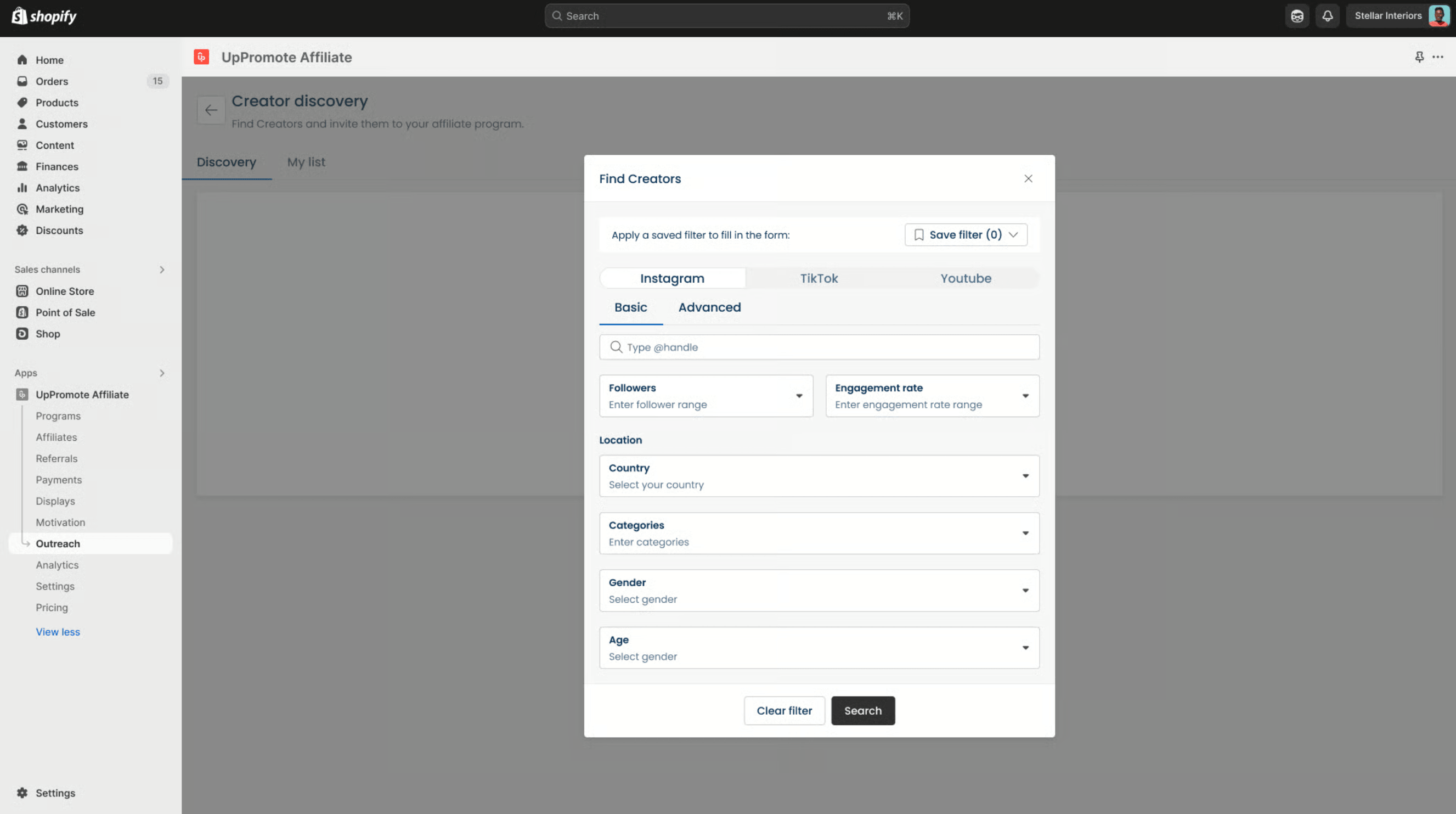
UpPromote's first route is outbound.
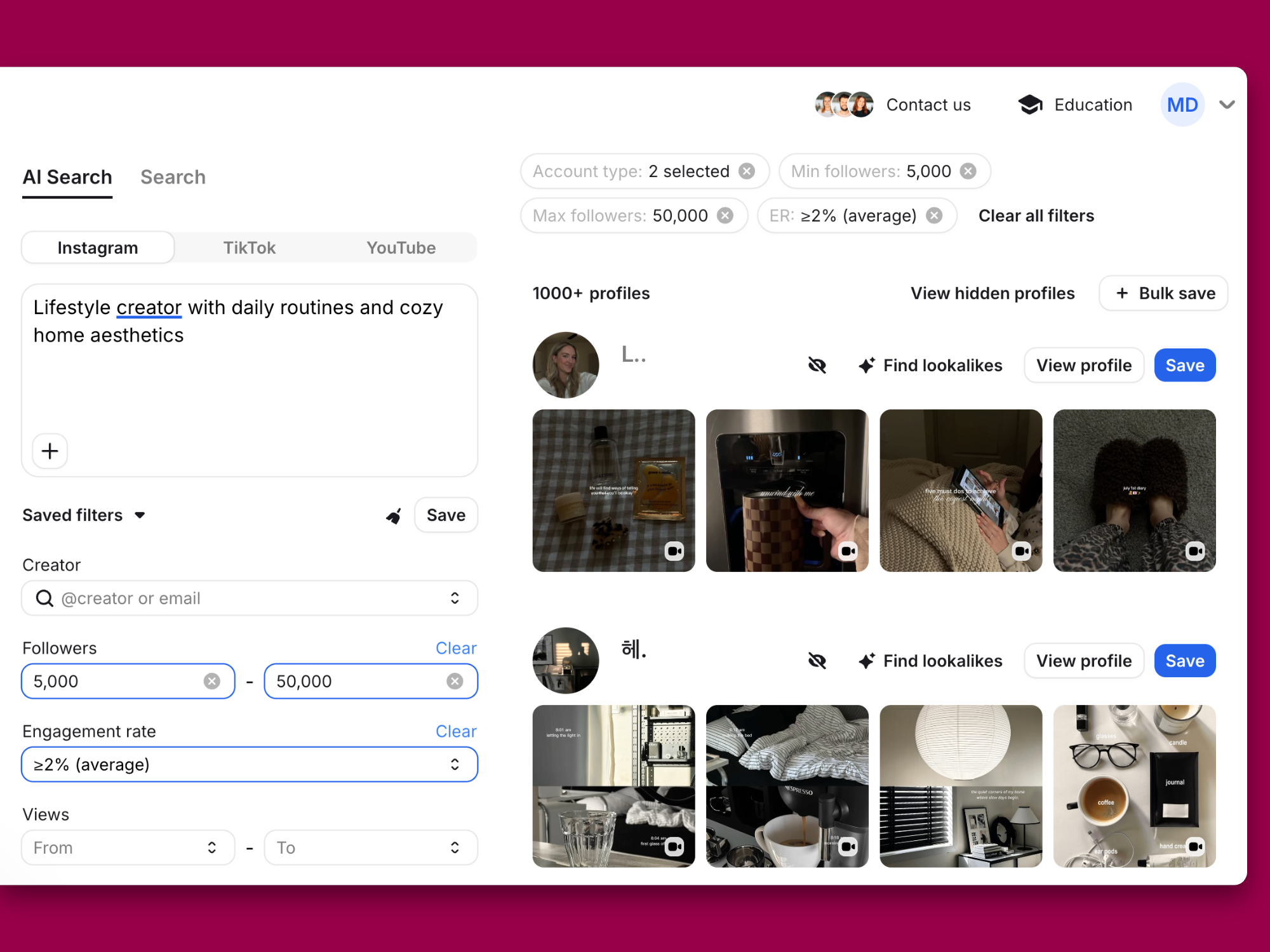
Inside the app, UpPromote's Creator Discovery feature lets you look up creators by niche, follower count, engagement rate, location, and more. Then open a creator's report to view data on audience demographics, fake follower estimates, and content performance.
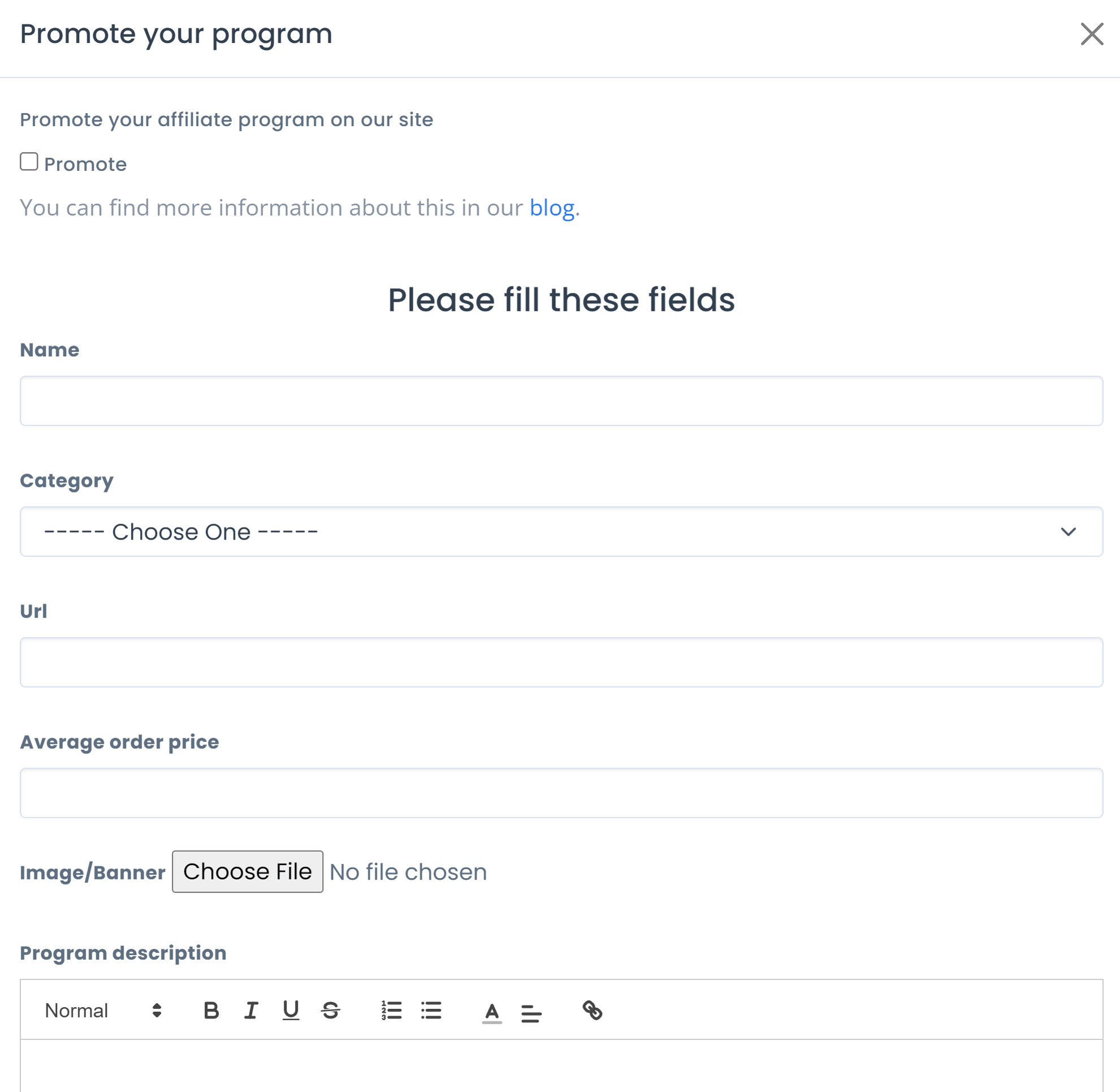
UpPromote's second route is inbound. The UpPromote Marketplace is a centralized platform that connects merchants with a network of affiliates – you list your offer, and affiliates discover it and apply from within UpPromote. Marketplace listing is available from the Growth plan or above, and you'll need at least one active program in your account before you can list.
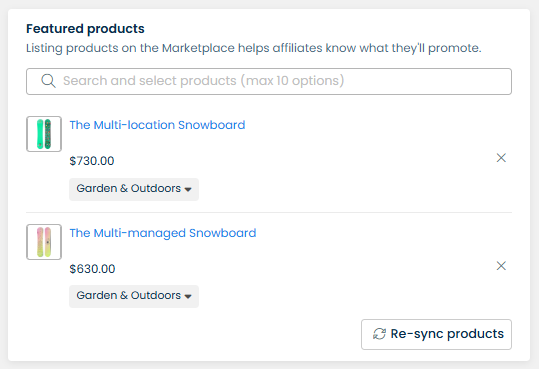
Recruitment on Affiliatly is inbound-only.
Affiliatly hosts a public directory of affiliate programs that affiliates can browse and register for, filterable by category such as Apparel/Clothing, Health and Fitness, and Internet Services. Affiliatly's recruitment runs through that directory rather than through a creator search inside the app.
In practice, your program grows at the pace affiliates find you, so the directory works best when you already have a recognizable brand or a strong commission offer to advertise.
However, neither approach gives you a large, open creator pool to search with audience filters.
That's the gap Modash fills as influencer-first affiliate recruitment software – you search a database of 380M+ creators and pick who to approach. You see each creator's audience demographics and engagement metrics during discovery, before you send a single outreach message, so you can qualify affiliates before they ever join your program.
Bottom line: UpPromote offers both outbound creator search and inbound marketplace applications. Affiliatly fits brands happy to have affiliates find the program in its public directory and register themselves. Modash lacks a marketplace but goes further on the outbound side, with a 380M+ creator database and audience data visible before outreach.
Both tools handle Shopify affiliate tracking, so the real question is whether you need coverage beyond Shopify.
UpPromote is an affiliate platform built for Shopify. You build affiliate programs, track sales, set commissions, and pay affiliates without leaving Shopify. It carries the Built for Shopify badge and holds a 4.9/5 rating from over 3,900 reviews.
The flip side is that UpPromote is a Shopify app, so it only comes into play if your store runs on Shopify.
Affiliatly integrates with Shopify, BigCommerce, and WooCommerce, and offers a custom integration process for platforms it doesn't list. For Shopify, BigCommerce, and Ecwid stores, Affiliatly sets up the integration automatically, though it still recommends testing. Affiliatly also connects to WordPress stores.
Selling on Shopify but sending creator traffic elsewhere too? Modash connects to Shopify for affiliate sales attribution and commission tracking, and its tracking links record clicks on any website, so you can measure creator traffic to landing pages or external sites regardless of where you sell.
Bottom line: UpPromote is a Shopify app through and through, which suits merchants who want everything inside the Shopify admin. Affiliatly works across Shopify, BigCommerce, WooCommerce, Ecwid, and custom-integrated platforms, so it fits brands that sell outside Shopify or run more than one storefront.
UpPromote takes a cut of approved referral sales, Affiliatly charges a flat fee by affiliate count, and the gap between them widens as your program grows.
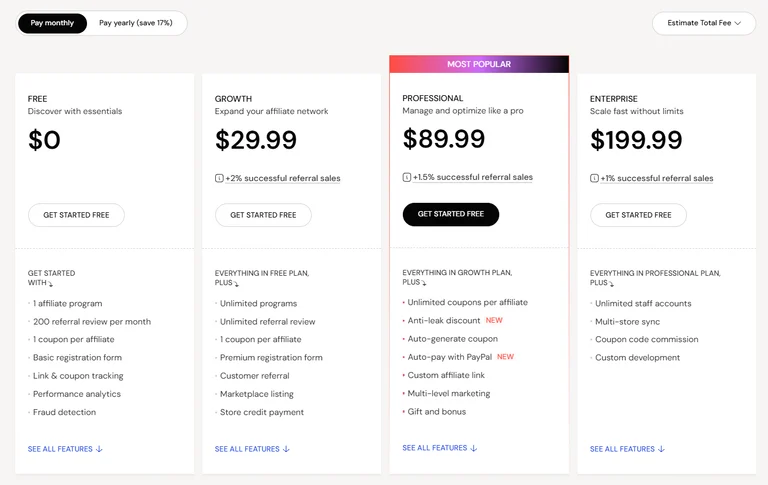
On top of its recurring subscription, UpPromote has a performance fee, calculated as a percentage of approved referral sales. The Growth plan costs $29.99/month plus 2% of successful referral sales. The Professional plan costs $89.99/month plus 1.5% of successful referral sales, dropping to 1% on the Enterprise plan.
The fee is the total sales amount of approved referrals multiplied by your plan's rate, so a bigger month for your affiliates means a bigger bill.
Affiliatly prices by how many affiliates you manage, not how much they sell.
The Starter plan costs $16/month and covers unlimited orders and up to 50 affiliates. Larger plans add more affiliate capacity and features, and all come with a 14-day trial.
One detail for Shopify stores: Affiliatly bills Shopify merchants through Shopify's own subscription plans and billing cycles, so the price options differ slightly from other platforms.

Modash takes a third approach by charging a flat fee plus a separate, optional, percentage-based fee on the total amount you pay affiliates. For example, on the Performance Annual plan, payouts carry a 0% fee up to $10,000 in total payout volume per year, and a 5% fee applies only to the amount above that. You pay affiliates from a single Modash invoice, and Modash handles the payment and tax side.
Bottom line: UpPromote's cost rises with every approved referral sale, which suits brands that want a free plan to start and accept a performance fee as they grow. Affiliatly's bill is predictable and tied to affiliate headcount, so brands with high sales volume and a small affiliate roster will usually pay less. Modash fits brands that want the bill tied to affiliate payouts rather than sales.
The next decision is how an order gets credited: which signals count, which one wins when 2 apply, and how long after the first click a sale still pays out.
Both tools cover the 2 methods most affiliate programs run on, a unique link and a personal coupon code. The difference is what else each one can use to decide who gets credit.
UpPromote gives you 4 tracking methods: affiliate link, coupon code, connected customer, and connected product or collection. UpPromote says these methods run side by side without overlap, so a shopper who arrives through a link and then types in a coupon doesn't create a double credit. When a shopper clicks an affiliate link, UpPromote saves a cookie so a later purchase within the cookie period still credits that affiliate, and you set the cookie duration, which averages 30 days.
Affiliatly offers 6 tracking methods: link, coupon, QR code, SKU, email, and tag. Those extra methods come with a priority order that decides who earns commission when more than one applies.
SKU tracking sits at the top of that order, so a product on the Disabled SKU list earns no commission even if the shopper arrived through an affiliate's link or coupon. Email tracking comes next and overrides link and QR tracking, which means a customer whose email is tied to one affiliate stays credited to that affiliate even when they check out with another affiliate's coupon or link.
If you'd rather run attribution on one clear rule, Modash makes it straightforward to track affiliate sales with links and discount codes on Shopify, using a 30-day attribution window you can shorten to as little as 1 day per program. Credit always goes to the last creator the shopper clicked, and discount codes attribute regardless of when the link was clicked, so a customer who sees a post on their phone and buys on their laptop still counts. Every tracking link also comes with a downloadable QR code you can drop into print materials and event handouts.
Bottom line: UpPromote covers links, coupons, connected customers, and connected products with a longer average cookie window, which is plenty when the link or code tells the whole story. Affiliatly fits brands that want product-level and customer-level rules deciding who earns commission, with SKU exclusions and email matching layered over links and coupons. If you'd rather skip rule hierarchies entirely, Modash credits the last creator clicked and leaves it there.
The next decision is what to pay affiliates, and the 2 tools get you to that number in different ways.
UpPromote hands the question to an AI-powered assistant that recommends commission rates and setup structures for your program. According to UpPromote, the assistant learns from 50,000+ affiliate programs to suggest a structure that fits your business. If you're launching your first program, that means you start from a suggested rate rather than a blank commission field.
Affiliatly takes a guided route instead, with a 10-step quickstart in the admin panel's Setup tab that walks you through launching an affiliate program. One of those steps covers how affiliates get paid and how they register, so payout and recruitment basics are settled before the program goes live.

Affiliatly also includes an optional 2-tier affiliate program, configured under Settings > General, where you can enable it for new or existing affiliates, add a recruitment bonus, and set a two-tier commission percentage. The 2-tier commission goes to the referring affiliate on top of what the referred affiliate already earns, and you choose whether it's calculated on the referred affiliate's earnings or on the total order sum.
If you'd rather not untangle test links from paid ones later, Modash lets both live side by side without extra admin – you decide, link by link, whether a sale from a Shopify tracking link earns an affiliate commission. You also set how long after a click a sale still counts, anywhere from 1 to 30 days.
Bottom line: UpPromote suits brands that want a recommended commission structure before they commit to one. Affiliatly fits brands that prefer to work through a checklist and want the option of rewarding affiliates who recruit other affiliates.
Once affiliates start sending traffic, the question shifts to whether the program is paying for itself. UpPromote and Affiliatly answer it from different sides of the program – 1 from your dashboard, the other from the affiliate's panel.
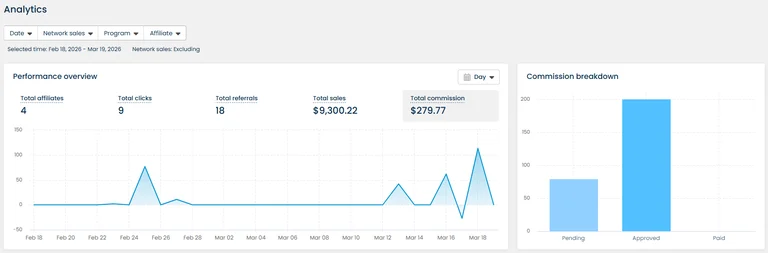
UpPromote's Analytics page gives you a central dashboard for tracking how your affiliate programs perform over time. It includes a performance overview, performance insights such as conversion rate, AOV, ROI, and CAC, a commission breakdown by status, and a ranking of top affiliates and products by sales.
Four filters (date, network sales, program, and affiliates) apply to almost all data on the page, though you can't use the program and affiliate filters at the same time.
By contrast, Affiliatly doesn't automatically calculate or display ROI or CAC directly on its dashboard. But it does track total visitor counts, referral clicks, sales, traffic volumes, and more.
Meanwhile, Modash reports click performance for every creator link, broken down by device, location, and traffic source, and it also tracks the content creators post so you can see how a partnership performed before and after the sale. Plus we automatically report metrics like CAC and ROAS.
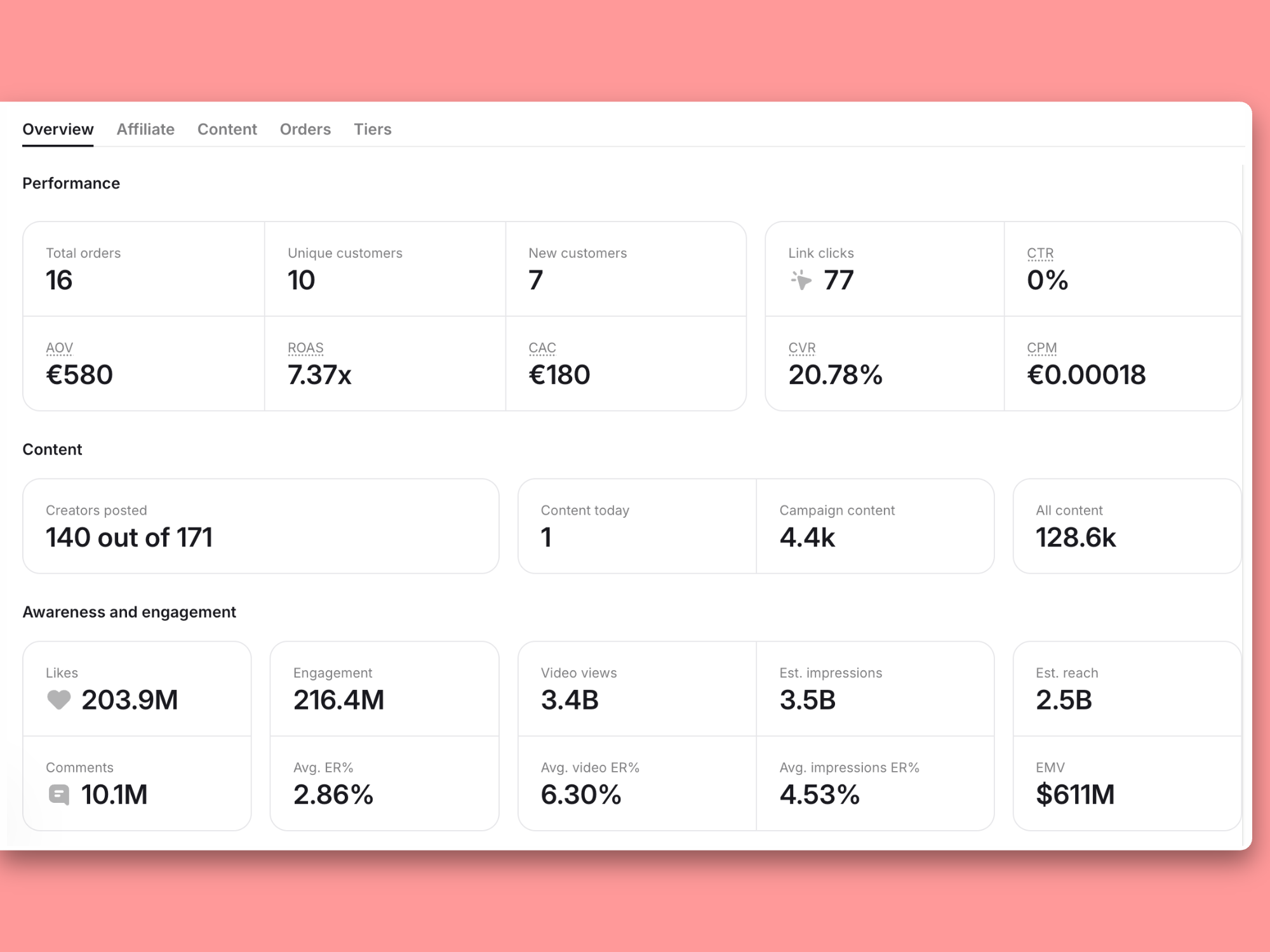
Bottom line: Unlike Affiliatly, UpPromote puts program-level ROI and CAC numbers in one dashboard, filterable by program or affiliate. With Modash, click and content performance sit next to each creator link, plus you get automatic ROAS and CAC calculations.
Once commissions are approved, the next decision is how you'll pay affiliates each month without building a spreadsheet. Both tools get the money out the door. The difference is how much of that work happens inside the app.
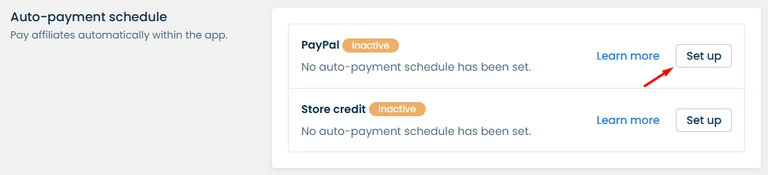
UpPromote lets you pay affiliates without leaving the app, by PayPal, Wise bank transfer, or store credit. On the Professional plan and above, you can schedule PayPal payouts to run automatically. Store credit can be scheduled for automatic payout on the same plans. Scheduled payouts can run on a specific date each period or on a recurring payment cycle, which cuts manual work and keeps affiliates paid on time.
Affiliatly runs more of the payout step outside the app, with options including PayPal, bank transfer, and store gift cards.
For bulk payments, Affiliatly generates a PayPal MassPay file. You select the affiliates who have passed the minimum payout sum, create a payout request, and download the file to run through PayPal.
Using PayPal Payouts requires a PayPal business account, and PayPal support has to enable the feature for you. Once the payout completes in PayPal, you go back into Affiliatly and mark it as paid.

If you'd rather not run payouts manually, Modash sends you a single invoice and handles creator payment and tax on your behalf.
Bottom line: UpPromote keeps the whole payout inside the app and automates it on the Professional plan and above. Affiliatly covers PayPal, bank transfer, and gift cards, and its bulk PayPal payouts run through a downloaded MassPay file that you confirm afterward.
The last question is the one neither tool answers: what did your affiliates actually post? An affiliate dashboard tells you what happened after a click, not what went live. If a creator posts a Reel or a TikTok with your link, you find out when the clicks and orders arrive, not when the content does.
UpPromote's affiliate dashboard shows each partner's total clicks, orders, and sales, and its Commission tab marks every commission as approved, denied, or pending. That's a sales-side view of what an affiliate contributed.
Affiliatly's affiliate panel reports from the same angle, and its Stats tab only counts paid orders in the conversion figures it shows. An affiliate who has posted several times this week but hasn't converted yet won't register in those numbers until an order is paid.
Neither UpPromote nor Affiliatly pulls the posts themselves into the dashboard, so you won't see post links, views, or engagement next to the sales data. To learn which post drove a spike, you ask the affiliate or check their profile by hand.
If you'd rather see the post sitting next to the sale, that's the gap Modash fills. Modash tracks the content creators post alongside their clicks and sales, so you can see which posts drove results without collecting screenshots.

Every click on a Modash tracking link is recorded as well, so you can measure traffic from specific creators and gather engagement analytics in the same place.
Bottom line: UpPromote reports clicks, orders, sales, and commission status per affiliate. Affiliatly reports conversions on paid orders only. Neither UpPromote nor Affiliatly shows you the posts behind those numbers, so if content performance matters to your program, you'll need a separate layer for it.
UpPromote and Affiliatly both tell you what happened after a click, but neither shows you the posts your affiliates published. Recruitment is the other open question – UpPromote's creator search caps report views per 30-day cycle, and Affiliatly waits for affiliates to find your program in its directory.
Modash is built for brands that want to find, track, and pay affiliates in one place. You search a database of 380M+ creators and see each creator's audience demographics and engagement metrics before you send a single message, so you qualify affiliates up front rather than after they apply.
Once a creator is on board, Modash tracks the content they post alongside the clicks and Shopify sales their links drive, so you can see which posts actually moved product. You pay affiliates from a single Modash invoice and Modash handles creator payment and tax.
Try Modash for free with a 14-day trial – no credit card required.