Capabilities
Integrations







Use cases
Capabilities
Integrations
Use cases


Contrary to popular belief, tracking influencer performance involves two separate jobs. For some reason, the image of two kids standing on top of each other wearing a trenchcoat comes to mind, but I digress.
Most teams have job one figured out (albeit badly, usually via screenshots and a humble spreadsheet) and then take a stab in the dark at job number two.
The problem is, neither job really tells you anything on its own. A post with 40k likes looks good from the outside, but if it’s driven zero sales it’s not the hero you thought it was. In the same vein, $6k in revenue you can’t trace back to a single creator is equally as useless.
The two jobs only really work when you tie them together, creator by creator, in one place.
Here, I’ll show you how to do just that, including the metrics you should be tracking, how to set up tracking before your campaigns kick off, and how to act on what you find when everything’s live.
By the end, you’ll be able to answer the million-dollar question: which creators are actually making us money?
When people say they're "tracking influencer performance," they usually mean one of two very different things.
They either mean content tracking, a.k.a. keeping tabs on what creators are posting and checking if they went live, if they used your hashtag, if they tagged your account, and if they included the appropriate disclosure.
It’s easy enough to do a scrappy version of content tracking. You can create a basic spreadsheet, get a load of screenshots, and put together a folder of links.
Or, they mean performance tracking, a.k.a. they’re looking at the clicks on a piece of content generated, the codes that were redeemed, and any revenue that can be attributed back to it.
| Types of influencer tracking | What it tells you | What you still don't know |
|---|---|---|
| Content tracking | What each creator posted, and whether it was compliant | Whether or not the partnership is worth the budget |
| Performance tracking | How much each creator drove in clicks, redemptions, and revenue | What they posted, or why it worked |
Neither half is enough on its own. Tie them to the same creator and the gaps close – you see what someone posted and what it earned. And that starts with tracking the right numbers on each half.
The trickiest part of all this is that not every metric needs to be in your report… so you have to figure out which ones matter for you.
Before we get into figuring out which metrics matter in your situation, here are some common numbers you can track:
| Metric | What it tells you | When it matters |
|---|---|---|
| Reach | How many unique people saw the content | Awareness campaigns, new product launches |
| Impressions | How many times the content was displayed | Gauging exposure across boosted or repeated content |
| Engagement rate | How the audience reacted, relative to size | Comparing creators of different follower counts |
| Comments, shares, saves | Depth of engagement and basically who cared enough to act | Judging content quality and how well it resonated |
| Clicks (total and unique) | How many people followed the link | Every campaign with a sales or traffic goal |
| Code redemptions | How many people used a specific creator's code | Any affiliate or gifting program where creators share a code. |
| Conversions (campaign) | Total sales driven by your influencer program | Judging whether the channel is working overall (if your goal is sales) |
| Conversions (per creator) | How many sales each individual creator drove | When you want to spot creators who are bringing the most sales |
| Revenue / net revenue | Gross is total sales. Net is after discounts, returns, and refunds – and net is what commission is based on | Deciding who to keep, cut, or scale + paying commission that doesn't eat into your margin |
| Average order value (AOV) | What people spend (on average) when they buy through a creator | Comparing creators who drive fewer, bigger orders vs. many small ones |
👉 Want a deeper dive on any single metric? This guide breaks each one down.
Which metrics matter can vary wildly depending on your program, your product, and your goals. Annoyingly, there’s no universal checklist.
Imagine there are two brands running the exact same campaign format where they gift products to creators in exchange for content:
Whatever your mix, the metrics above fall into two groups – the ones that tell you people noticed, and the ones that tell you they bought. They answer different questions, so it's worth being clear on which is which.
Reach, impressions, engagement rate, and engagement depth (comments, shares, saves) all tell you the same basic thing: did people pay attention?
Note the emphasis on attention here – not revenue. Because, while engagement rate can absolutely tell you that a creator gets a ton of saves and interactions on their posts, it doesn’t tell you if that translates into cold, hard sales.
Pssst…if you’d like to see an influencer’s engagement rate in a jiffy, try our free engagement rate calculator. All you have to do is enter the creator’s username and click “Check profile.”
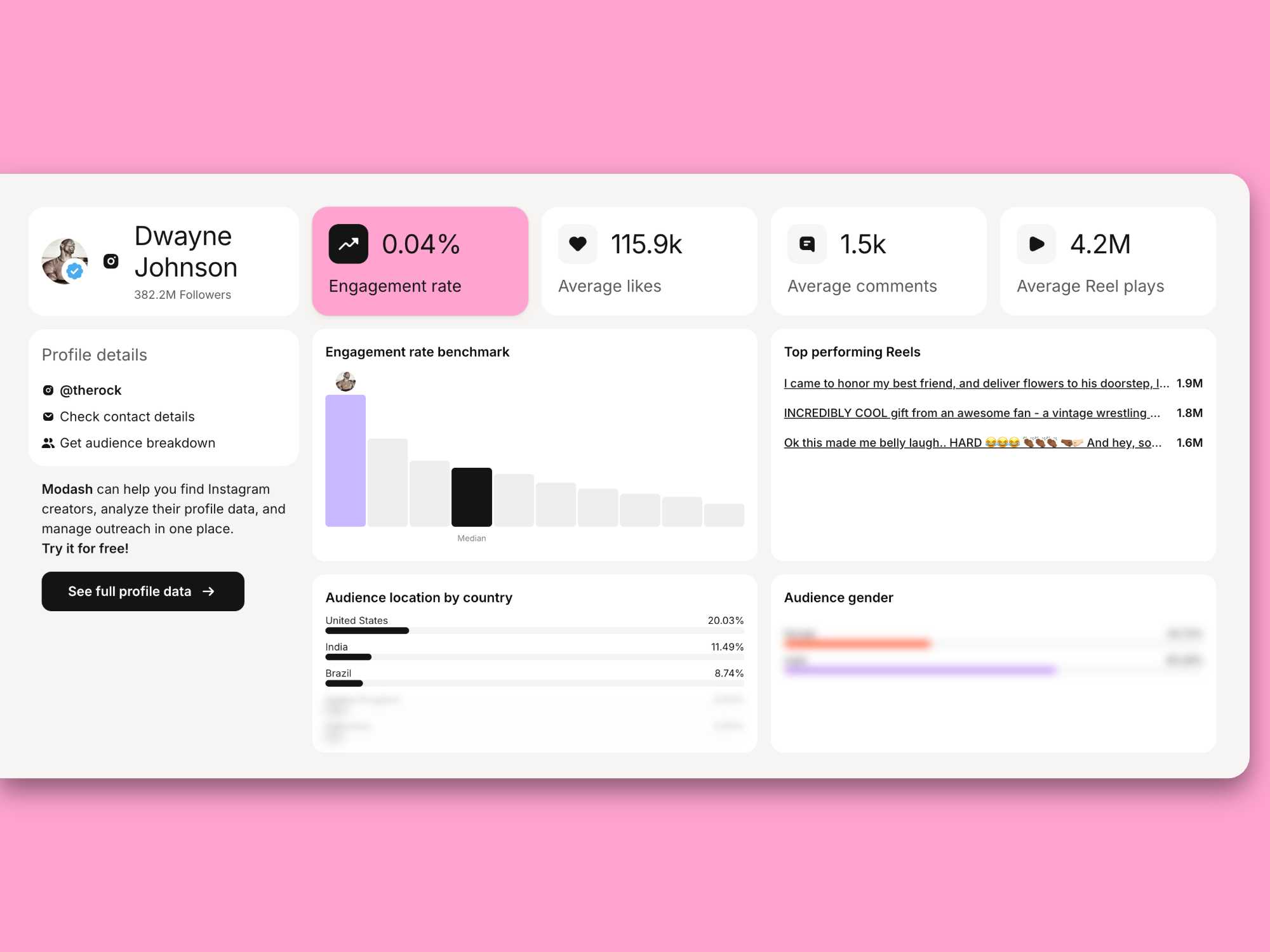
But I digress.
The important thing to remember is attention (and the metrics related to it) is a precondition for revenue, but it’s not a proxy for it.
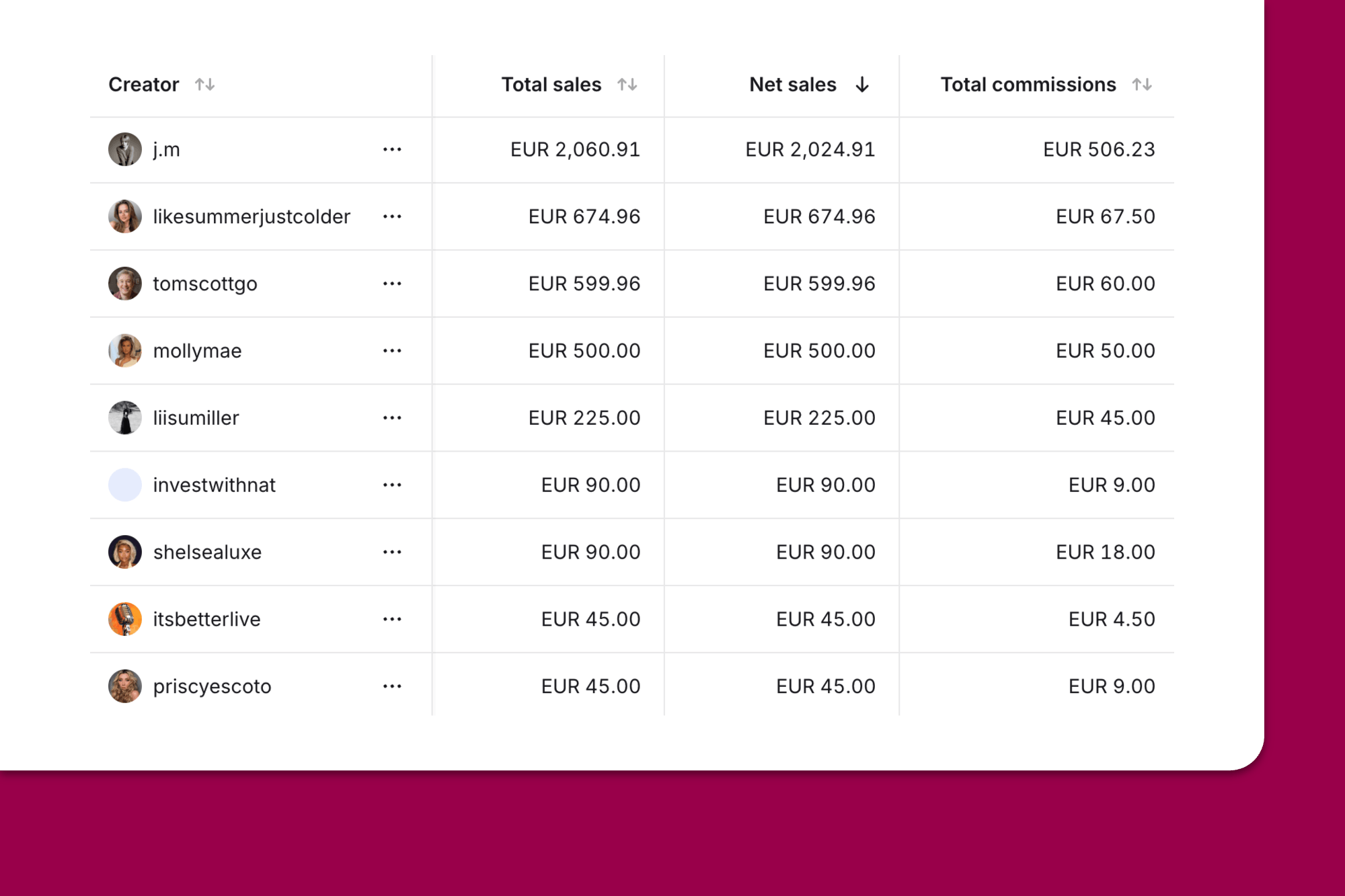
Clicks, code redemptions, and revenue are a good indicator of whether a creator or a piece of content is doing what it’s supposed to (spoiler: sell your products). To really get into the nitty-gritty of this, you should look at these metrics per creator alongside the overall campaign:
The tricky part is getting these attributed to the right creator in the first place. This is because the data is often spread across several very separate tools (i.e., clicks will be in GA4 and redemptions will be in your Shopify dashboard).
So, obviously, you have to cross-reference a lot. Luckily, an influencer marketing platform like Modash handles this all from one place and breaks it down per creator. Both discount codes and tracking links tie each sale back to the creator who drove it.
It's completely understandable to lean on the numbers that are easiest to pull, like follower count and likes which are right there on the post, while revenue and ROAS take a little digging to find.
But remember: easy to find isn't the same as useful to report on.
Follower count and raw like counts, on their own, tell you almost nothing about whether a partnership is working. They're easy to pull, easy to put in a slide, and easy to disguise as some kind of performance (especially if they look big and pretty).
That's not to say they're completely useless though. A follower count gives you a sense of scale, and likes can hint at whether content is resonating. But when they’re reported as "performance" on their own, without any tie to clicks, redemptions, or revenue, they just tell leadership a creator is popular, not that they're making you money.
Note that even meatier metrics like revenue can be in vain if you’re using them in isolation. As Andreea Moise says:
Any metric can become vanity if it's not grounded in insight and connected to outcomes. Even revenue. "Oh, look, we converted $50k in revenue this month through influencers. We're doing great!" – but if you spent $100k to get that and churn is over 10% and it's a mixed audience with separate goals that you have no idea how to retarget through content, it's not a long-term win. It's actually setting an impossible standard to scale and maintain for the team

All of this – picking real metrics over vanity ones, tying them to each creator – only works if the tracking is actually in place before anyone posts. Miss that window and you're reconstructing the data after the fact, which is exactly where most of it gets lost.
So here's how to set it up properly, from the start.
One thing before we jump in: you don't need a tool to start. If you're running a handful of creators, a spreadsheet can get you through your first few campaigns just fine. We've got a free influencer marketing spreadsheet template if you want a head start.
Once your program grows, that's when a tool starts earning its keep by taking the manual work off your plate. Each step below covers both ways.
Before you track anything, work out what the campaign is actually for. That comes down to your business priorities, your budget, and the resources you've got to play with – there's no point setting a goal your team can't realistically chase.
A one-person influencer team juggling 30 creators, a gifting program, and a Q4 push realistically can't track deep engagement, branded search, click-throughs, and revenue per creator all at once. Something has to give, so it's better to decide upfront what actually matters for this campaign.
Most campaigns come down to one of two goals: awareness or sales.
Sometimes you want both, and that's fine – attention and sales is the dream. But you still need to name a priority. Pick one or two primary metrics to judge the campaign by, and let everything else sit as secondary. Otherwise you're tracking a bit of everything and can't say whether any of it worked.
Once you’ve chosen your goal, add a tangible number to it (no, unfortunately “raise awareness” or “drive sales” aren’t good enough). Turn it into something like:
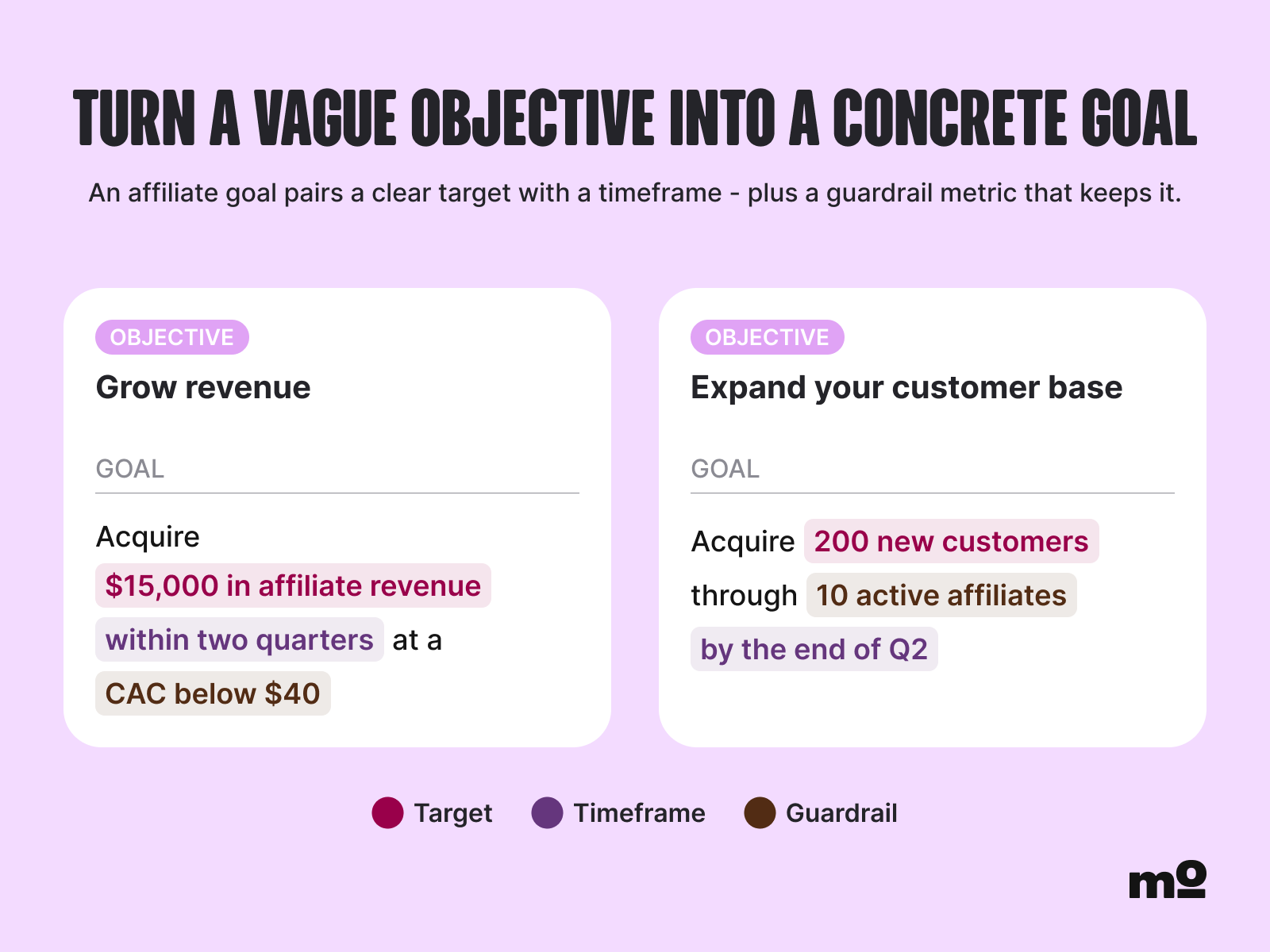
One pro tip: Put your goal and the primary metric in your creator briefs. If creators know what the campaign is aiming for, they can shape their content and CTA around it instead of guessing.
Lastly, go in knowing not every goal tracks cleanly. Awareness rarely gives you a hard number that proves cause and effect, and even sales journeys aren't linear. A spike in branded search or site visits is a strong signal, but treat those numbers as directional.
Still working out where goals fit in the bigger picture? Our influencer marketing strategy guide goes deeper on planning.
If you’re collecting influencer content by hand, that means saving post links and screenshots into your spreadsheet and checking in daily so you can catch Stories before they expire. This is pretty straightforward if you’re working with a few creators.
But it gets more and more complex and time-consuming if you’re dealing with influencer content across multiple creators and platforms. Not only is it a huge drain on your resources, it’s also impossible to catch everything at scale. No matter how careful you are, something always slips through.
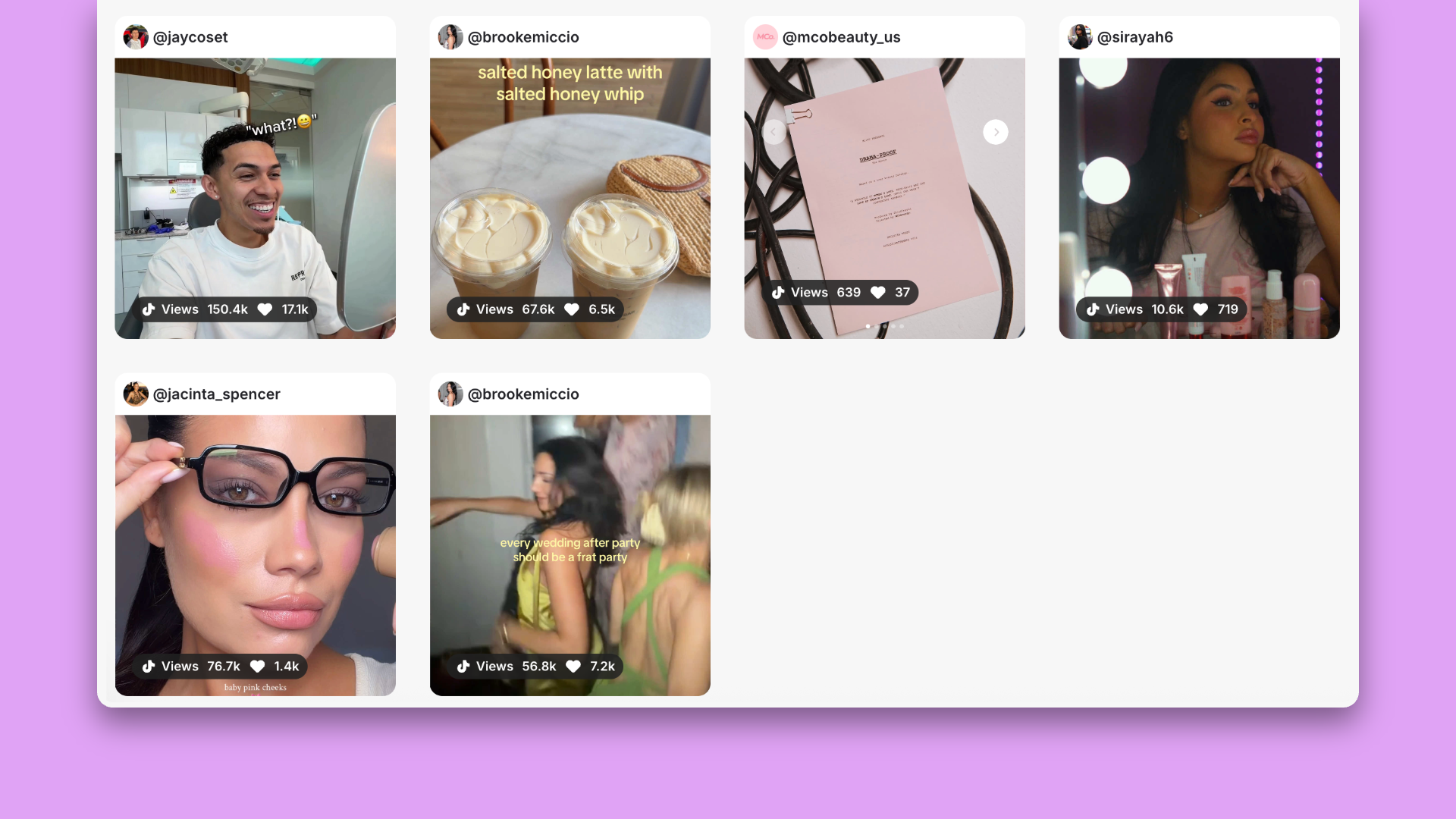
An influencer marketing solution like Modash solves this by auto-collecting creator content for you. It automatically pulls in posts, Reels, and even Stories by matching your campaign’s hashtags, mentions, and keywords.
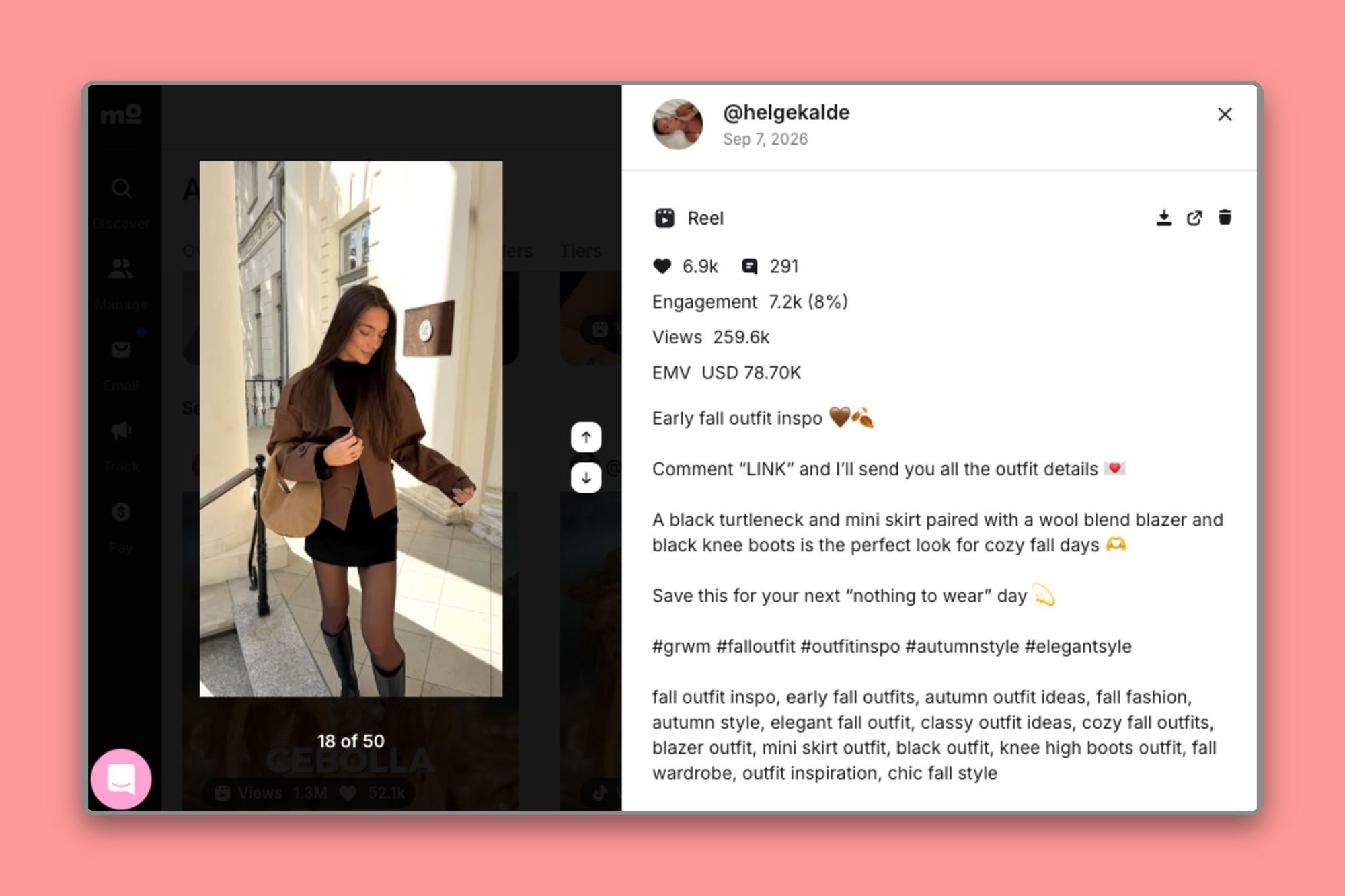
You can also see the performance metrics (aka reach, engagement, likes, comments, etc.) on a creator’s post:
And if a creator forgets to tag you, it’s no big deal. Event Mode in Modash catches everything a creator posts during the campaign window. So even if your influencer partner forgets to use the right hashtags/mentions or misspell a hashtag (slip ups happen!), you’re still guaranteed to see every post. The tool even flags if an influencer hasn’t met the FTC guidelines.
Try Modash for free for 14 days and see all your influencer content in one place.
If you’re going down the manual route, you gotta give each creator a unique discount code and UTM link, then pull redemptions from Shopify and clicks from GA4 into your spreadsheet. Sure, it works, but it’s a lot of hassle, especially when code numbers and link numbers don’t play ball.
If you’re scaling, sooner or later, you’ll want to upgrade from the spreadsheets and use an influencer tracking tool that can automate most of this for you.
Take Modash, for example. It automatically ties redemptions, clicks, and revenue back to each creator with a link vs. code split so you can see which influencer drove the most (or least) sales.
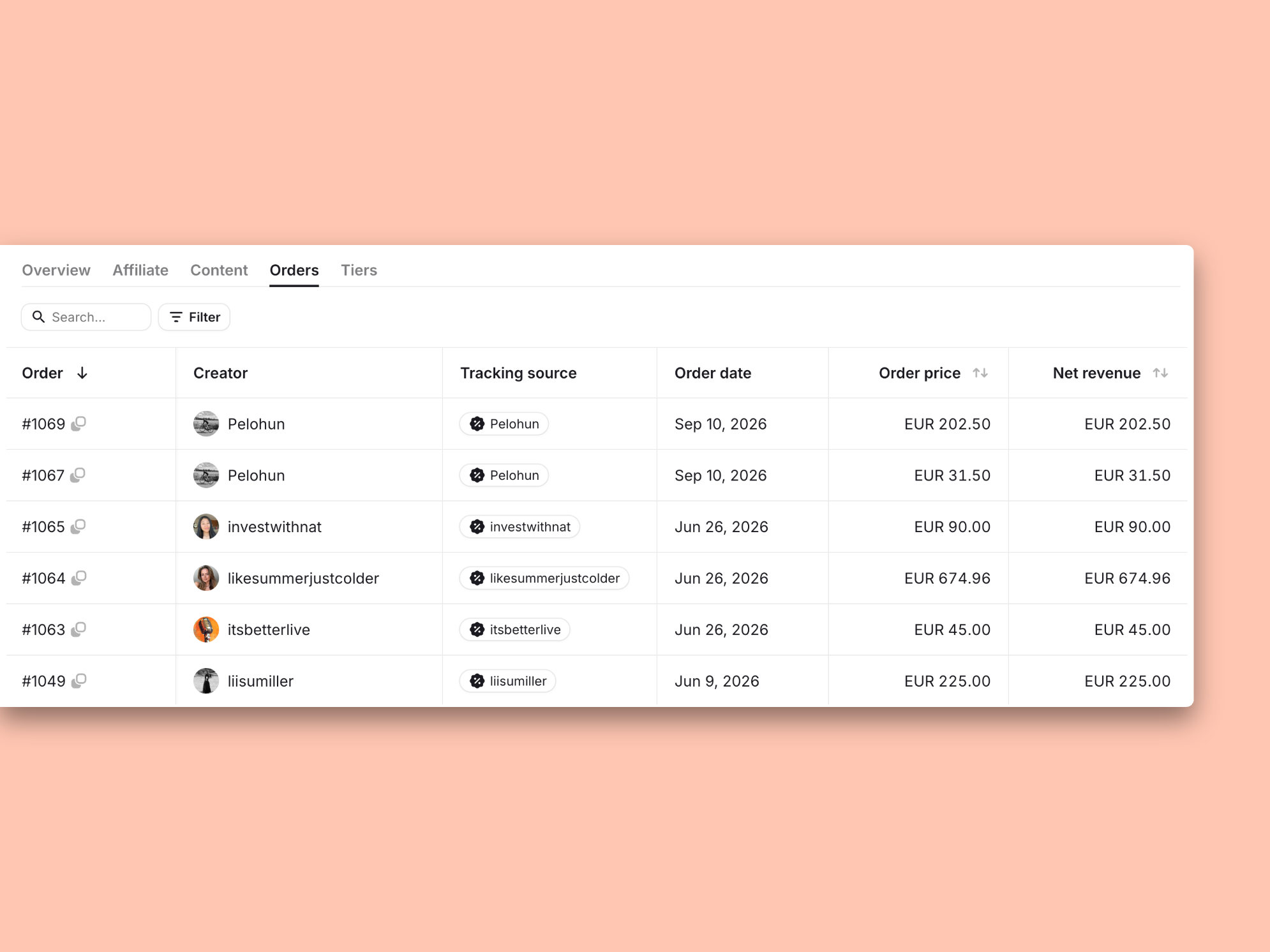
(Just FYI, codes take priority when both apply to the same order. You’re never paying a creator for the same sale twice.)
We go into waaay more detail on attribution windows and how sales get tracked in this article.
Oh hey, this is where it all starts to come together.
Build one view (a spreadsheet, a dashboard, anything that works for you) where you can plonk each creator’s content, engagement, clicks, revenue, and ROAS.
There's no native way to do this inside Shopify. It'll happily show you sales and discount code redemptions, but it has no idea what a creator posted. So you're back to stitching content from one place onto sales from another. Melissa Sorby, Senior Creator Marketing Manager at Metapic, ran into exactly this:
In my experience, Shopify affiliate tracking was limited to just clicks and conversion, and we couldn't cross-check content pieces without also using our affiliate marketing platform, so it was important to have both.

As you can expect, the manual version will only get you so far here. Once the numbers start ramping up, you’ll probably experience some kind of entry lag (when someone inevitably forgets to update the spreadsheet), a distinct lack of live updates, and small, seemingly insignificant errors that snowball into another beast entirely.
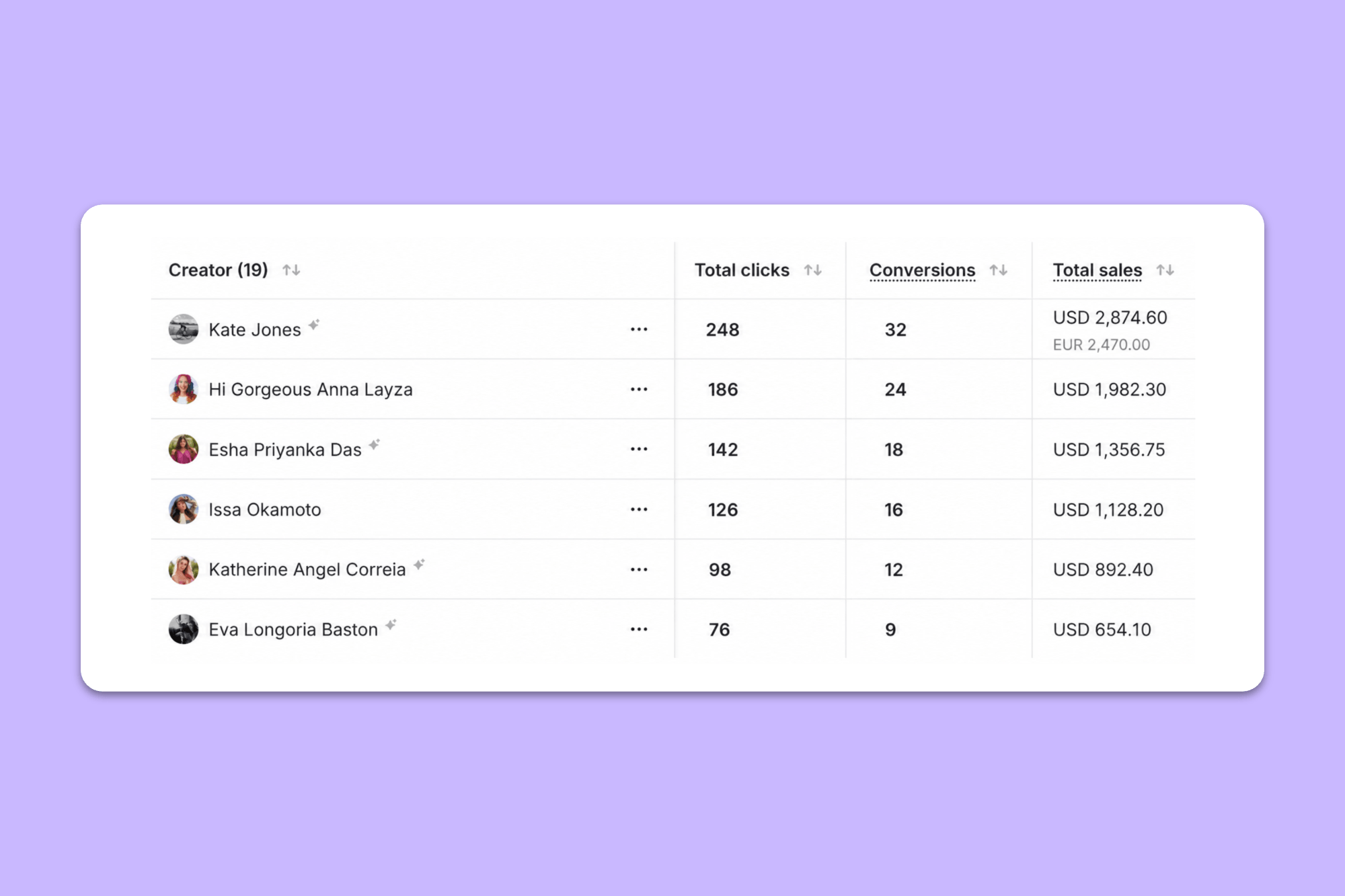
This is the job Modash does. It pulls each creator's content together with their clicks, redemptions, and revenue in one view, per creator and per campaign, and updates as data comes in. So you don’t have to do the manual stitching or deal with out-of-date rows.
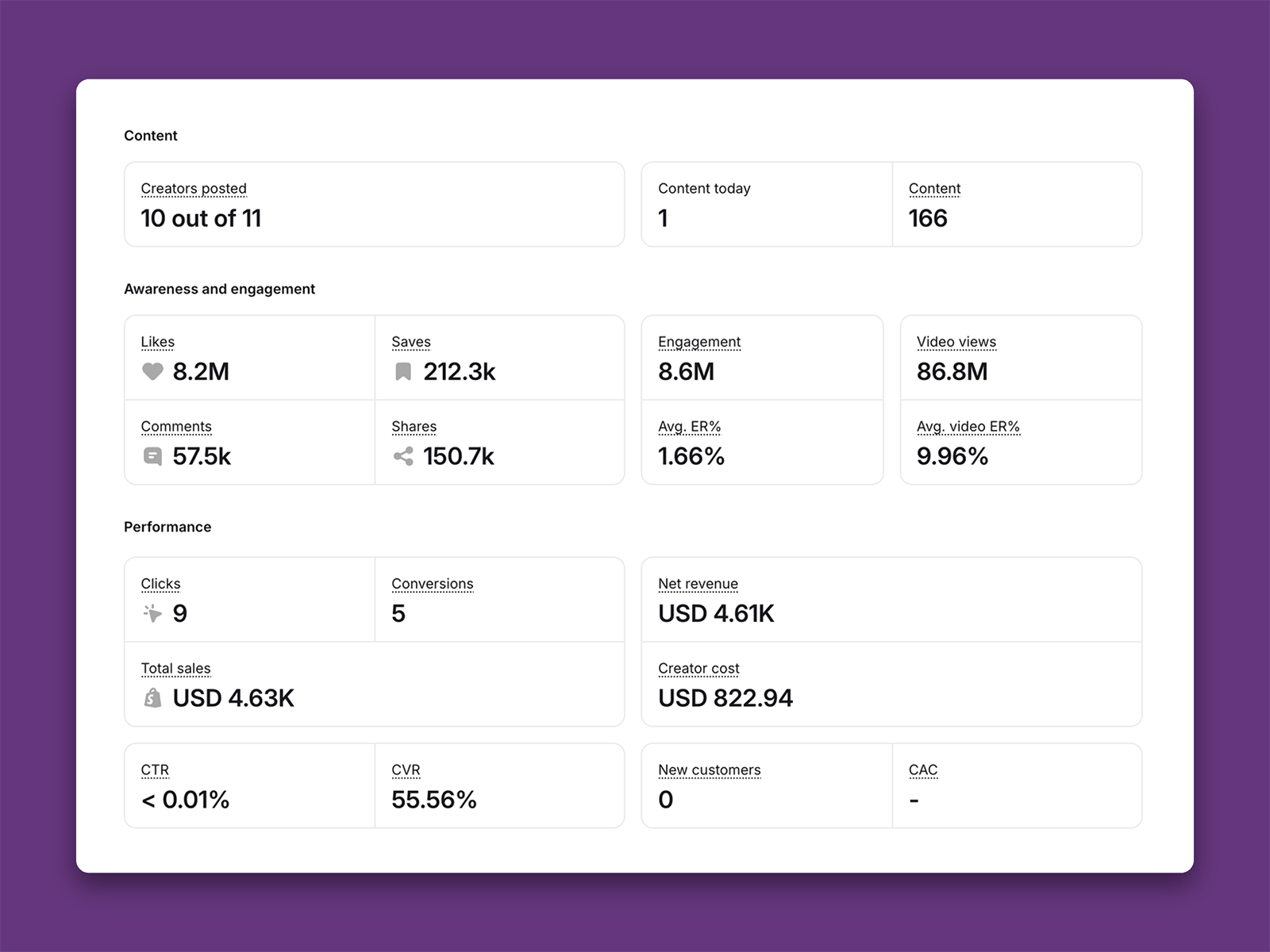
Tracking only really pays off if you do something with it. Set a regular check-in (weekly is a good default for most programs) and look at the numbers you can directly attribute to the campaign… we’re talking the usual clicks, redemptions, sales.
Modash gives you both:
Then, most importantly… act on what you see.
Stick with the creators driving results and cut the ones that aren’t. You can (and absolutely should) reallocate budget while the campaign is still live instead of waiting for a post-mortem.
Something worth doing alongside this is looking at the content.
The numbers tell you what’s working, the content tells you why.
Running a successful creator program is, like anything, a bit of a learning curve. In the early days, it’s not unusual to run into a few mistakes. Luckily, most are easy to rectify before they cause any real, lasting damage.
Imagine a shopper clicks a creator's link, then also punches in their code at checkout. If you're not careful, that sale will be counted twice (once for the click and once for the redemption), which makes it look like the creator is driving way more revenue than they are. Not to mention this will mess with the numbers of your overall program.
The fix: decide upfront whether you’ll honor code redemptions or link clicks when they both apply to the same order. Modash handles this automatically (codes take priority over links).
Awareness campaigns and sales campaigns on two completely different playing fields, so it makes zero sense to score them in the same way. If you're side-eyeing a creator's ROAS on a campaign that’s not really designed to sell anything, you might just end up cutting out a partner who was doing what you asked (a.k.a. raising awareness)
The fix: match the metric to the goal. Reach, engagement, and branded search tell you if an awareness campaign worked. Save ROAS and revenue for campaigns built to sell.
Let’s say a creator drives $10k in sales this month. Sounds great, until $2k of that comes back as returns three weeks later. $8k is obviously still a great result, but you might end up making important decisions (like who stays and who goes) based on that original $10k even though it’s not the “true number”.
The fix: always track net revenue (after refunds and returns), not gross. It's a less flattering number, sure, but it's true (and the one Modash calculates by default).
If five creators are all pushing the same code, congratulations! You now have zero idea who’s behind each sale. The best you can do is split the receipt five ways and hope no one’s grumpy with the outcome.
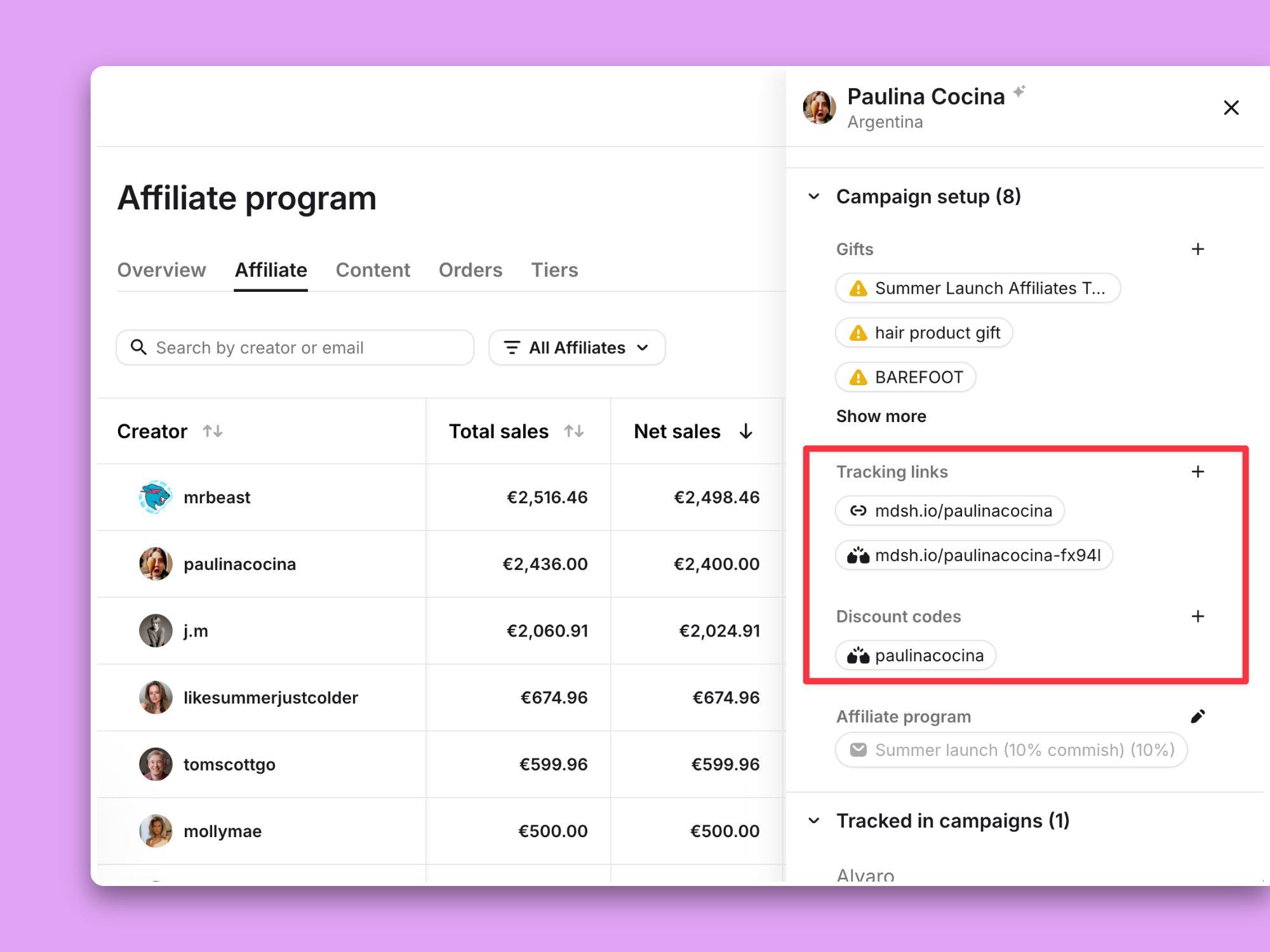
The fix: use a unique code and a unique link for each creator every single time. Modash automatically generates these for each creator so redemptions and clicks always, always link back to the person who earned them.
Tracking what your creators post and tracking what those posts do in terms of clicks, buys, etc., can get you into a muddle real quick if you’re not doing it in the same place.
When they’re split across a spreadsheet, 70 tabs (we see you), and a folder of screenshots, you’re basically tasked with piecing together a very complicated puzzle and figuring out the why behind it all yourself.
But when everything’s together in one glorious, singular dashboard, you can answer the pressing why questions without breaking a sweat (or your browser) and spend more time building relationships with creators and improving your overall strategy.
That’s why you need a tool like Modash. It auto-collects creator content across multiple social media platforms, then ties each creator’s clicks, redemptions, and revenue straight back to them in one campaign view. You can also zoom out to a campaign-wide view and get the full picture in a jiffy.
Try Modash free for 14 days and see it for yourself.
You track two things at once: what a creator posted (content, tags, disclosures) and what it drove (clicks, redemptions, revenue), then tie both back to the same creator. You can either do this manually or automate it using a tool like Modash.
Give each creator a unique discount code and a tracking link, then attribute sales back to whichever one a customer used. Codes and links can disagree on numbers, so it's worth tracking both and deciding upfront which one takes priority when a sale could be credited to either. Modash lets you create both a code and a link for each creator, and automatically prioritises codes.
Yes, and it's a perfectly fine starting point for a handful of creators. It tends to become more hassle than it’s worth though once you're juggling several platforms and manually reconciling Shopify against GA4 every week. At that point, you might want to start looking at a dedicated tool.
Look at conversions, unique clicks, and revenue per creator, not just engagement or follower count. Note, though, that you won’t necessarily see every sale a creator influences in these numbers. Brand awareness content, in particular, can nudge someone toward a purchase days or weeks later with no code or link in sight. Try running a post-purchase survey asking people how they heard about you with an “influencer/ambassador/affiliate” option. This will help you catch at least some of that otherwise invisible impact.
Tracking is monitoring what a creator posts (the content itself) and whether it meets your hashtag and disclosure requirements. Attribution is connecting that content to actual outcomes, like a click, a redemption, or a sale, and crediting it to the right creator.
Weekly is a solid default for most programs, though sales-driven or higher-spend campaigns can warrant more frequent check-ins. The key is reviewing while the campaign's still live, so you can act quickly if something’s underperforming.
Our expert contributors