Capabilities
Integrations







Use cases
Capabilities
Integrations
Use cases


Affiliate conversion tracking is kinda like playing catch with an egg. It all seems so simple… until it breaks.
And, to continue this clumsy analogy: just like in that game of catch, when tracking goes wrong, you end up with egg on your face. Think bad data and overpaid or underpaid affiliates. Which, in turn, leads to damaged relationships with your fav creators.
If you want to avoid all of that, read on and I’ll help you self-qualify where your tracking setup is vulnerable and what to fix. And no more egg stuff, I promise.
(PS if your store runs on Shopify, you might want to head over here instead: Shopify Affiliate Tracking: 5 Ways to Set It Up (and Where It Breaks))
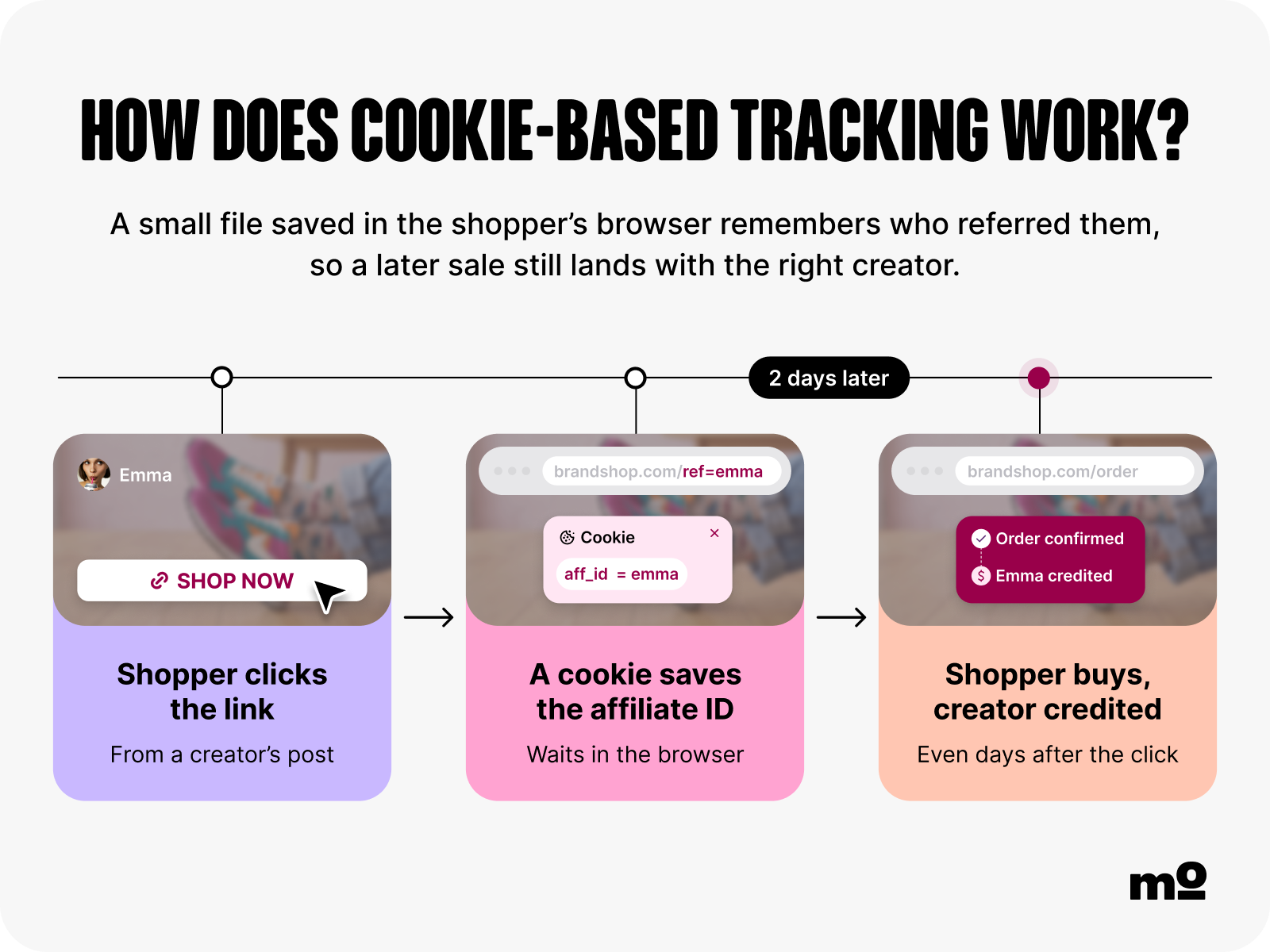
Cookie-based tracking is one of the most common methods of affiliate conversion tracking. A cookie is a small text file dropped in an internet user’s browser when they click an affiliate link. It “remembers” the affiliate whose link they clicked, allowing any resulting conversions to be attributed to the right creator – even if the user doesn’t buy straight away.
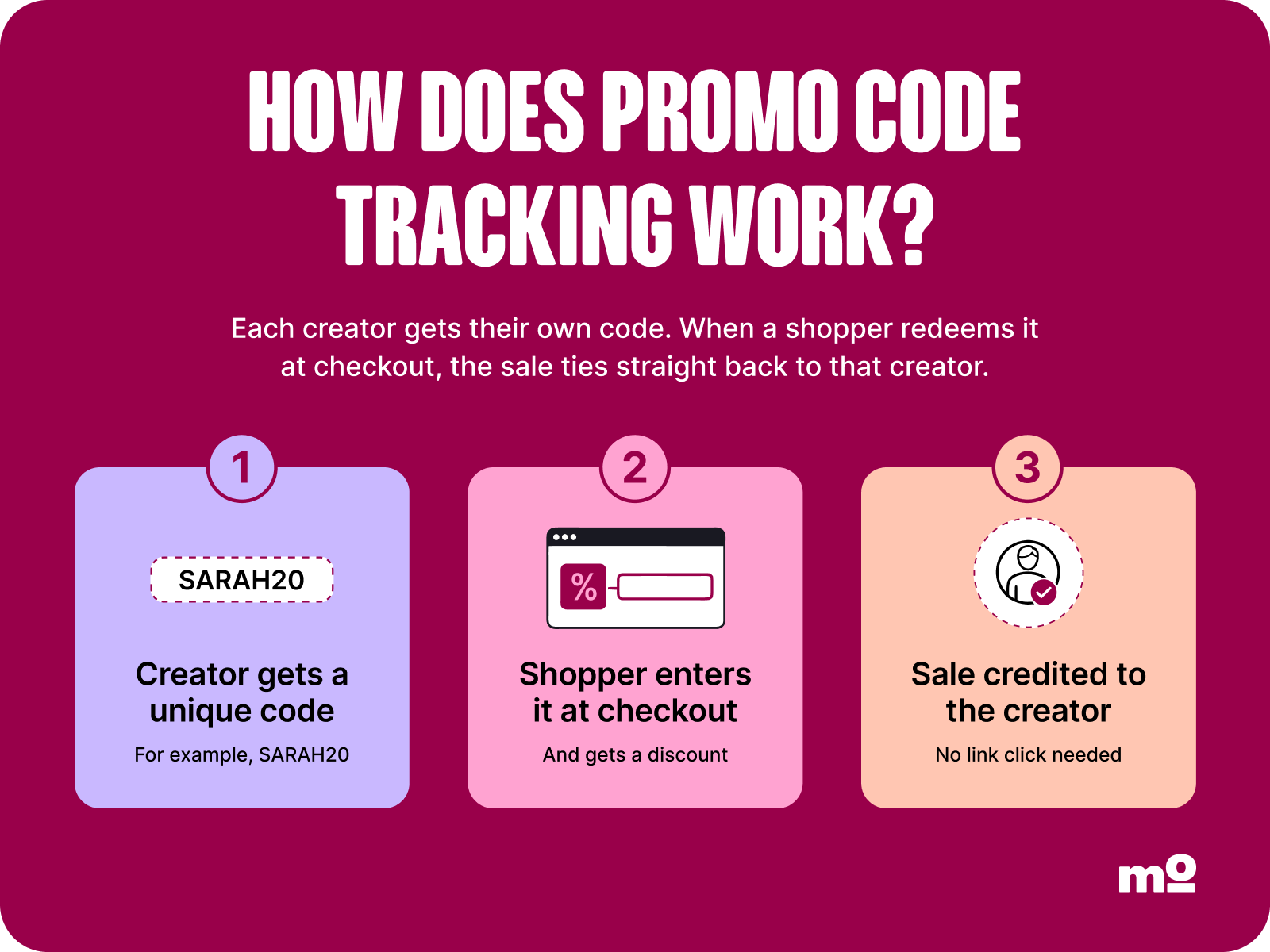
Promo codes are another common tracking method. It works by assigning a unique code to each affiliate. When a customer enters that code during the checkout process, they receive a discount and the sale gets tracked back to the relevant affiliate – it’s a double win 🥳

UTM-based tracking is super popular too. A UTM is a custom tag added to the end of an affiliate link URL. When a user clicks that link, the UTM parameter tells analytics programs like Google Analytics where the clicker came from, thereby ensuring any resulting sales are attributed to the right affiliate.
⚠️ FYI: UTMs can be lost when the user returns through another channel, or switches to a different device, or clears their cookies (or various other ways, too), which means they won’t track any subsequent conversions.

Cookie-based tracking isn’t watertight, because cookies can be blocked, which stops sales being attributed to the right creator. One solution is to use a cookie-free alternative like postback tracking, where conversion data is sent directly between your store’s server and that of your affiliate tracking platform ↔️ That way, the data can’t be touched by cookie restrictions or ad blockers.
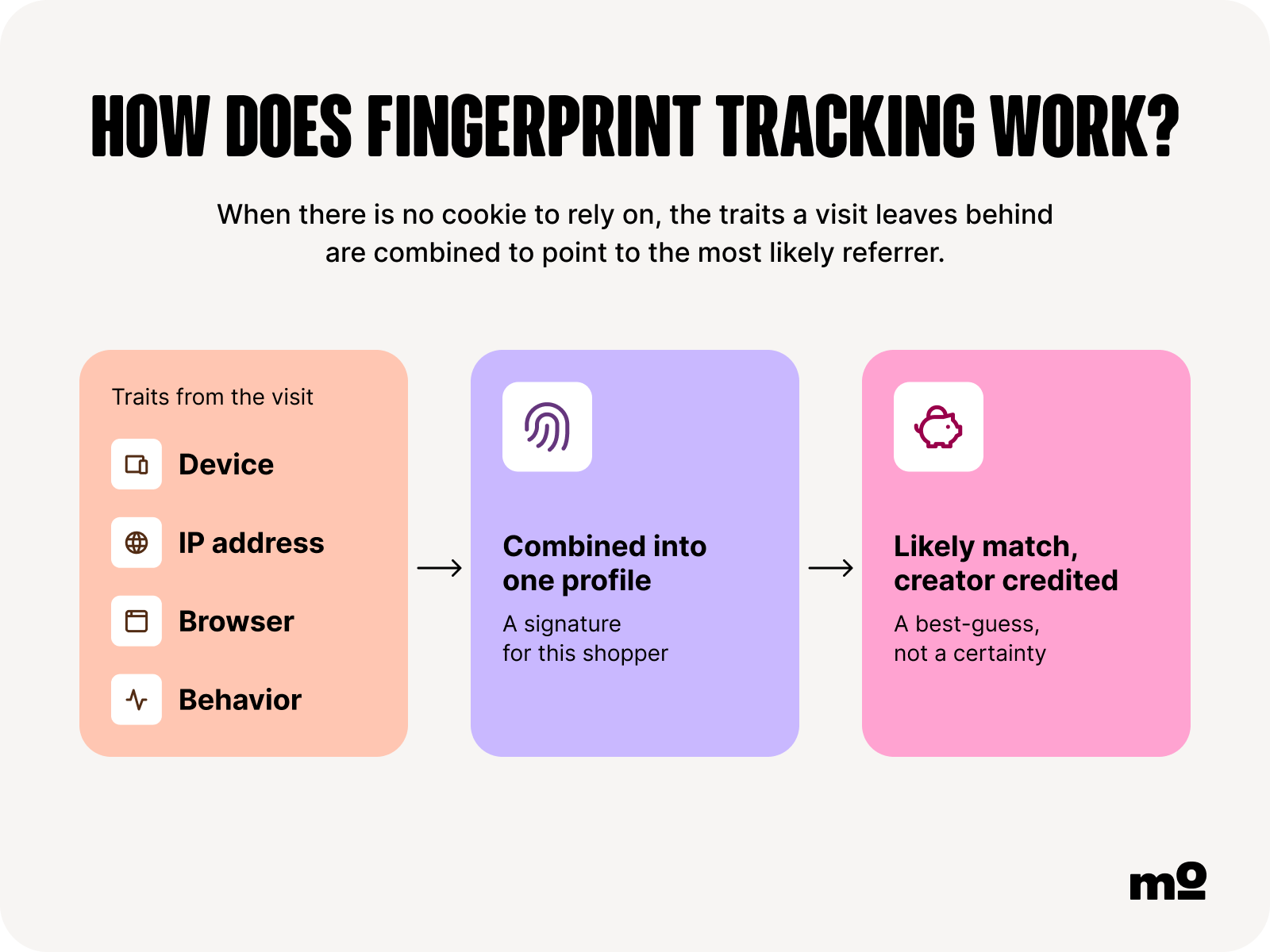
Another cookieless solution is fingerprinting and probabilistic tracking. This advanced tracking method involves digitally profiling a user based on various characteristics, like their:
This approach is more complex than traditional cookie-based tracking, but it offers a valuable safeguard in cases where cookies aren’t available.
⚠️ FYI: Fingerprinting and probabilistic tracking can be privacy-sensitive and may be restricted by consent/privacy rules, browser policies, and platform terms in some regions, so you’ll definitely want to check compliance in your region before using it.
Let’s start simple:
Your first step is to choose one of the tracking methods I outlined in the previous section 👆 Ultimately, this decision is up to you, but most stores use a combination of three approaches:
That way, if one method falls down – say, the cookie gets blocked or the user forgets to enter their discount code – you’ve still got the others as backup.
Assuming UTM parameters are part of your chosen affiliate conversion tracking system, your next step is to set those parameters up correctly. Specifically, you can assign values for several different parameters (although you don’t need to use them all)...
It’s totally possible to set all this stuff up manually using a tool like Google’s Campaign URL Builder. But, as you can probably imagine, it becomes a real drag at scale – imagine creating dedicated UTM parameters for dozens of creators 😬
That’s why lots of affiliate marketers streamline this process by using creator marketing solutions like Modash, which generates unique affiliate links per creator directly within the platform (AKA no manual link-building).

Plus you can save even more time by adding dynamic variables and saving your most popular UTM templates. Smart stuff, eh? See for yourself by creating your free Modash account!
As well as picking your attribution method, you also need to define your preferred attribution model. Broadly speaking, there are three to choose from:

Now, I can’t tell you which is best for your store – but I can share some helpful advice from a legit expert in the form of Melissa Sorby, former Influencer Marketing & Advocacy Manager at ALLIES OF SKIN. For Melissa, there’s a clear winner:
First-click attribution is better in my experience as it allows the original source to be credited for their influence. This seems fairer for creator marketing, where you may need a day or two to consider a purchase before buying.

In particular, Melissa says the first-click model makes most sense for brands with more considered purchase cycles and higher price points because it can take longer to complete the sale.
On the flip side, if you typically see more “impulse purchases”, last-click attribution might be better for you.
Time decay offers a more nuanced approach, making it an attractive choice in various scenarios – like if you work with a diverse mix of affiliates (social media creators, bloggers, comparison sites, etc) and don’t want to over-reward the first or final clicks.
As I’ve already noted, using promo codes in tandem with affiliate links gives you a fallback when cookies get blocked or UTMs get stripped.
Like with building UTM links, it’s easy enough to create and assign unique promo codes if you’re only working with a handful of creators – just make them up yourself, then paste them all into a spreadsheet so you can attribute sales to the correct affiliate. In fact, we’ve even created a free affiliate tracking spreadsheet template for you 🎁
But if you’re scaling your program and/or collaborating with 10+ affiliates, do you really want to spend hours every month manually matching orders + promo codes to individual creators?
I’m guessing not. In which case you’ll need a tool like Modash. With Modash, you can create and assign codes to each creator without leaving the platform.
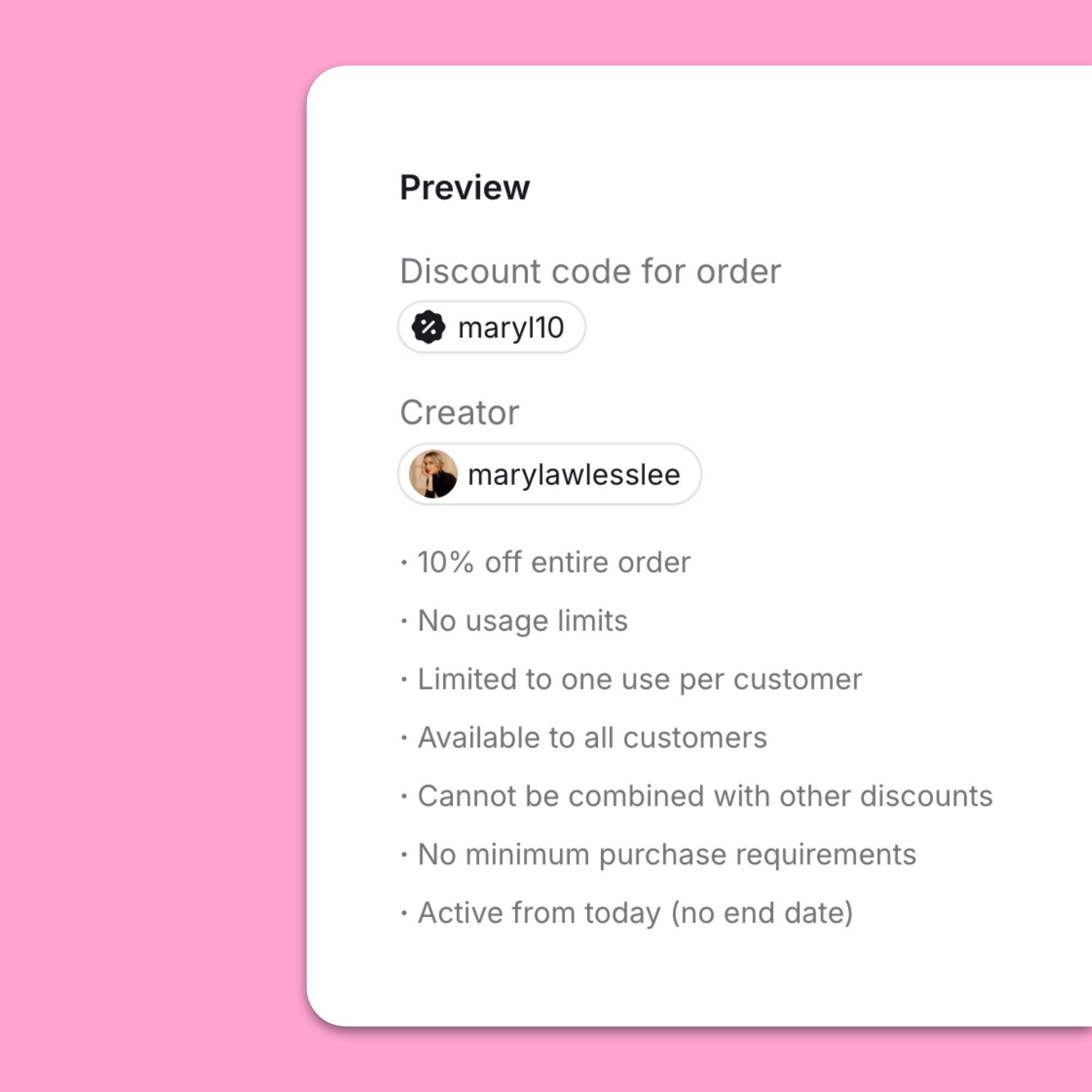
Not only that, but if you’re on Shopify, Modash syncs with your store – so if a customer clicks an affiliate link and enters a promo code at checkout, the conversion tracks back to the same creator without double-counting.
A conversion event is any predefined user action that triggers a payout for the affiliate who referred them. From an ecommerce perspective, conversions typically = sales, but depending on your industry, they can also include things like:
The process of setting up conversion effects varies depending on which platform powers your website or store. But, in a nutshell, you need to install the native app for your chosen sales channel (e.g. if you’re on Shopify and running campaigns on Facebook and Instagram, you’d install the Meta Pixel app for Shopify). Or, for more advanced/custom setups, you can use a third-party tool like Google Tag Manager, or even edit your site’s source code yourself.
While installing an app is a whole lot easier than re-coding your website, all of those options are at least a little fiddly.
For a more user-friendly approach, use Modash. Our Shopify integration handles conversion tracking and revenue attribution out of the box, meaning sales are automatically tied back to the affiliate who drove them. So there’s no need to manually set up your own conversion events 😅
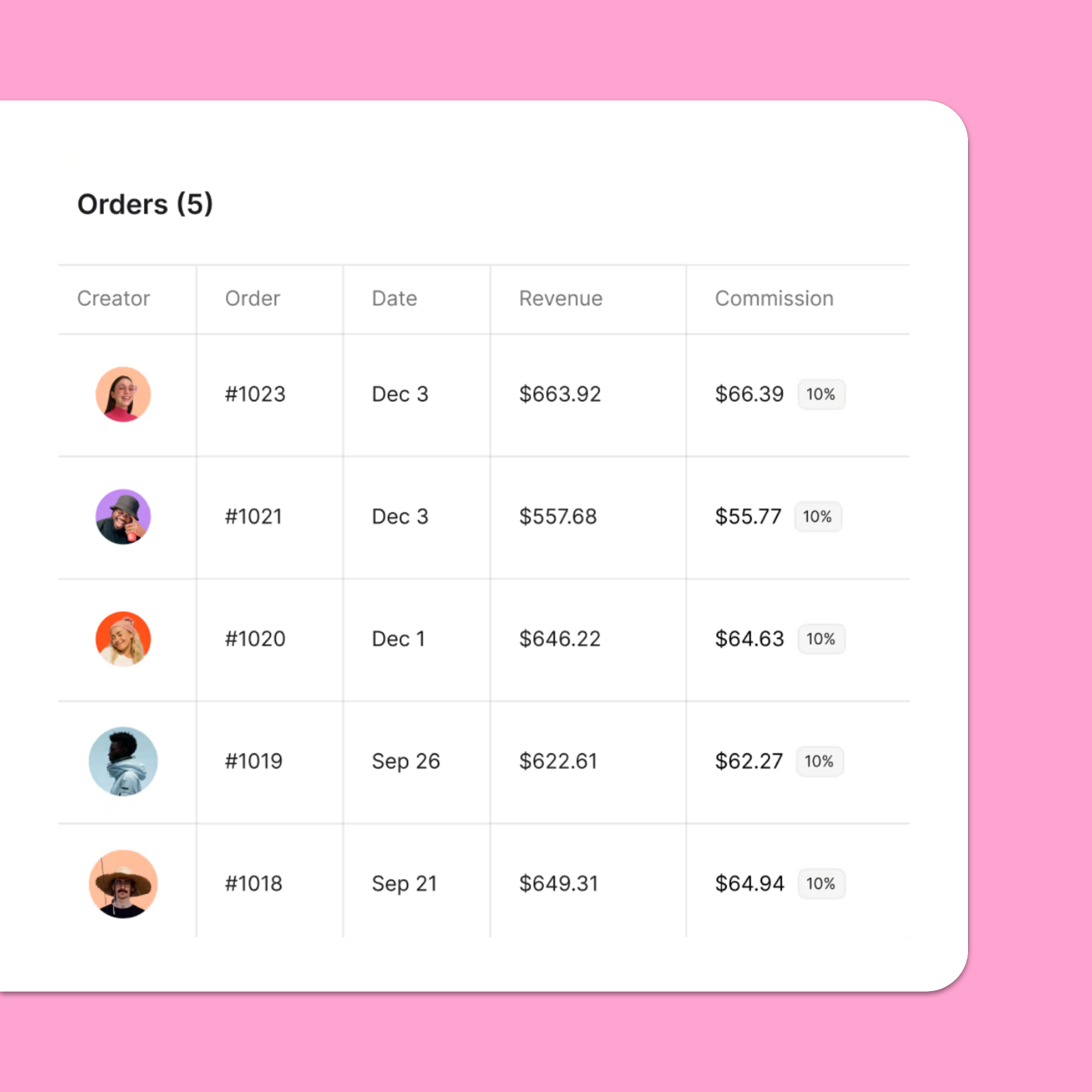
👉 Check out our Shopify integration – and all our other juicy affiliate program management tools – when you create your free Modash account!
The final two steps are short and sweet:
First, testing. Once you’ve set up your affiliate links, promo codes, and conversion events (or chosen a tool like Modash to do it for you), it’s worth placing at least one dummy transaction to make sure everything tracks as expected.
If not, you can figure out what went wrong without worrying about over- or underpaying your affiliate partners.
By this point, you’ve made all the necessary strategic calls around what and how to track, you’ve got it all working, and you’ve tested to make sure it works properly.
The only thing left is to write it all down and share it as part of your affiliate onboarding process to ensure your creator partners understand exactly when they will (and won’t) earn commissions.
This level of transparency should go a long way to reducing future commission disputes.
Again, I asked Melissa Sorby – former influencer + advocacy supremo at ALLIES OF SKIN – for a steer on where affiliate conversion tracking typically goes wrong. She was super clear:
I think promo codes being shared beyond the intended affiliate is the most common issue, and I think this would be the same for most in-house affiliate marketers.
This issue happens when an affiliate shares their code in places like Facebook discount groups and voucher code sites (or, alternatively, when their code gets leaked to a voucher site without their knowledge). The result: the code ends up getting used by people who were already planning to buy and are simply looking for a discount, rather than genuinely new customers.
🤓 How to fix it: While it’s impossible to completely stamp out this issue, there are a couple ways to mitigate it. First, cross-check the affiliate’s content output vs code redemptions; if their code has been used a ton of times but they’ve barely posted anything (or if their content sucks), there’s clearly a discrepancy. Secondly, try regularly refreshing your promo codes so any that have been leaked will stop working.
While it makes sense to use both affiliate links and promo codes, it can lead to the same conversion being attributed twice – which may mean you end up paying two commissions for a single transaction. Again, Melissa says this is a pretty common issue:
This can happen fairly often, especially if a customer clicks one creator's affiliate link but then checks out using someone else's promo code.
As long as the brand and affiliate network have clear rules in place from the start, it's much easier to avoid confusion around who should receive the commission.
🤓 How to fix it: This issue is most likely to cause problems when you track conversions manually, because it’s easy for a human to simply miss an instance of duplicate attribution – so the best solution is to use software for conversion tracking. For example, for Shopify stores, Modash automatically resolves double counting, which means no risk of overpayments.
For brands relying on cookie-based tracking, multi-device journeys can be a real headache. The customer clicks an affiliate link and browses your store on their phone, then returns a couple days later on their laptop to make the purchase. Unfortunately, the cookie doesn’t follow them across devices, so the original affiliate doesn’t get credited for the sale.
🤓 How to fix it: If you use promo codes as well as tracking cookies, this issue pretty much solves itself. Sure, the cookie gets lost somewhere along the path to purchase – but as long as the customer remembers to enter the discount code when checking out, the sale still gets attributed to the right creator.
Affiliate links might be one of the most common and effective tracking methods, but all those UTM parameters mean they’re not too easy on the eye…

…which might persuade some creators to use non-approved links or hide them behind vanity URLs.
Trouble is, doing this might remove all the crucial tracking elements, so the affiliate in question wouldn’t get credited for any conversions originating from their link 🤦♀️
🤓 How to fix it: Communication is key here. If, during your onboarding process, you warn affiliates that they might not get paid if they mess with their links, there’s much less chance of them doing it. Although you might still get some cases of creators altering their links accidentally, which Melissa says happens “occasionally”.
I’ve got a small piece of bad news for you:
However much thought and effort you put into setting up affiliate tracking, you can’t rely 100% on conversion data, because it only sees the sales it can attribute. The actual influence might be bigger than the data shows.
Oh, you want an example? I’ll give you an example: a customer sees a creator’s promotional post, types the store’s URL into their address bar, and pays full price for the product. No link click, no promo code, no credit for the affiliate.
Fortunately, even if you can’t track the sale, there’s other stuff you can track…
As well as looking at conversion data, you should be tracking the content your affiliate partners are publishing. Not just the volume of posts they share, but also things like:
Of course, if you’ve got 5 – 10+ affiliate partners, each posting a couple times a month, tracking all their content manually is a serious heavy lift.
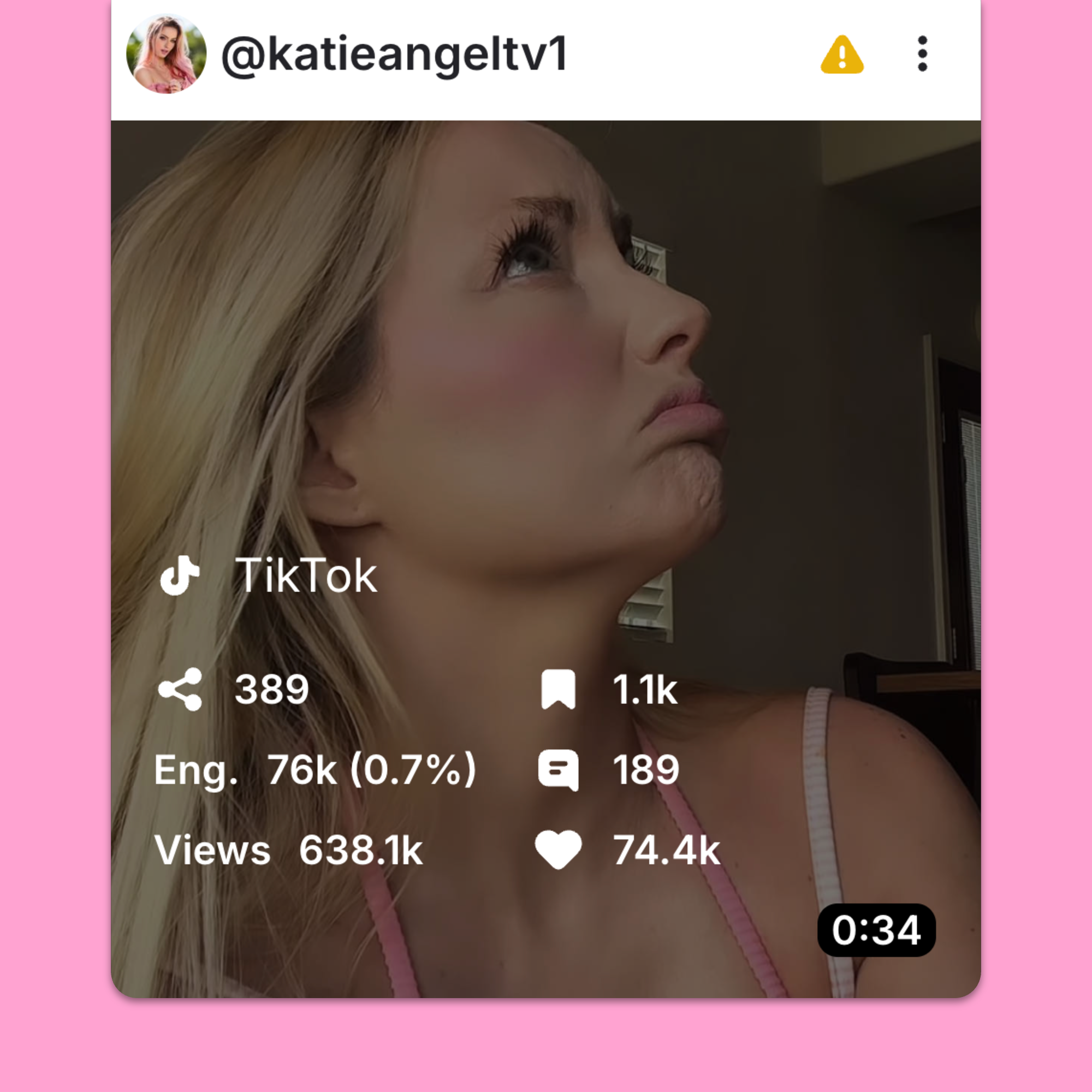
That’s why you need an affiliate tracking tool like Modash, which automatically captures all your live affiliate content across Instagram, TikTok, and YouTube – yep, even Stories – alongside performance data like views, engagement rate, shares, and comments.
You’ve got your conversion data. You’ve got your content data, too. Now it’s time to join them together 🤝
For example, let’s say you see a spike in traffic and sales. So you take a look at your affiliate content and see that in the same week, one creator shared a Reel that racked up 200k views. Sure, there’s no concrete connection between the two, but there’s certainly meaningful context.
The point here is that you shouldn’t see conversion data in isolation. Rather, look at it alongside content performance for a more complete vision of affiliate program performance.
There’s no such thing as the “best” attribution model for every affiliate program. There are simply too many variables, from the goals of your affiliate strategy to the length of your buyer cycle and your average order value.
So instead of a direct answer, here’s a comparison table to help you choose between first-click, last-click, and time decay attribution:
| Attribution model 📌 | Best for 💪 | Pros 👍 | Cons 👎 |
|---|---|---|---|
| Last-click | Brands focused on maximizing conversions and rewarding the affiliate that closes the sale. |
• Simple to understand and implement • Rewards affiliates that directly drive purchases • Supported by almost every affiliate platform |
• Ignores earlier touchpoints that built awareness • Can over-reward coupon and cashback sites that appear at the end of the journey • Undervalues content creators and influencers |
| First-click | Brands prioritizing customer acquisition and top-of-funnel marketing. |
• Rewards affiliates that introduce new customers • Encourages investment in awareness-building content • Recognizes influencers, bloggers, and publishers that generate initial interest |
• Gives no credit to affiliates that help convince customers later • May under-reward partners that actually close sales • Less suitable for conversion-focused programs |
| Time decay | Brands with longer buying journeys and multiple affiliate touchpoints. |
• Reflects the full customer journey more accurately • Rewards multiple contributing affiliates • Balances recognition between awareness and conversion partners |
• More complex to explain and manage • Requires multi-touch attribution capabilities • Commission calculations are less transparent than single-touch models |
When a creator says their sale wasn’t tracked, your only option is to dive into the data to see what went on. Did the order get attributed to a different creator? Did it even get tracked at all?
As you can imagine, this can be a pretty labor-intensive process if you’re tracking everything through spreadsheets. That’s why Melissa Sorby, who I’ve quoted throughout this article, says the best approach is to use affiliate software:
If a creator ever had a question about a commission, we'd be able to investigate by checking the attributed order, link activity, and discount code usage across our affiliate platform and our Shopify backend.
Sure! In fact, it makes sense to use both codes and links for tracking. That way, if one fails – such as if the UTM parameters get removed from a link, or the customer forgets to use the promo code at checkout – the other acts as backup.
Cookies now get blocked on iOS by default. This means that the majority of clicks and sales from Apple devices won’t be attributed correctly for brands that use cookie-based tracking. The solution is to switch to a more advanced tracking method, like server-side / postback tracking or fingerprinting and probabilistic tracking. Or use promo codes alongside cookies, so that if the cookie fails, you’ll still be able to track sales through code redemptions.
Last-click attribution awards 100% of the credit to the final affiliate link the customer clicked before purchasing. Multi-touch splits the credit between every affiliate link the customer interacted with along the path to purchase.
Our expert contributors