

More tools
Use cases



Affiliate marketing and ecommerce go together like marinated tofu and pickled cucumber in a banh mi (sorry, I’m writing this hungry). So you’d assume that Shopify, as the world’s most popular ecommerce platform, would make it pretty damn easy to set up an affiliate program.
But you’d be wrong, because it has no native affiliate tracking – i.e. there’s no out-of-the-box solution for measuring the results your affiliates are generating. Which leaves you with a choice of three methods that scale differently:
In this article, I’ll walk through each of those options, then set out seven steps to launch your own affiliate program on Shopify 🚀
Short answer: no. Or at least, not really.
Because Shopify has no built-in affiliate tracking, you’ll have to find some other way to measure performance. First up, let’s compare your three main options side by side…
…and now let’s take a deeper look at each:
Technically, there is a no-app method to set up affiliate tracking in Shopify:
Sounds simple enough, but there are some pretty glaring drawbacks to this workaround.
For starters, there’s still no affiliate link tracking – so if a customer buys without using a discount code, there’s no way to track the sale back to a creator.
With no affiliate-facing dashboard, there isn’t an easy way to share performance with your creator partners.
And even though this method is technically free, prepare to spend a whole heap of time staring blankly at a spreadsheet as you manually reconcile orders, codes, and payouts 😬
In short: the fully manual approach is peachy if you only work with a handful of affiliates. But once you scale to ~5 – 10+ creators, it becomes a serious drag.
Shopify Collabs is Shopify’s in-house creator and affiliate tool.
Although Collabs is a separate app rather than a core part of Shopify’s functionality, it’s built straight into the platform’s admin, and it’s totally free. Both of which make it a popular choice for brands that want a simple, affordable solution to test affiliate marketing.
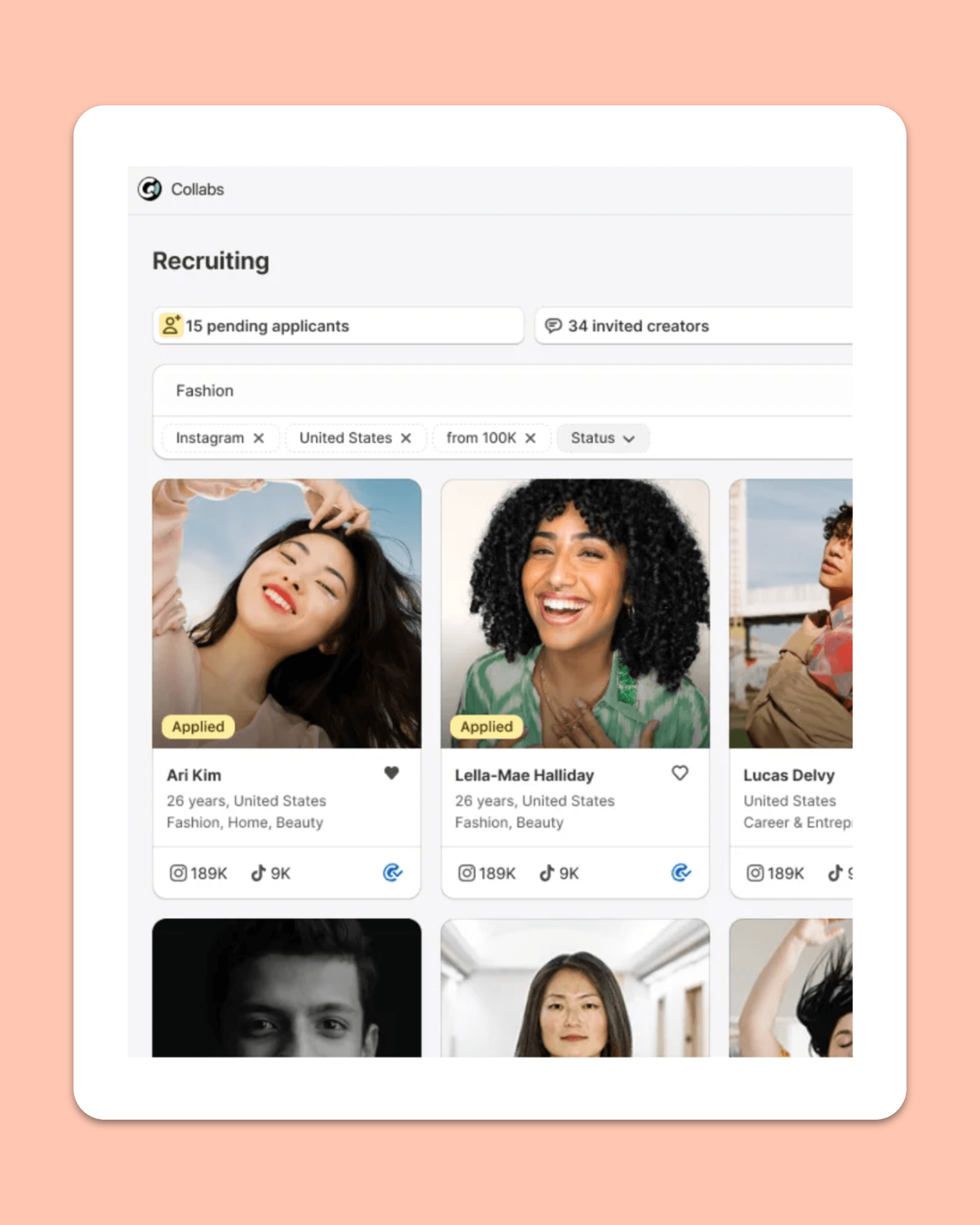
Oh, actually, the word “free” should have an asterisk next to it. My bad! Because while there’s no fixed subscription, Shopify Collabs does charge a 2.9% processing fee on commission payments – so if you’re paying $10K a month in commissions, Shopify will yoink a further $290 from you.
Also, if you’re relying on Shopify Collabs for affiliate recruitment, you’re gonna find the app has a smaller pool than most dedicated 3rd party platforms. For example, Shopify says you can “search millions of creator profiles in the Collabs app”, whereas Modash – to pick a tool completely at random – has a database of 380M+ creators.
Oh yeah, and you can only invite up to 100 creators in any 7-day period. Which is still a lot, but might be a speedbump for brands looking for rapid growth.
🤓 Further reading: Find out more in 5 Signs You’ve Outgrown Shopify Collabs.
Running your affiliate program manually or through Shopify Collabs are totally viable options.
However, if you’re scaling, sooner or later you’ll wanna ditch the spreadsheets and/or graduate to a dedicated affiliate marketing platform that offers more than just links, codes, commissions, and payouts.
Sure, most 3rd party tools cost money. But if you and your team are already spending multiple hours a week managing your program, just think of all the efficiencies you’ll enjoy by switching to a platform that automates all the busy work.
Modash is an obvious choice because it connects to Shopify and handles the full affiliate marketing workflow in one place, from discovering new creators to paying commissions to tracking results…
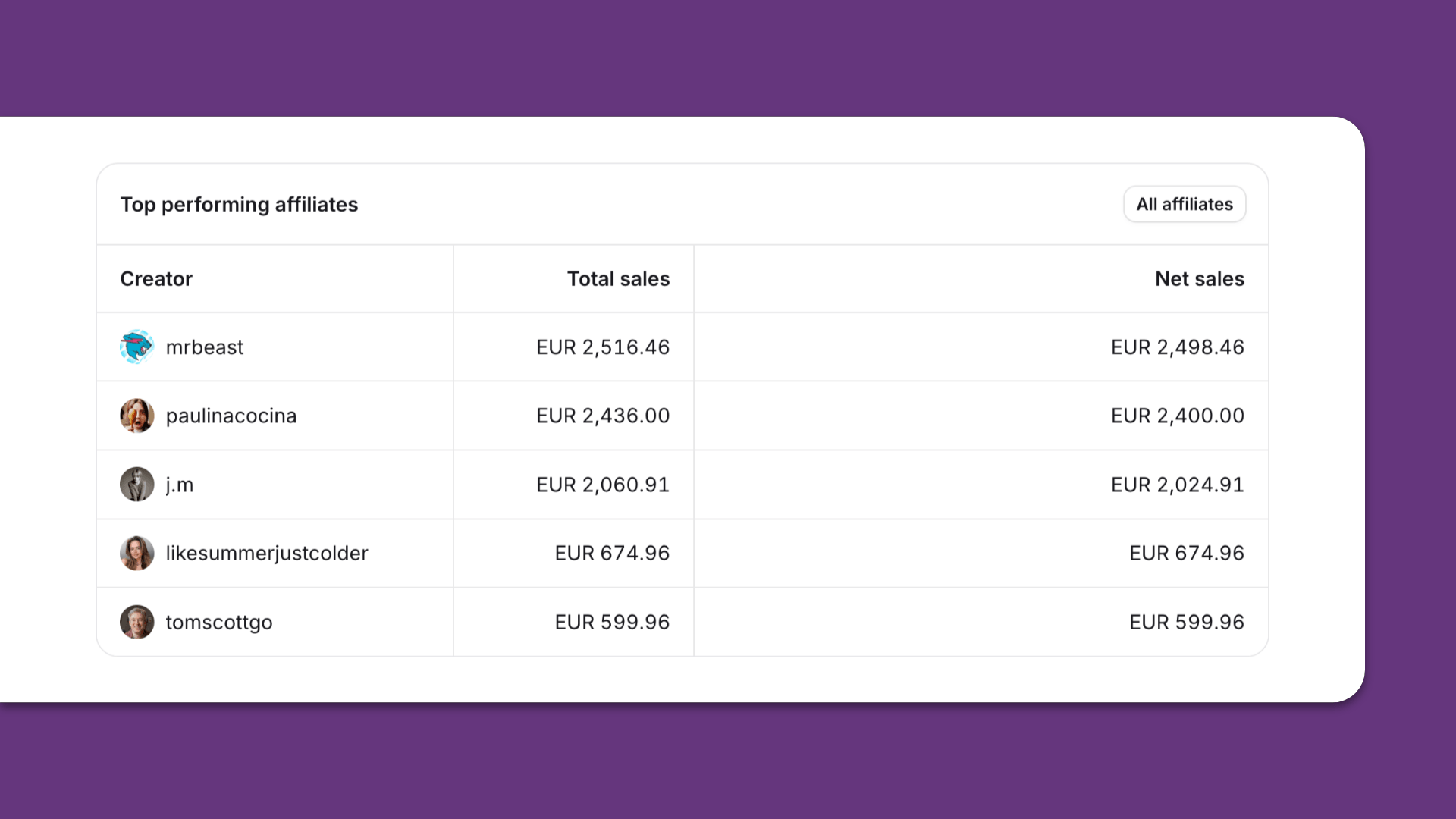
…so you can spend less time on manual admin and more on growing your program 💪
🤓 Further reading: For more on Modash’s capabilities, check out How to Build an Affiliate Program: A 10-Step Guide for Ecommerce Brands. Or for more platform options, read my roundup of the 10+ Best Affiliate Apps for Shopify.
Okay, so you know that broadly speaking, there are three ways to do affiliate marketing on Shopify. Now, let’s dig into the specific steps for getting your program off the ground…
However much a creator loves your brand and product, they’re not gonna promote you for free – not consistently, at any rate. They want to be rewarded for their efforts, and that means building a sustainable affiliate payout structure with attractive rewards.
A quick note on that word “sustainable”.
Most ecommerce brands pay commissions of 5% – 25%. But while it might seem tempting to lure affiliates away from your rivals by paying the juiciest rates in your niche, you can’t afford to gnaw too deeply into your margins. It’s unsustainable.
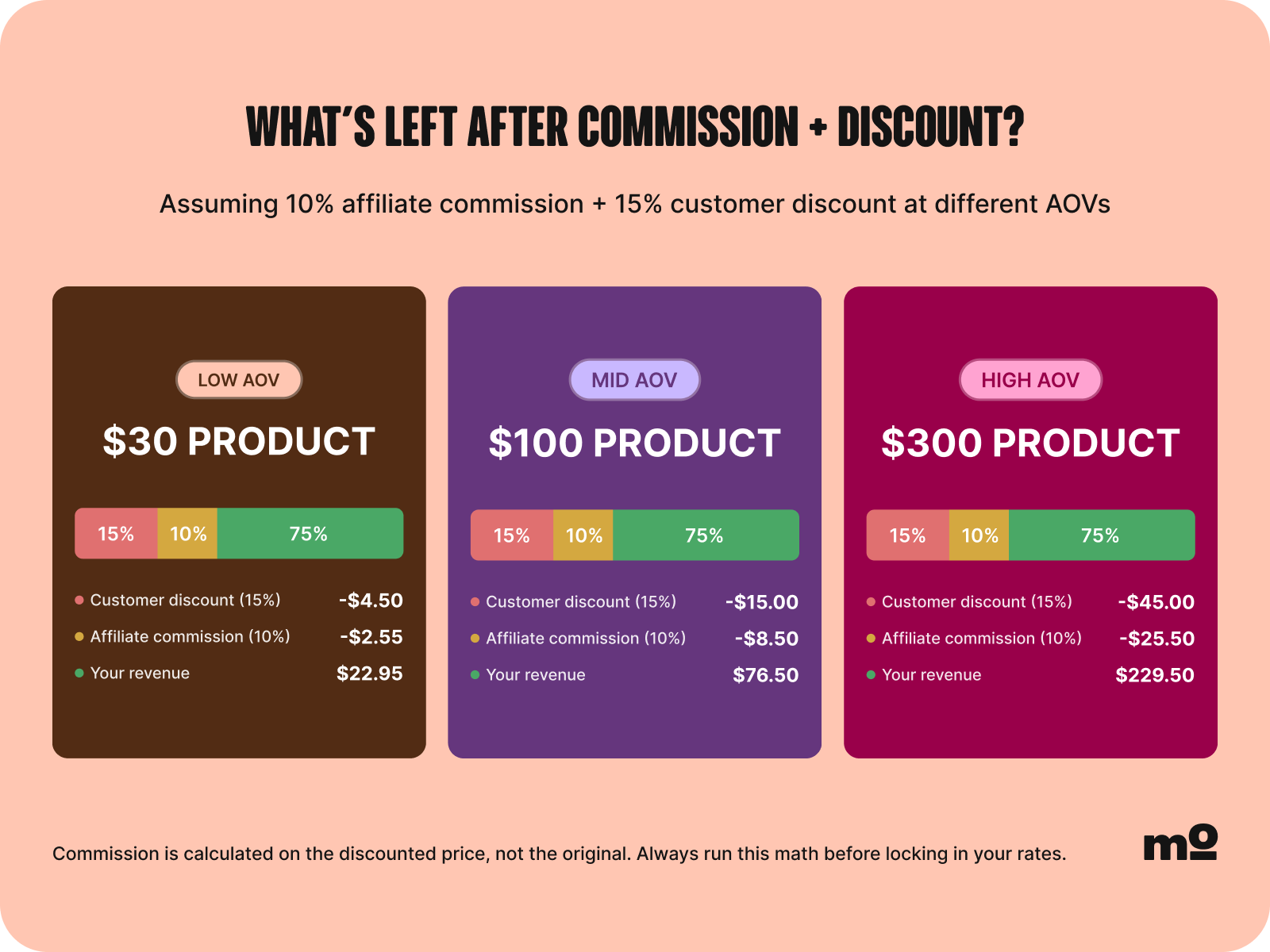
Because what’s the point in generating a billion affiliate sales if you’re barely breaking even from them?
Also, bear in mind that there’s more than one way to pay commissions. Most brands choose one of the following options:
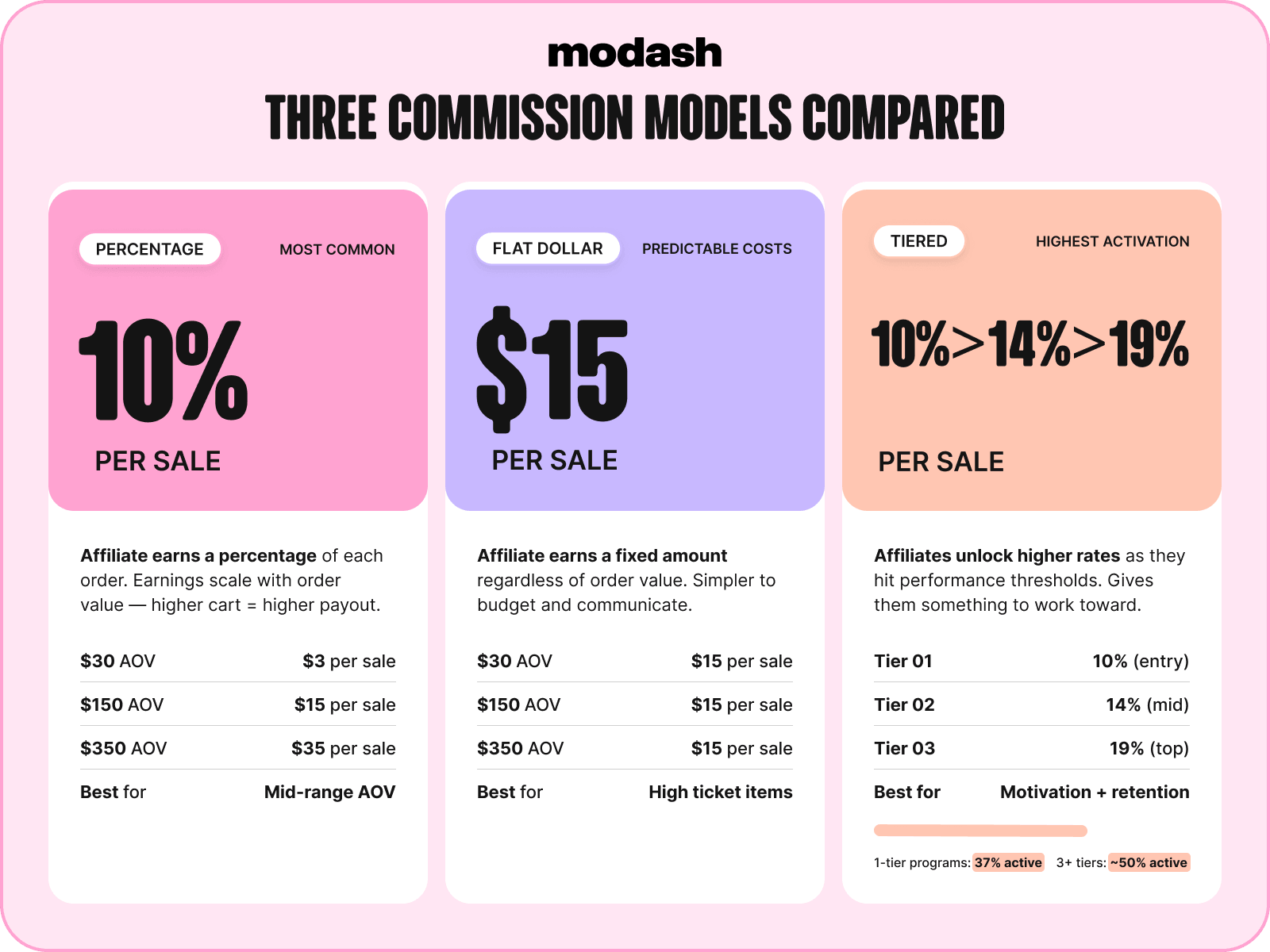
While single-tier structures – either flat dollar or percentage – might seem easier to manage, they don’t give affiliates much to get excited about, beyond the chance to earn more of the same old commissions 🥱 So it’s no surprise that our research found the average 1-tier program only has 37% active affiliates, compared to ~50% for 3-tier programs.
Or, to put it another way, multi-tier programs are more engaging. And the more engaged your affiliates feel, the more content they’ll share and the more sales you’ll generate 💰
🤓 Pro tip: Modash makes it easy to create your own affiliates tiers with custom rates, right down to setting different commissions for repeat orders. Plus we automatically calculate how much each creator is owed based on their sales volume – so you don’t have to! See for yourself by starting your 14-day free trial of Modash.

Once you’ve puzzled out your commission structure and rates, you need to figure out what actually counts as a commissionable action.
Presumably, you want to reward affiliates for generating sales – but are you happy to pay for any sales, or just a customer’s first order? If you do pay out on repeat orders, will you offer your standard commission or a reduced rate? And will you calculate commissions on the gross order value or the net amount (AKA minus any discount codes)?
There are no right or wrong answers here; it all depends on your specific goals. For example, if you’re using affiliate marketing to drive new customer acquisition, it makes sense to offer a higher rate for first orders, or to pay a big fat zero on repeat orders.
🤓 Further reading: For a whole lot more on commissions, check out Affiliate Payouts: Which Model to Choose & How to Structure Your Process.
Besides commissions, there’s a whole bunch of other terms and conditions you need to iron out before launching your program.
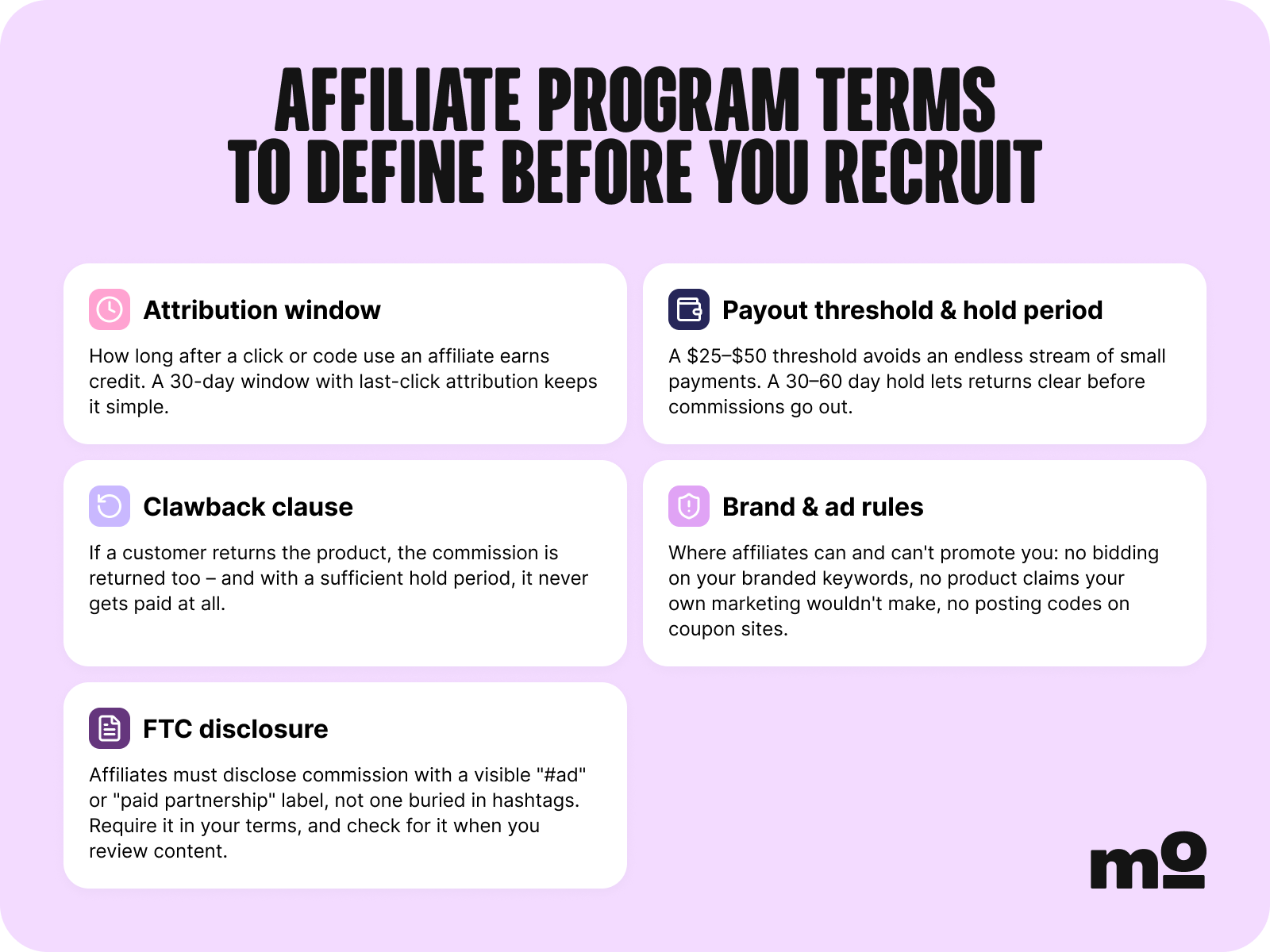
First up, let’s talk attribution. The attribution window (AKA “cookie window”) is the time following an affiliate link click in which the creator still earns a commission on any resulting sales.
For example, if a brand has a 7-day window and a customer buys 5 days after clicking an affiliate link, the affiliate question bags a cut of the sale – but if they leave it until day 8 or later, the creator gets nada, nothing, zilch.
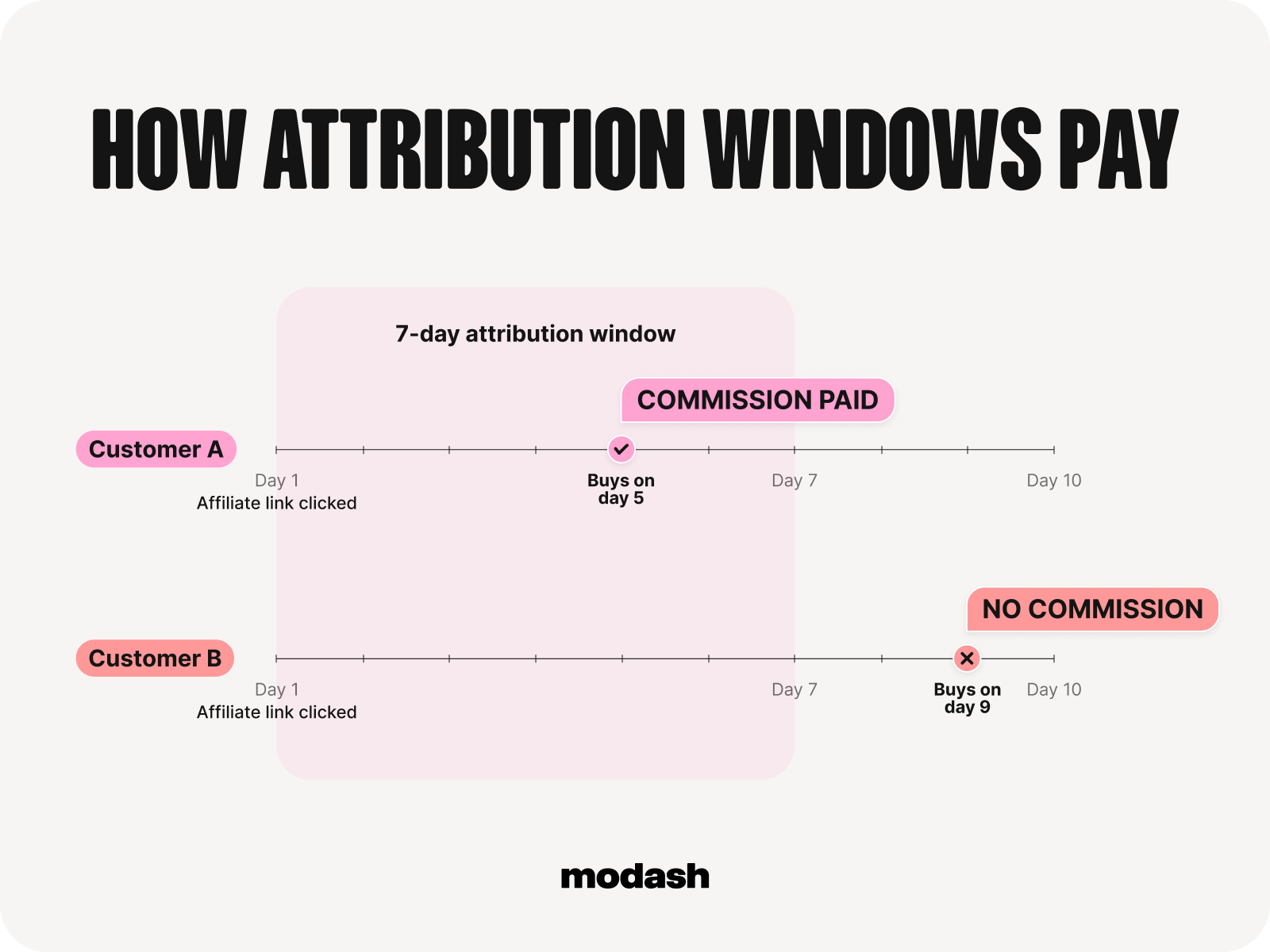
Ecommerce brands typically set attribution windows of 7 – 30 days, with stores that favor impulse purchases generally favoring shorter windows. It’s worth doing a little competitive analysis before choosing your own window, because you don’t want to be way out of step with what other brands in your niche are offering.
Next up, payout thresholds, AKA the minimum amount an affiliate has to earn before getting paid.
Naturally, (most) creators would prefer to receive their hard-earned commissions immediately, whereas (most) brands would rather avoid a constant stream of micropayments – think of all the admin and fees 😱
Thresholds vary by niche and product type, but most programs set minimum limits of $10 – $100 before paying commissions. Again, though, it’s worth checking what your competitors are up to before choosing your own.
Hold periods – that is, the time it takes for a sale to become commissionable – go hand in hand with payout thresholds. For example, if a brand has a 30-day hold period, a sale on June 15 would be eligible for payment on July 15 and transferred to the affiliate in the next payment run.
This measure protects you against paying out on orders that later get canceled, so it’s important your hold period aligns with your return window. If you offer refunds up to 14 days after the purchase date, you’ll want a hold period of at least 15 days.
And finally, you need to define how creators disclose that they’re working with you, including the fact that they stand to earn money by recommending your products.
The FTC (and various other national consumer protection agencies) require these disclosures be visible, rather than buried under a mountain of hashtags. So be sure to spell out the rules for your creators – and check that they’re playing ball when reviewing their content.
Hopefully, you’ve spent the last 1,000-or-so words ruminating on which of the three methods – manually, through Shopify Collabs, or with a 3rd party tool like Modash – you’re gonna use to run your affiliate program.
If not, now’s the time to figure it out!
In a nutshell, your decision should be based on the number of affiliates you expect to work with and the amount of manual work your team can absorb.
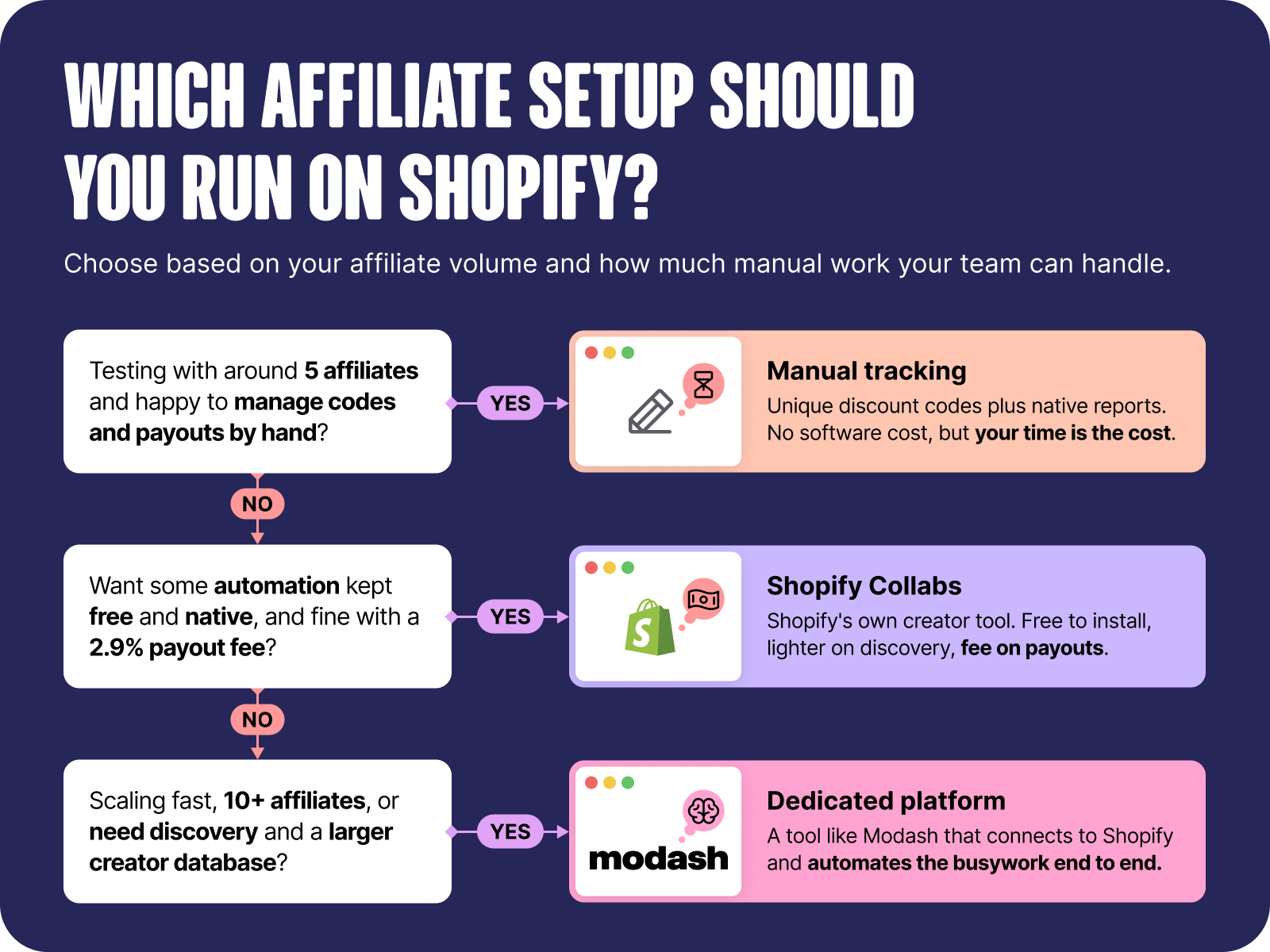
Planning to start slow with ~5 affiliates? Go the manual route. Or if you need some degree of automation (and don’t mind paying the processing fees), Shopify Collabs is the one.
Alternatively, if you’re…
…you’ve probably already outgrown the free options. In which case it’s time to upgrade to a dedicated tool like Modash.
Remember back at the start of this article when I explained that Shopify doesn’t have a native system for tracking affiliate sales? Well, now’s the time to discuss tracking in a little more depth.
Most affiliates programs use one or both of the following methods to track performance:
Neither method is 100% watertight. Like, a customer might forget to use the creator’s code while checking out, or search a brand on Google rather than clicking an affiliate link. That’s why it’s best to track via codes and links – after all, with two tracking mechanisms in place, you’re more likely to accurately identify and reward the correct affiliate.
Okay, so that’s the theory side of tracking; now let’s discuss how to actually do it.
First up, setting up promo codes in Shopify manually (AKA without Shopify Collabs or a dedicated 3rd party tool). Fortunately, it’s a simple enough process:
🤓 Pro tip: Alternatively, you can skip all those manual steps by asking Sidekick, Shopify's free built-in AI commerce assistant, to help create, edit, or troubleshoot discounts in your Shopify admin. For example, you can tell it to "create a 15% discount code for my summer collection, one use per customer, ending Sunday”.
But what if you also want to track sales via affiliate links? Well, you can’t do that in Shopify’s back end (at least, not without using Collabs or dedicated software), so you’ll have to use a 3rd party tool like Linkly or Google’s Campaign URL Builder.
All of which means you’re looking at a solid 5+ minutes of work every time you set up tracking for a new creator, not to mention all the hours you’ll spend matching orders to codes in a big, horrible spreadsheet at the end of every month.
And there’s another problem: what happens if a customer purchases after clicking an affiliate link and entering a promo code?
In that case, you risk double counting the sale, meaning the creator gets paid twice for a single purchase. Which isn’t gonna do your affiliate marketing ROI any favors.
For a less cumbersome and more reliable method, ditch the manual approach and use an affiliate marketing tool like Modash. Once you connect Modash to your Shopify store, our commission tiers automatically assign discount codes and tracking links to each creator…
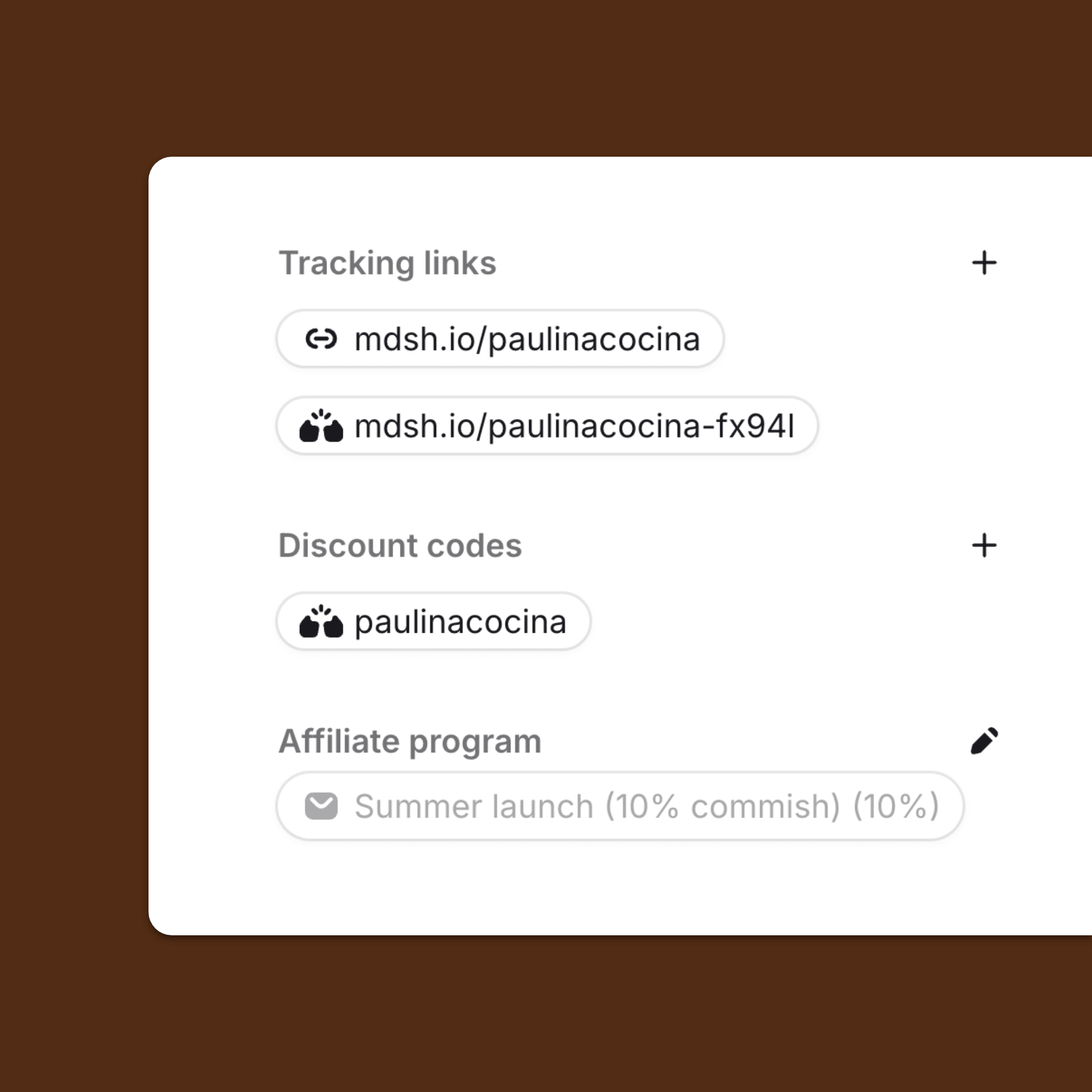
…and to prevent double counting, we always assign priority to promo codes.
Finally, you’re ready for the fun stuff: hiring your first affiliate partners.
With literally hundreds of millions of creators out there, it’s hard to know where to begin. So my advice is to start simple by targeting low-hanging fruit in the form of:
Folks in these two categories are much more likely to accept your affiliate proposal than some rando creator who’s never heard of you. And because they genuinely 🫶 your product, their content is more likely to convert, too.
🤓 Pro tip: With Modash, finding high-profile creators who love your brand is a breeze thanks to our Find your fans feature – just enter your social account to discover a list of those who already follow you and engage with your content.
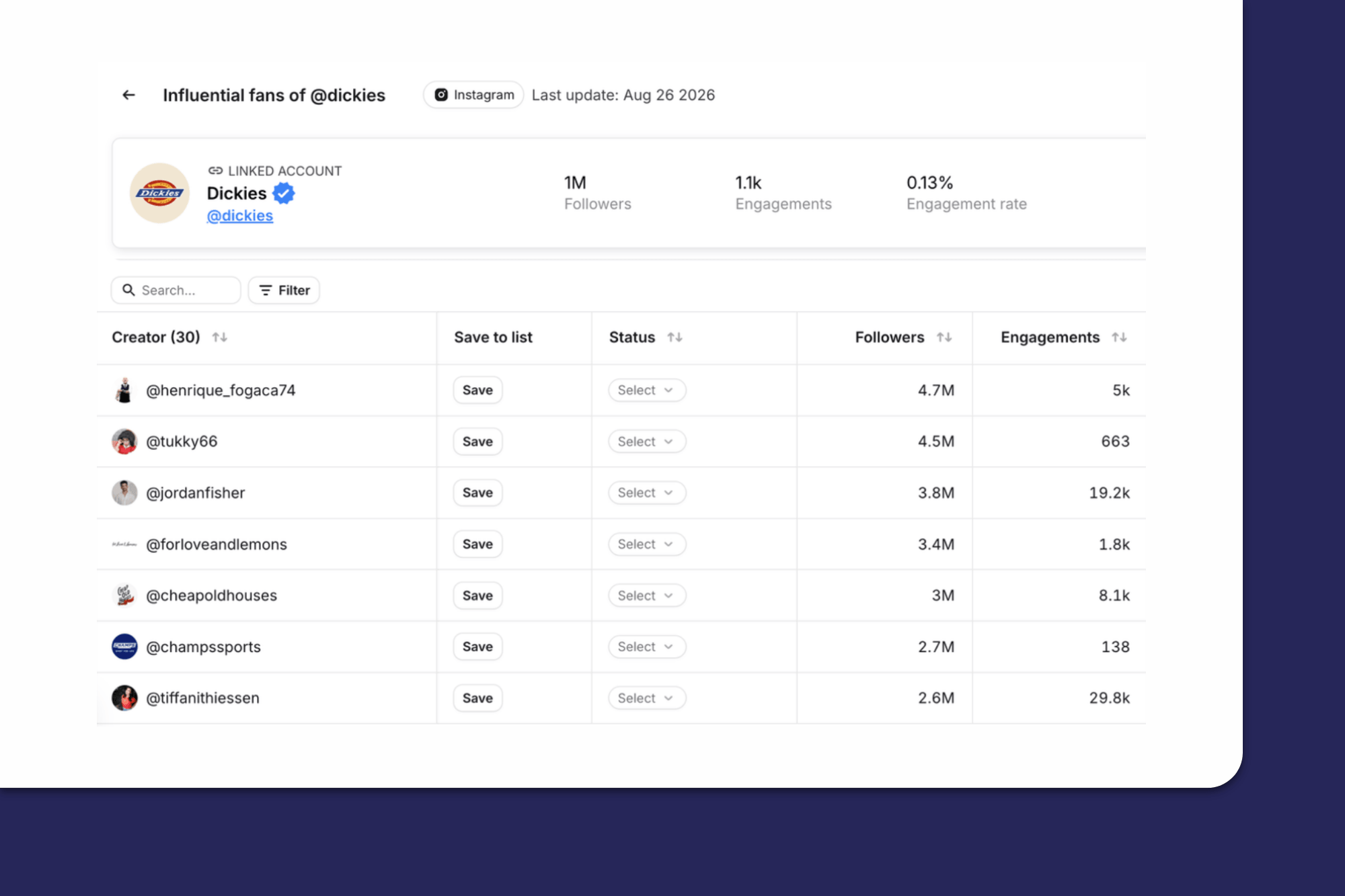
But what happens when you’ve exhausted that list? Or what if you’ve never worked with influencers before and/or your brand is too new to have built a dedicated fanbase?
In all those cases, you’re gonna have to identify creators who may or may not be familiar with you, but who match your vibe and have complementary audiences. There are lots of ways to do this yourself, including:
(For an in-depth look at this, check out How to Find Affiliates: 9 Strategies to Build a High-Quality Program.)
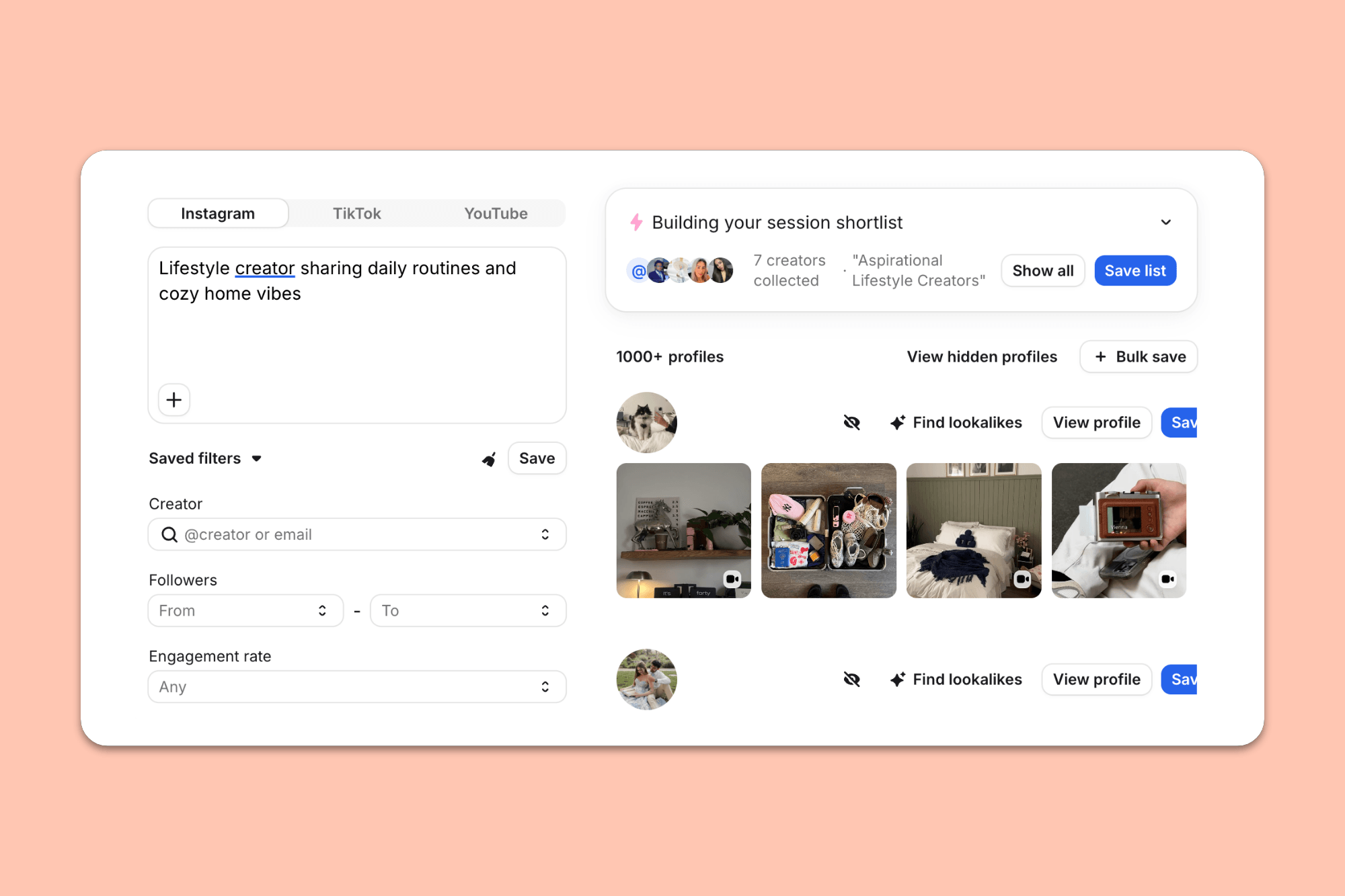
However, by far the most convenient solution is to use a dedicated affiliate recruitment tool like Modash, which lets you filter every public social profile on Instagram, TikTok, and YouTube with 1,000+ followers by demographics, performance, content topics, and more.
Or if that sounds like too much work, just describe the type of creator you’re looking for – like “lifestyle creator sharing daily routines and cozy home vibes” – to our AI Search tool. It’ll round up all the matching profiles for you, based not just on the captions they post but also what’s in the images and videos they share. Clever stuff!
By this point, unless you’re in a super specific niche – say, hosiery for geese – your search will likely have returned thousands of results.
But not all of those creators will be a good fit for your brand. So your next task is to whittle down that huge pool of potential affiliates as efficiently as possible using a 2-step process:
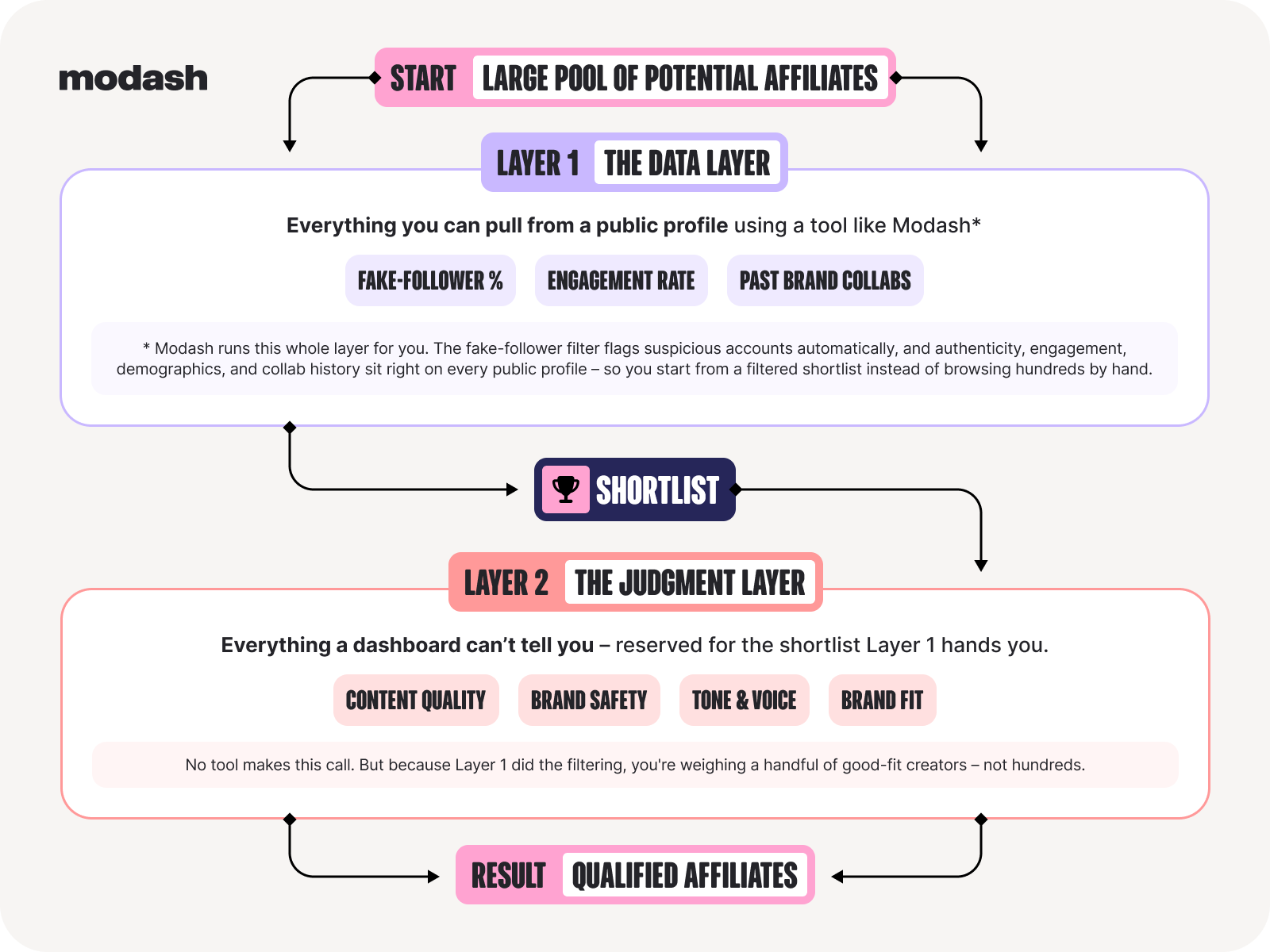
You’re gonna need dedicated software to handle the data layer.
With Modash, you can add your own fake follower and engagement rate filters to automatically weed out accounts with disinterested, bot-filled audiences, then view all their latest collabs right from the results screen. Open their creator profile for even more depth, including:
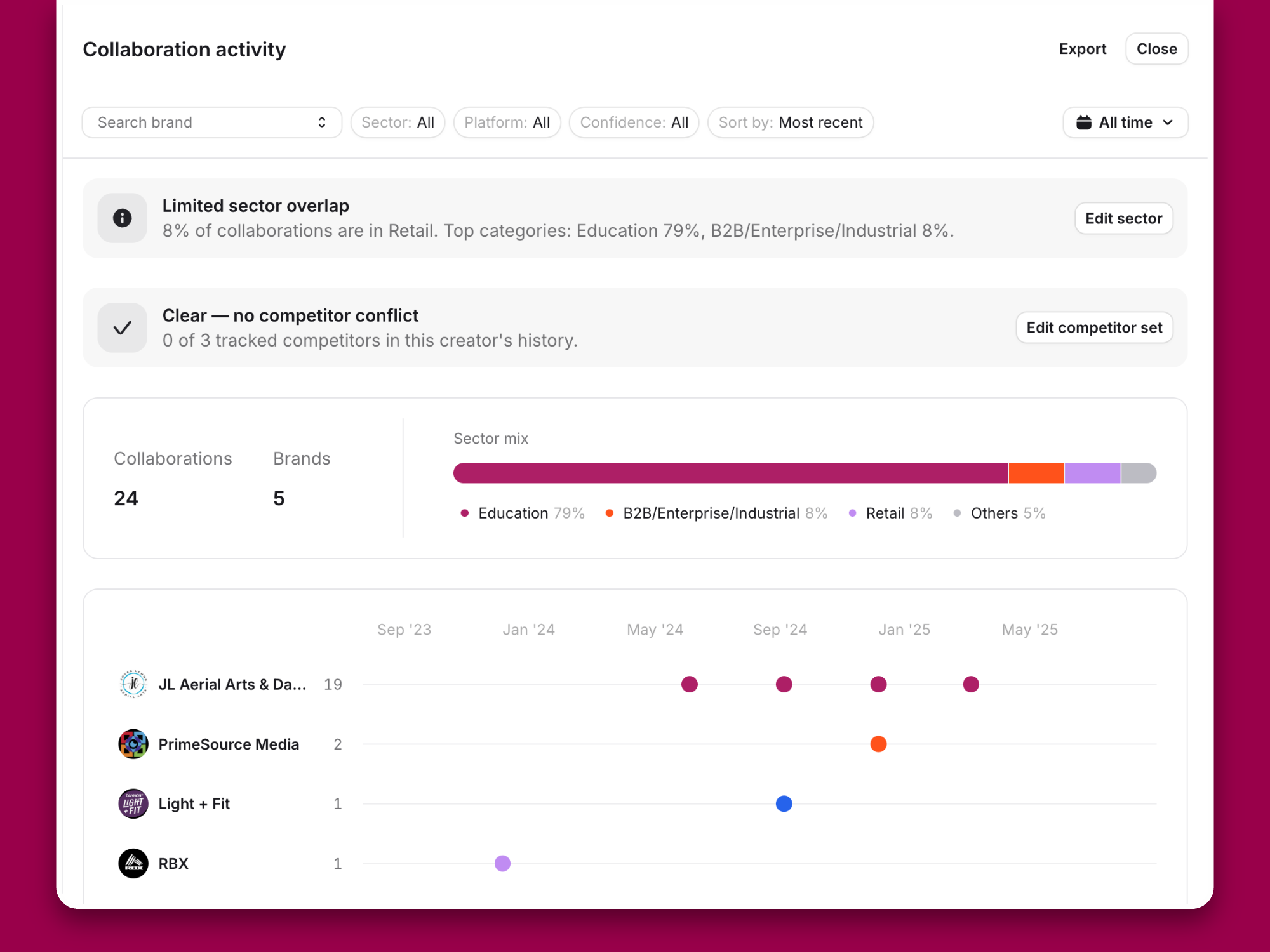
And because all that stuff happens in a split second, you can afford to take your time manually reviewing the remaining accounts for tone, content quality, brand fit, etc. That way, you can feel super confident about those you reach out to.
Oh, and one further time-saver for you:
Once you’ve found a creator you love, you can instantly track down similar accounts using our Lookalikes tool.
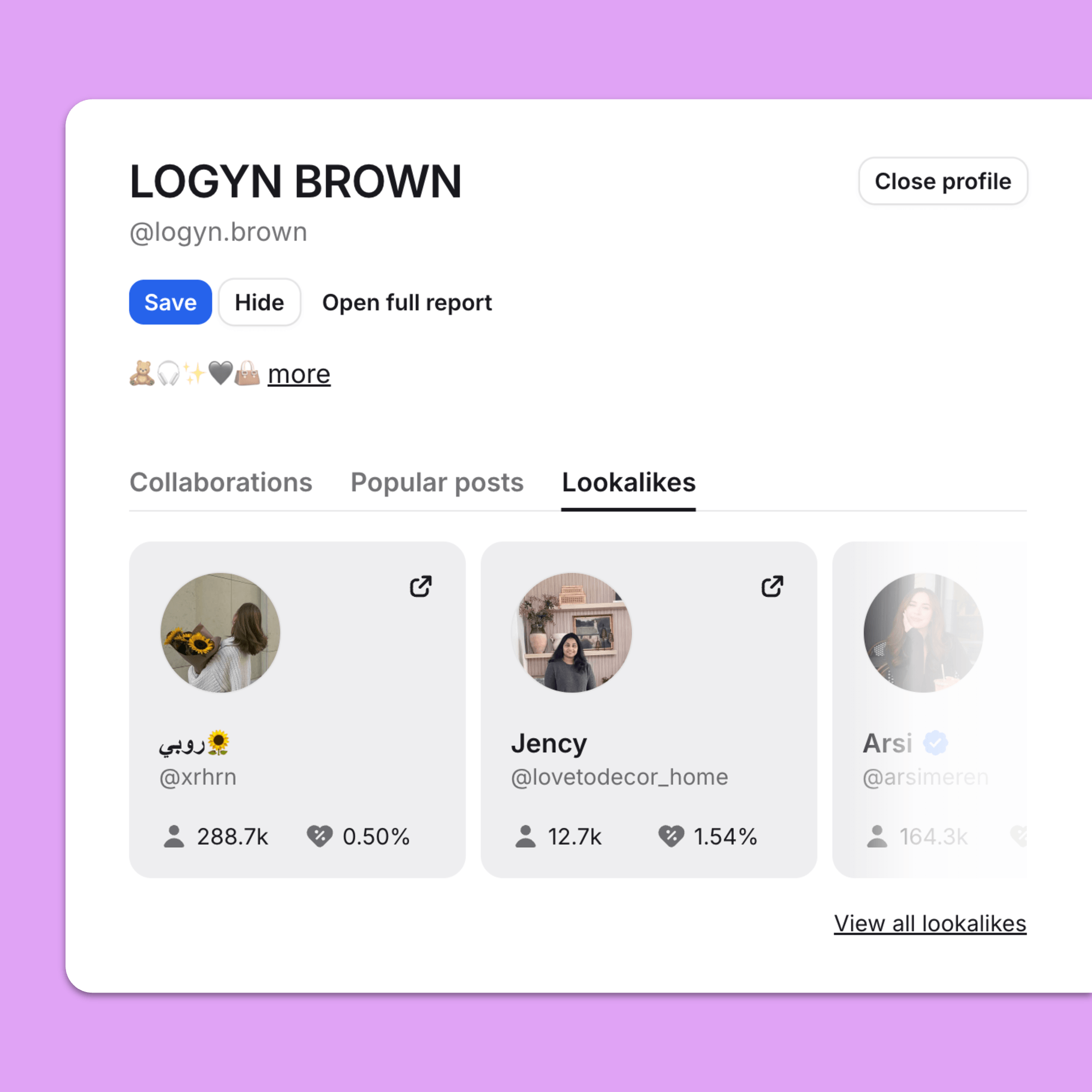
It’s a quick and easy way to turn one brand fit creator into dozens more potential affiliate partners based on audience, content similarity, and engagement patterns.
🤓 Further reading: This has been a whistlestop tour of the vetting process. For a full-on deep dive, check out How to Qualify Affiliates: A Framework for Vetting Creators at Scale.
Listen up because this bit’s important:
Did you know keeping affiliates active is the #1 problem that keeps affiliate marketers up at night?
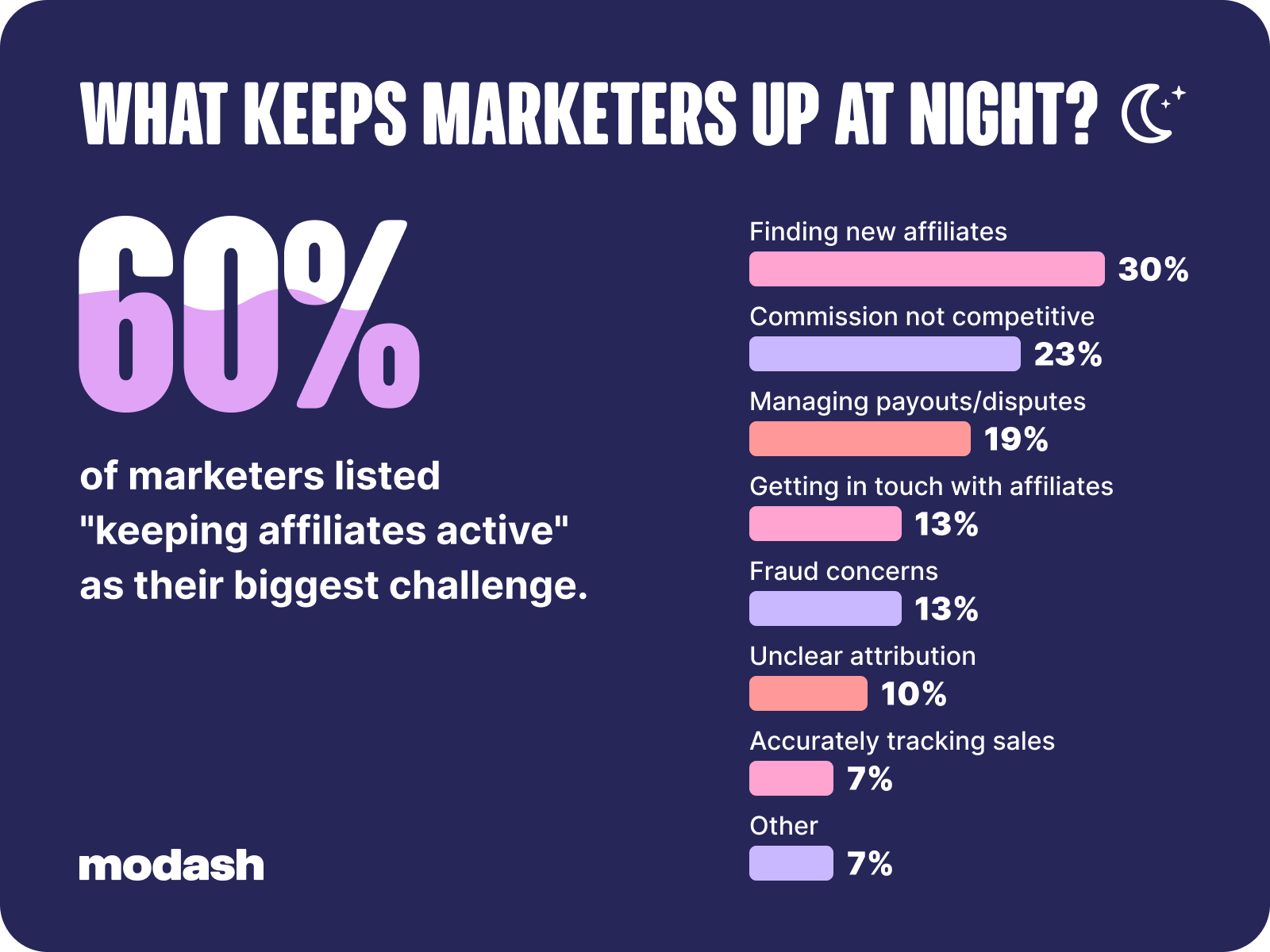
And why is this such a struggle? Well, for many brands, it’s because their affiliate onboarding process isn’t fit for purpose. Often, it’s not really a process at all – just a single email sent the second a creator joins an affiliate program.
When the welcome feels this unwelcoming, it’s hardly surprising that a lot of new affiliates never end up posting, which is a big part of the inactivity problem.
Rather than trying to jam everything – your mission statement, your top-selling products, that story about The Event that happened at your last office party – into one email, treat onboarding as a multi-step flow covering the following elements:
While it’s totally possible to do all this stuff through Gmail or Outlook, it means sifting through a half-dozen tabs just to write a single email. So you spend 5 minutes hunting for Jenny’s tracking link – then you call her “Jane” 🤦♀️
Save yourself the heartache with Modash Inbox, which gives you an at-a-glance view of everything you need (codes, links, social handles, past collabs, and more) right there in the same place you write your emails.
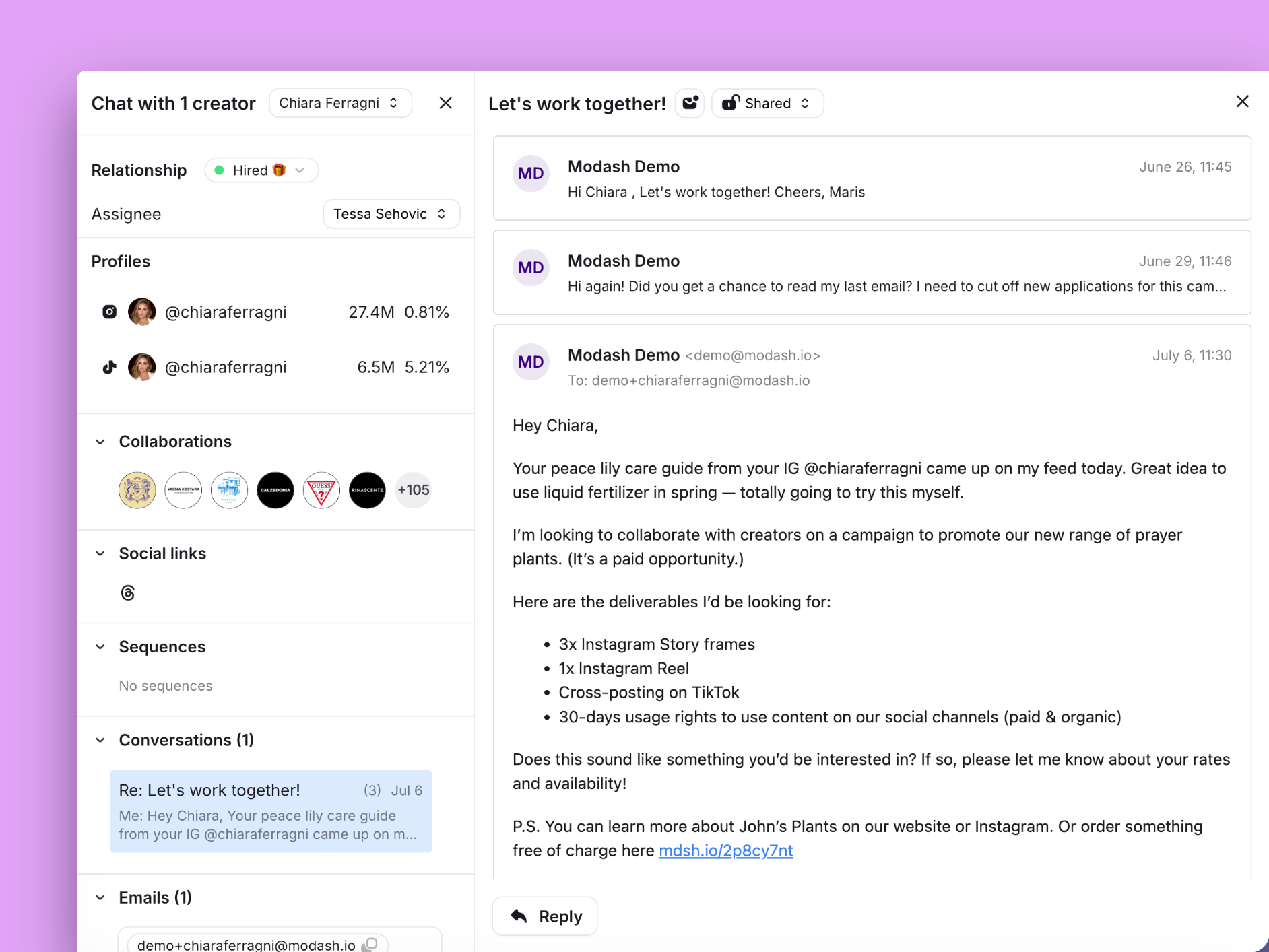
Plus you can build multi-step, automated sequences with custom wait times between each step, so you don’t have to send each email manually.
And because Modash Inbox works with your existing Gmail or Outlook account, you don’t have to create yet another email address to use it.
🤓 Further reading: Again, onboarding is a pretty hefty topic, so for a much more detailed discussion read my 7-Step Affiliate Onboarding Process to Boost Activation Rates.
By this point, you’ve built a small army of creators who are actively promoting your products, so your next task is to figure out what’s working (and what isn’t).
Shopify’s native reports will get you some of the way, showing you sales by discount code and referral source. But beyond that, it has some major limitations:
All of which leaves you struggling to understand the true impact of your program and how individual affiliates are performing.
For best results, you need a dedicated affiliate tracking tool like Modash, which tracks clicks, conversions, sales, and commission owed per affiliate.
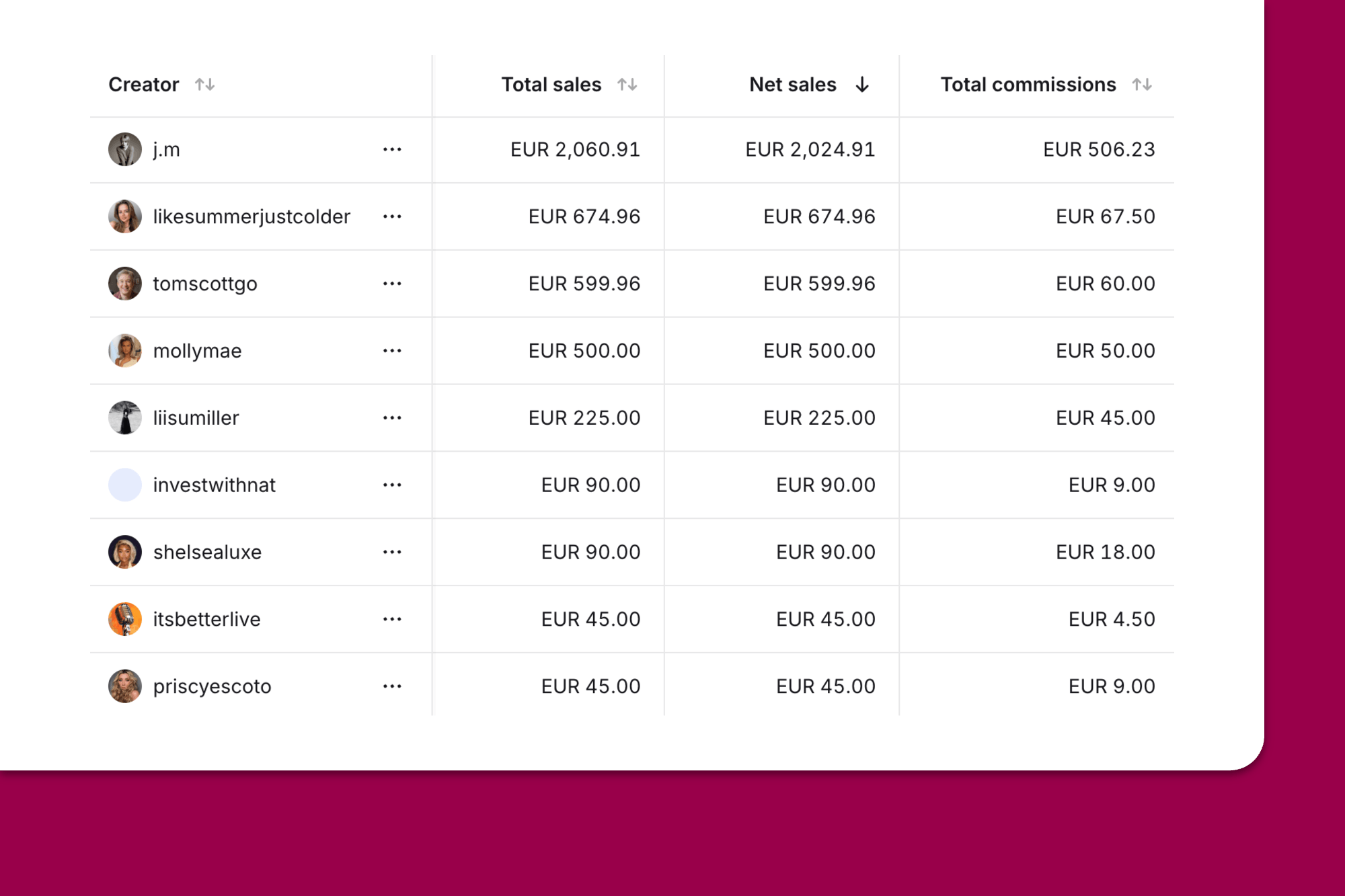
Now you know how your creators are performing, it’s time to actually pay them. As with pretty much everything in affiliate marketing, this is a little trickier than it sounds.
For starters, you should calculate commissions based on net revenue – that is, minus the affiliate’s discount – rather than the gross order amount. Otherwise, your margins will take a bigger hit with every affiliate-driven sale.
You’ll need to ensure you’re applying a hold period (remember them from earlier in the article?) to protect against paying commissions on refunds and returns.
And then there’s arguably the two most annoying elements of the payment process, namely invoicing (yuck!) and tax requirements (boring!). Honestly, those are pretty meaty topics, so I’m not gonna go into them here – but you can learn more in my guide on how to pay affiliates.
Or, if you don’t like the sound of all that scary compliance stuff, you can handle it through Modash Pay instead.
With Modash, you send payment links to your affiliates, then they add their details and automatically generate compliant invoices.
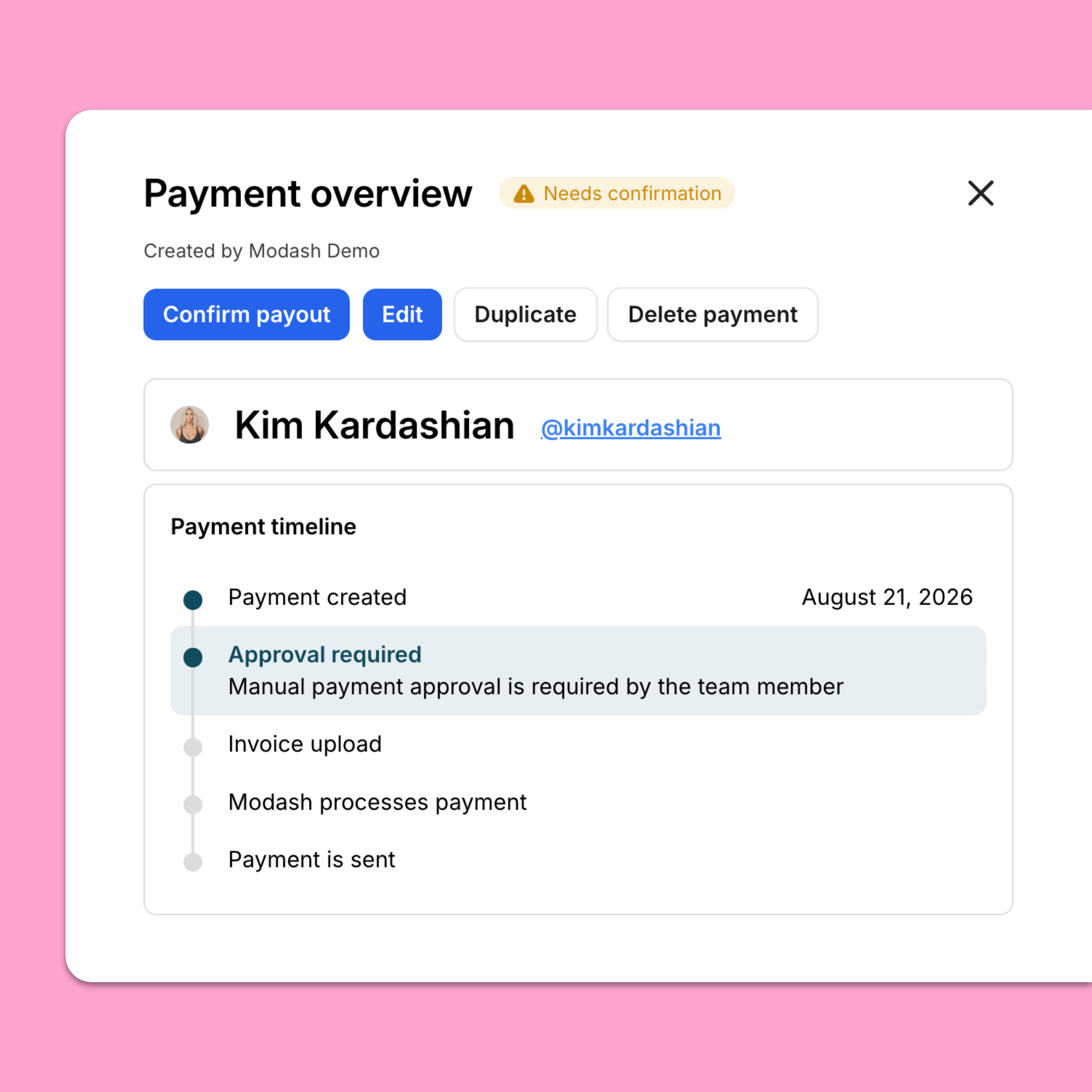
Rather than dealing with dozens of invoices at once, your finance team receives a single consolidated invoice covering all commission payments.
And because affiliates can check payment status through our creator-facing portal, they don’t have to chase you to find out when their commissions will hit their account.
Think the cost of an affiliate program = the amount you pay your creators?
Think again, because there are actually a bunch of different costs involved, including:
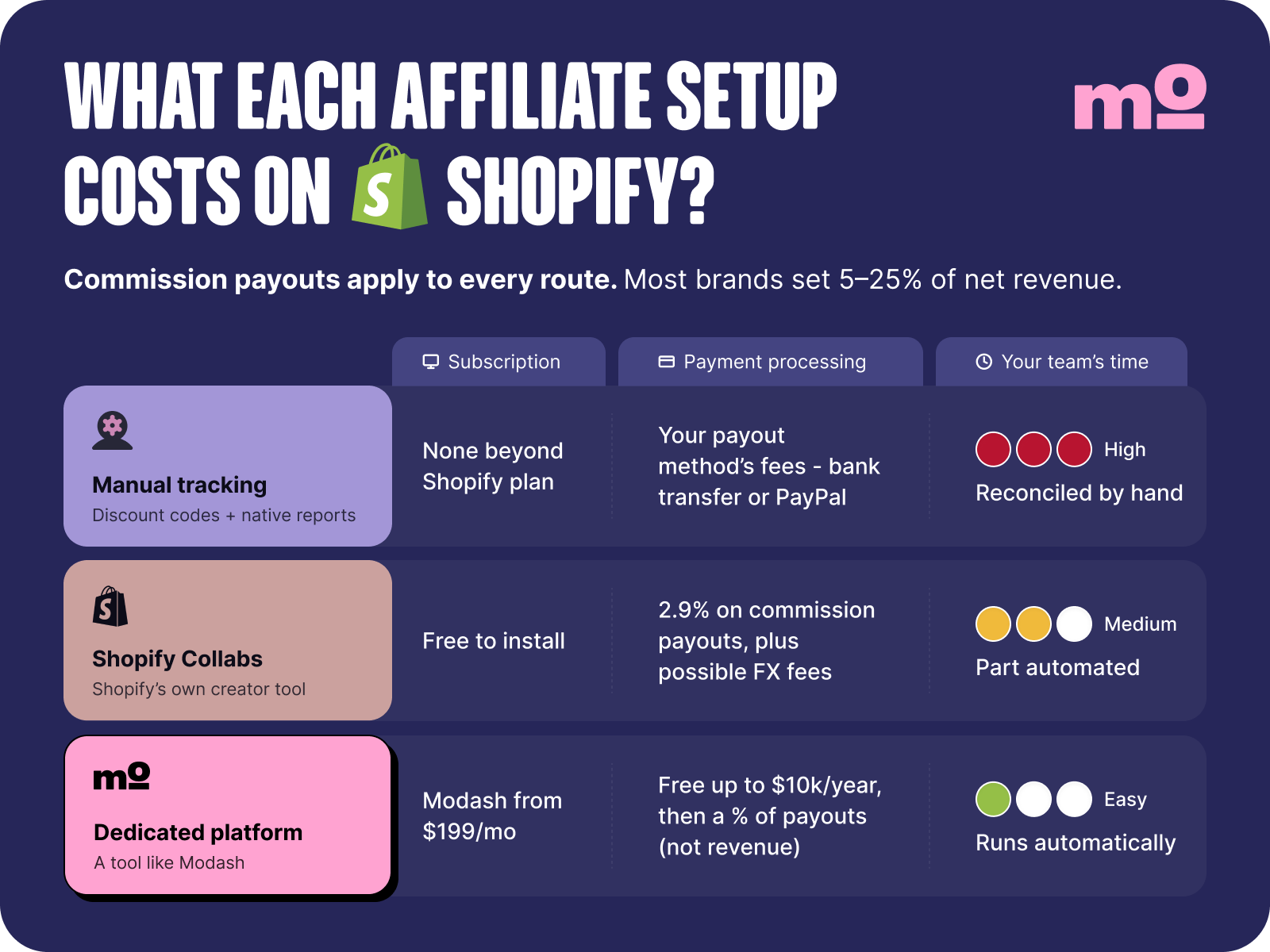
But those costs don’t apply equally to every program; they vary based on whether it’s run manually, through Shopify Collabs, or via a 3rd party tool like Modash.
For example, if you go the fully manual route, you’re obviously saving on software costs – but the tradeoff is much more labor for you and your team to keep all the various plates spinning.
Choose Shopify Collabs and you also save yourself the software subscription, but at the expense of a 2.9% processing fee on all commission payments.
Or if you subscribe to a 3rd party tool, you have to pay the monthly fee (from $199/month, in Modash’s case), but all the built-in automations and workflows will save you a ton of manual labor.
One final point on software costs:
Bear in mind that some tools charge processing fees on payout value and others on order value. So a brand with high orders and a low commission rate could potentially save a little cash by choosing a platform that charges on payouts (and vice versa).
Modash charges 5% on creator payouts – although payments are totally free up to a value of $10K per year. So if you’ve already exceeded the $10K mark and have…
…you’d pay 5% on the payout amount of $100, for a total fee of $5. If we charged on order value instead, you’d be paying 5% of $400 instead, or $20.
Now that I’ve run you through all the different options, you’re probably expecting me to say something like:
The best choice is a 3rd party affiliate tool, and the best 3rd party tool is Modash.
Honestly, I’m disappointed. My writing is far more nuanced.
In reality, while a dedicated affiliate marketing platform is undeniably the most powerful solution, not every brand needs that much power. To avoid overbuying, go with the cheapest route that fits your current scale, but understand where each setup breaks – and have a clear plan to graduate to a more advanced option when it happens.
👉 Already outgrown spreadsheets and Shopify Collabs? Start your 14-day free trial of Modash today!
In a word: no. Shopify doesn’t have native affiliate tracking, which holds you back from running an affiliate program – after all, you need to know where your sales are coming from.
Sort of. While Shopify doesn’t have built-in affiliate tracking, you can set it up yourself through manual discount codes without an app. But there are some serious limitations – such as Shopify restricting you to a maximum of 25 active discount codes at any time.
Shopify Collabs is a good fit for brands with small budgets that just need to set up affiliate links and codes, manage commissions, track results, and pay creators. But its small creator database makes it a poor choice for brands looking to proactively recruit new affiliates, and its 2.9% processing fee on all commission payouts is comparatively high.
There are three ways to track affiliate sales on Shopify:
The honest answer is: pay whatever rate you need to pay to recruit brand-fit affiliates without eating too deep into your margins. Naturally, this varies for every Shopify store. But as a general rule, most ecommerce brands pay commissions of 5% – 25%.
You’ve got two options – either use Shopify’s in-house affiliate marketing tool, Shopify Collabs, or a 3rd party platform that integrates with Shopify (like Modash).
There are lots of ways that Shopify affiliate tracking can break down. For example, unless a customer clicks a link or uses a promo code, Shopify probably won’t know the sale was referred by an affiliate. The same goes for multi-device journeys: if the customer clicked a link on mobile but purchased on desktop without using a code, the sale likely won’t track to your affiliate program. Learn more in Shopify Affiliate Tracking: 5 Ways to Set It Up (and Where It Breaks).
Yes, absolutely! Under FTC rules, affiliates must make it clear and obvious that they stand to earn a commission from posting about your products (AKA they can’t just bury “#ad” beneath 28 other hashtags).